此页面需较新浏览器(支持 SharedArrayBuffer)。请升级 Chrome、Edge、Firefox 或 Safari 至最新版本。
字符串就是文本
- 字符串(string)是引号里的文本:
"Ada"或'Ada'。 - 用
+把字符串连起来 —— 这叫做拼接(concatenation)。
English
let first = "Ada";
console.log("Hi, " + first + "!");   // → Hi, Ada!
注意空格
+会把文字原样连在一起,它不会替你加空格。- 想要空格的地方,就把空格写进引号里。
English
let pet = "Rex";
console.log("Good dog," + pet + "!");    // → Good dog,Rex!   (no space)
console.log("Good dog, " + pet + "!");   // → Good dog, Rex!
长度与大小写
.length数出字符的个数。.toUpperCase()和.toLowerCase()返回一个全大写或全小写的副本。
English
console.log("hello".length);        // → 5
console.log("hello".toUpperCase()); // → HELLO
探索
索引和切片一个字符串
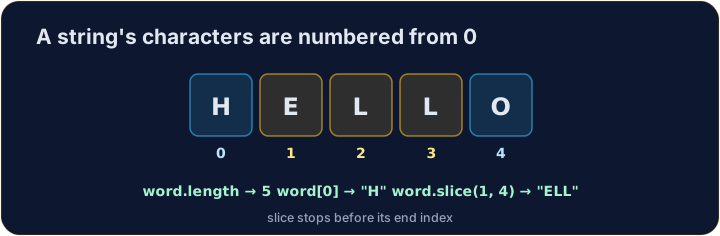
Characters are numbered from 0. A slice takes from start up to — but not including — end.
进入字符串内部
- 每个字符都有一个位置,从 0 开始数:
text[0]是第一个。 .slice(start, end)取从start到(但不包括)end的部分。
English
let word = "JAVASCRIPT";
console.log(word[0]);          // → J
console.log(word.slice(0, 4)); // → JAVA
注意
- 位置从
0开始,所以第 4 个字符是word[3]。 - 字符串方法返回一个新字符串 —— 原来的字符串永远不变。
常见错误
- 从
0开始索引;s.length是属性(不带())。 - 字符串不能原地修改。
现在轮到你
- 构造并检查字符串。
- 按检查答案来测试它。
难度 1/5 · 今日首次完成可获 100 金币及少量额外奖励
let name = "Sam". Use + to log Hello, then the name then !, so it reads Hello, Sam!.
点击“运行”查看此处输出。
难度 1/5 · 今日首次完成可获 100 金币及少量额外奖励
Log how many characters are in the string computer using .length (it is 8).
点击“运行”查看此处输出。
难度 1/5 · 今日首次完成可获 100 金币及少量额外奖励
Log the string cat in CAPITALS using .toUpperCase() (it is CAT).
点击“运行”查看此处输出。
难度 1/5 · 今日首次完成可获 100 金币及少量额外奖励
let word = "code". Log just its 第一个 letter using word[0] (it is c).
点击“运行”查看此处输出。