INPUT and data types · INPUT 与数据类型
This page needs a recent browser (with SharedArrayBuffer support). Please update Chrome, Edge, Firefox or Safari to the latest version. · 此页面需较新浏览器(支持 SharedArrayBuffer)。请升级 Chrome、Edge、Firefox 或 Safari 至最新版本。
English
INPUT reads what the user types
INPUTreads one line the user types and stores it in a variable.- Pair it with
OUTPUTto talk to the user.
中文
INPUT 读取用户的输入
INPUT读取用户输入的一行,并存进一个变量。- 把它和
OUTPUT搭配,就能和用户对话。
INPUT Name
OUTPUT "Hello, ", Name
English
DECLARE the type so numbers work
- Text typed in is a string by default.
DECLAREa variable asINTEGER(orREAL) soINPUTreads a number.
中文
声明类型,数字才能用
- 输入的文字默认是字符串(string)。
- 把变量
DECLARE为INTEGER(或REAL),INPUT才会读成数字。
DECLARE Age : INTEGER
INPUT Age
OUTPUT Age + 1
English
The five data types
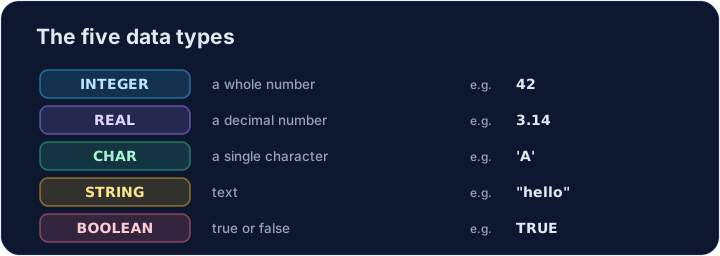
- Every value has a type. The 2026–2028 syllabus uses five: INTEGER, REAL, CHAR, STRING and BOOLEAN.
中文
五种数据类型
- 每个值都有一个类型。2026–2028 考纲使用五种:INTEGER、REAL、CHAR、STRING 和 BOOLEAN。
DECLARE Price : REAL
DECLARE Letter : CHAR
DECLARE Passed : BOOLEAN
Price ← 2.50
Letter ← 'A'
Passed ← TRUE
OUTPUT Price, " ", Letter, " ", Passed
English
Watch out
- Without
DECLARE ... : INTEGER,INPUTkeeps the value as a string, soAge + 1would fail. CHARholds one character in single quotes ('A');STRINGholds many in double quotes.
中文
注意
- 不写
DECLARE ... : INTEGER,INPUT会把值当成字符串,这样Age + 1就会出错。 CHAR用单引号装一个字符('A');STRING用双引号装很多个。
English
Common mistakes
INPUT xreads a value intox.- Choose the right type: INTEGER, REAL, STRING, BOOLEAN or CHAR.
中文
常见错误
INPUT x把一个值读入x。- 选对类型:INTEGER、REAL、STRING、BOOLEAN 或 CHAR。
English
Now you try
- Each task reads one input with
INPUT. - Press Check answer to test it.
中文
现在轮到你
- 每个任务用
INPUT读取一个输入。 - 按检查答案来测试它。
Read a name with INPUT, then output Hi, followed by the name. For input Sam, output Hi, Sam. · 用 INPUT 读取一个名字,然后输出 Hi, 再接名字。当输入为 Sam 时,输出 Hi, Sam。
Click Run to see the output here. · 点击“运行”查看此处输出。
DECLARE N as INTEGER, read it with INPUT, then output N + 1. For input 9, output 10. · 把 N 用 DECLARE 声明为 INTEGER,用 INPUT 读取,然后输出 N + 1。当输入为 9 时,输出 10。
Click Run to see the output here. · 点击“运行”查看此处输出。
Read an INTEGER N, then output N doubled (times 2). For input 6, output 12. · 读取一个 INTEGER N,然后输出 N 的两倍(乘以 2)。当输入为 6 时,输出 12。
Click Run to see the output here. · 点击“运行”查看此处输出。