此页面需较新浏览器(支持 SharedArrayBuffer)。请升级 Chrome、Edge、Firefox 或 Safari 至最新版本。
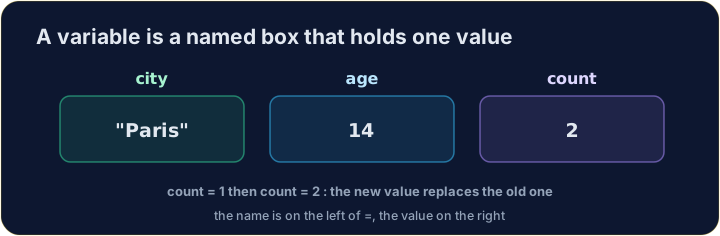
变量是一个有名字的盒子
- 变量(variable)是一个用来存值的名字。
- 用
=把值放进去 —— 这叫做赋值(assignment)。 - 用清晰的名字,程序才好读懂。
English
age = 15
price = 2.50
name = "Ada"
print(age, price, name)
探索
Variables as named boxes
每个 = puts a value into a named box you can use later.
五种数据类型
- IGCSE 用五种基本数据类型(data type):
- 整数(integer)→ Python
int;实数(real,小数)→float。 - 字符(char,一个字母)、字符串(string,文本)→
str;布尔(Boolean,True/False)→bool。
English
score = 42          # integer
height = 1.75       # real
grade = "A"         # char
town = "Cairo"      # string
passed = True       # Boolean
常量保持不变
- 常量(constant)是程序运行时永远不变的值。
- Python 没有特殊关键字,因此我们将常量写在
CAPITALS中。 - 这是在提醒其他读者:不要改我。
English
PI = 3.14159
VAT_RATE = 0.20
print(PI)
在类型之间转换
input()返回字符串,所以需要数字时要转换。int(x)得到整数;float(x)得到小数;str(x)得到文本。
English
n = int("5")
print(n + 1)                 # 6
print("Total: " + str(n))    # Total: 5
在考试里:DECLARE 与 CONSTANT
- 伪代码用
DECLARE声明类型,用CONSTANT固定一个值。
DECLARE Age : INTEGER
Age ← 15
CONSTANT Pi ← 3.14
常见错误
- 先给变量赋值再使用。
- 常量是不会改变的值——给它清晰的名字。
- 用对类型:数字用于运算,字符串用于文本。
现在轮到你
- 创建变量,并用它们做一点数学运算。
- 按检查答案来测试你的代码。
难度 1/5 · 今日首次完成可获 100 金币及少量额外奖励
The variables width and height are set for you. Work out the rectangle's 面积 (width × height) and store it in a variable called area.
点击“运行”查看此处输出。
难度 1/5 · 今日首次完成可获 100 金币及少量额外奖励
price is a 实数 number and quantity is an integer. Work out the total cost (price × quantity).
点击“运行”查看此处输出。
难度 1/5 · 今日首次完成可获 100 金币及少量额外奖励
Read a whole number with input(), convert it with int(...), then print the number plus 3. For input 7, the output should be 10.
点击“运行”查看此处输出。