Encoding is not encryption · 编码不是加密
This page needs a recent browser (with SharedArrayBuffer support). Please update Chrome, Edge, Firefox or Safari to the latest version. · 此页面需较新浏览器(支持 SharedArrayBuffer)。请升级 Chrome、Edge、Firefox 或 Safari 至最新版本。
English
A common mix-up
- People often say "encoded" when they mean "encrypted". They are not the same.
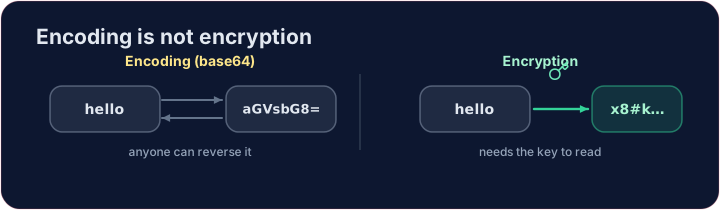
- Encoding changes the format of data so it can be stored or sent — it is not secret.
- Encryption changes data so that only someone with the key can read it — it is secret.
中文
一个常见的混淆
- 人们常常把“编码(encoded)”和“加密(encrypted)”混为一谈。它们并不相同。
- 编码改变数据的格式,以便存储或传输 —— 它不保密。
- 加密改变数据,使得只有持有密钥的人才能读懂 —— 它是保密的。
English
Base64 — a famous encoding
- Base64 rewrites bytes using 64 safe characters. It is used to put images or files inside text (like email).
- Anyone can decode it — no key needed. So base64 hides nothing.
中文
Base64 —— 一种著名的编码
- Base64 用 64 个安全字符来重写字节。它常用来把图片或文件塞进文本里(比如电子邮件)。
import base64
secret = base64.b64encode(b"hello").decode()
print(secret)            # aGVsbG8=
print(base64.b64decode(secret).decode())   # back to hello
- 任何人都能解码它 —— 不需要密钥。所以 base64 什么也藏不住。
English
Why this matters for security
- If a website "protects" your password with base64, it is not protected at all.
- Real protection needs encryption (with a key) or hashing (one-way). Encoding is just a costume.
中文
这为什么和安全有关
- 如果一个网站用 base64 来“保护”你的密码,那它根本没有被保护。
- 真正的保护需要加密(配密钥)或哈希(单向)。编码只是一件外衣。
English
Try it
- Encode
helloto base64 below. Then imagine decoding it — and remember it is not a secret.
Covers: foundation for IGCSE 2.3 / A-Level 17.1 (encryption).
中文
试一试
- 下面把
hello编码成 base64。然后想象一下解码它 —— 记住它并不是秘密。
涵盖:IGCSE 2.3 / A-Level 17.1(加密)的基础。
English
Common mistakes
- Base64 is encoding — anyone can reverse it, so it gives no security.
- Encoding changes the format; encryption protects the content.
中文
常见错误
- Base64 是编码——任何人都能还原,所以毫无安全性。
- 编码改变的是格式;加密保护的是内容。
Use base64 to encode the word hello. Encode its bytes and print the result as text. (Notice: anyone can decode it — encoding is not · 不 secret.) · 用 base64 对单词 hello 进行编码。对它的字节编码,并把结果作为文本 print 出来。(注意:任何人都能解码它 —— 编码并不保密。)
Click Run to see the output here. · 点击“运行”查看此处输出。
An app 'protected' a message as base64 — prove that protects nothing. Decode captured with base64.b64decode and print the text. No key needed. · 某应用把一条消息'保护'成了 base64 —— 证明这毫无保护。用 base64.b64decode 解码 captured 并打印出文本。不需要任何密钥。
Click Run to see the output here. · 点击“运行”查看此处输出。