Storing passwords safely · Lưu trữ mật khẩu an toàn
The big rule: never store plain passwords
- If a website stores your password as plain text and gets hacked, every password is stolen instantly.
- Instead, sites store a hash — a scrambled fingerprint that cannot be reversed back into the password.
Quy tắc lớn: KHÔNG bao giờ lưu mật khẩu dạng văn bản thường
- Nếu một trang web lưu mật khẩu của bạn dưới dạng văn bản thường và bị hack, mọi mật khẩu sẽ bị đánh cắp ngay lập tức.
- Thay vào đó, các trang web lưu một hash — một dấu vân tay đã bị xáo trộn và không thể đảo ngược trở lại thành mật khẩu gốc.
What is a hash?
- A hash function turns any input into a fixed-length string. The same input always gives the same hash.
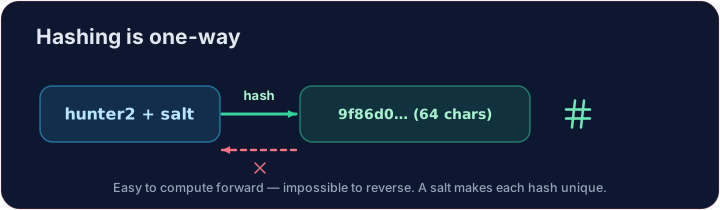
- It is one-way: easy to compute forwards, practically impossible to reverse.
- When you log in, the site hashes what you typed and compares it to the stored hash — it only ever stores the hash, never your actual password.
Hash là gì?
- Một hàm hash biến bất kỳ đầu vào nào thành chuỗi có độ dài cố định. Đầu vào giống nhau luôn tạo ra cùng một giá trị hash.
- Nó mang tính một chiều: dễ dàng tính toán theo hướng tới, nhưng gần như không thể đảo ngược.
- Khi bạn đăng nhập, trang web sẽ tạo hash nội dung bạn nhập và so sánh nó với giá trị hash đã lưu — nó chỉ EVER lưu giá trị hash, không bao giờ lưu mật khẩu thật của bạn.
import hashlib
print(hashlib.sha256(b"hello").hexdigest())
Add salt
- If two users pick the same password, their hashes match — a clue for attackers.
- A salt is a random string added before hashing, so identical passwords get different hashes.
- It also defeats pre-computed "rainbow table" attacks. Always salt.
Thêm Salt
- Nếu hai người dùng chọn cùng một mật khẩu, giá trị hash của họ sẽ trùng khớp — một manh mối cho kẻ tấn công.
- Một salt là chuỗi ngẫu nhiên được thêm vào trước khi tạo hash, để các mật khẩu giống nhau sẽ tạo ra các giá trị hash khác nhau.
- Nó cũng ngăn chặn các cuộc tấn công "bảng cầu vồng" (rainbow table) đã được tính toán sẵn. Luôn luôn dùng salt.
Your turn
- Hash
salt + passwordwith SHA-256. The check confirms you produced the correct 64-character digest.
Covers: A-Level 6.1, 17.1 (encryption/hashing).
Đến lượt bạn
- Tạo hash
salt + passwordbằng SHA-256. Trình kiểm tra xác nhận bạn đã tạo ra đúng digest 64 ký tự.
Phạm vi: A-Level 6.1, 17.1 (mã hóa/hash).
Common mistakes
- Never store passwords in plain text.
- Store a salted hash, not the password itself.
Lỗi thường gặp
- NEVER lưu mật khẩu dưới dạng văn bản thường.
- Lưu giá trị hash có salt, chứ không phải mật khẩu trực tiếp.
Store the hash, not the password · Lưu hash, không lưu mật khẩu
Sites store a hash; a tiny change gives a totally different digest. · Các trang web lưu hash; một thay đổi nhỏ sẽ tạo ra digest hoàn toàn khác biệt.
Never store a plain password — store its hash. Using hashlib, hash the salt + password with SHA-256 and put the hex digest in a variable called digest. · Không bao giờ lưu mật khẩu rõ ràng — hãy lưu hash của nó. Sử dụng hashlib, tạo hash cho muối + mật khẩu bằng SHA-256 và đặt digest hex vào biến tên là digest.
Click Run to see the output here. · Nhấn Chạy để xem kết quả ở đây.
Now be the login system. The database holds a salt and a stored digest — never the password. Hash salt + attempt with SHA-256 and print welcome if it matches stored, else denied. · Bây giờ hãy đóng vai trò hệ thống đăng nhập. Cơ sở dữ liệu chứa một salt và một stored digest — chưa bao giờ chứa mật khẩu. Tạo hash salt + attempt bằng SHA-256 và in welcome nếu nó khớp với stored, ngược lại in denied.
Click Run to see the output here. · Nhấn Chạy để xem kết quả ở đây.