HCI and accessibility
Введено
Словарь
| English | Значение |
|---|---|
| states/steɪts/ | The possible configurations or conditions of a system at a particular point in its operation. |
| transitions/trænˈsɪʃnz/ | transitions |
English
Design in states
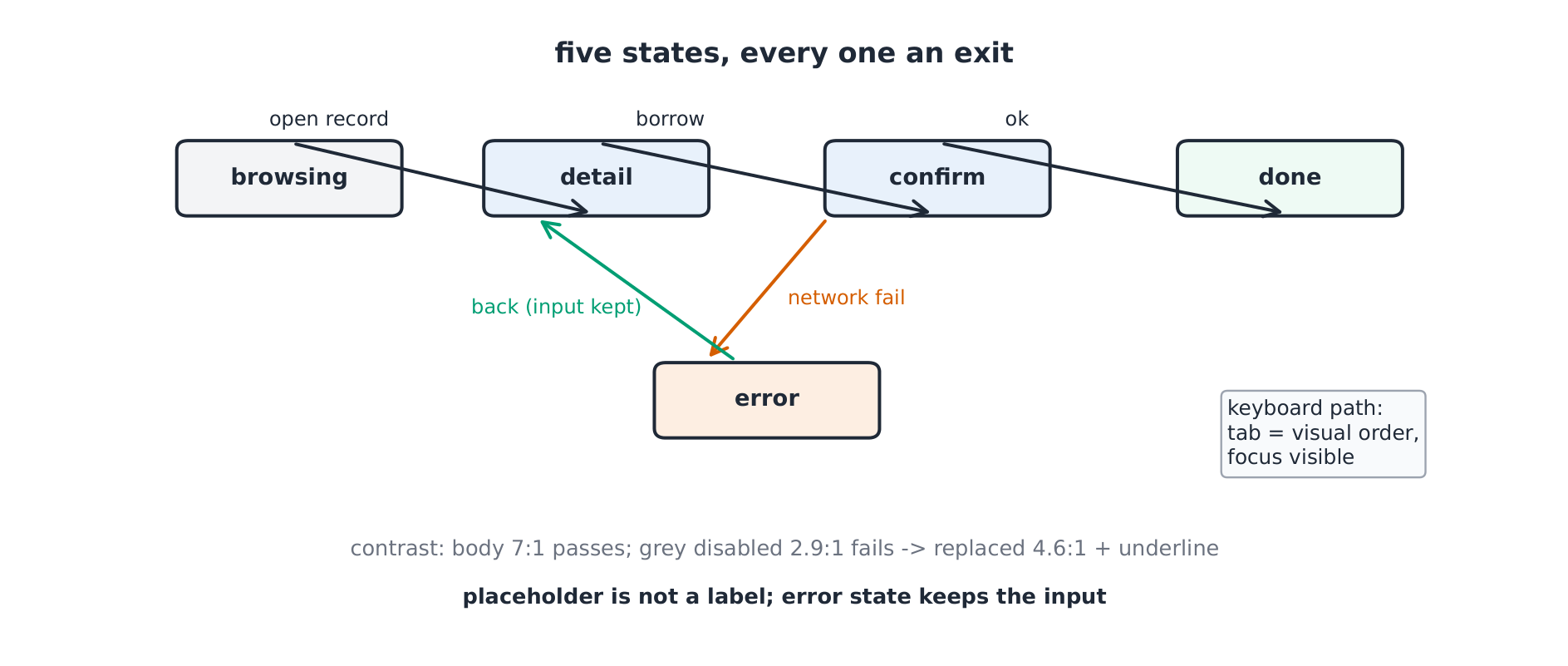
- The borrow flow has five states (browsing, detail, confirm, done, error) and labelled transitions. Every reachable state needs a visible way out — the error state keeps the member's input and returns to detail.
{exercise:uni-cs1203-states}
Практика
Every reachable interface state needs —
Сложность 1/5 · 100 монет + небольшой бонус за первое завершение сегодня
No exit = a trap; the error state returns to detail with input kept.
English
Accessibility as mechanics
- WCAG's core: perceivable (contrast $\ge 4.5{:}1$ for text), operable (keyboard reachable, focus visible), understandable (labels, not placeholders), robust (semantics).
- The course prototype measured: body text 7:1 passes; the grey disabled button at 2.9:1 fails — replaced by 4.6:1 with an underline affordance. Accessibility is measurable or it is decoration.
{exercise:uni-cs1203-contrast}
Практика
Text contrast must be at least —
Сложность 1/5 · 100 монет + небольшой бонус за первое завершение сегодня
WCAG AA: 4.5:1 for body text; 7:1 comfortably passes.
English
The keyboard path
- A member completes a borrow with tab and enter only: focus order matches visual order, focus is visible on every control, confirm is announced. Hover-only menus fail this path — the test finds them before users do.
- Error states that discard input and placeholder-as-label are the recurring defects.
{exercise:uni-cs1203-keyboard}
Практика
The keyboard path fails when —
Сложность 1/5 · 100 монет + небольшой бонус за первое завершение сегодня
Hover-only affordances are unreachable by tab.