Forms · Formas
This page needs a recent browser (with SharedArrayBuffer support). Please update Chrome, Edge, Firefox or Safari to the latest version. · Esta página precisa de um navegador recente (com suporte a SharedArrayBuffer). Por favor, atualize Chrome, Edge, Firefox ou Safari para a versão mais recente.
English
Forms
- A form lets people type things in — a name, a message, a search.
- The boxes you type in are called inputs.
- A text box is
<input type="text">— a single tag, like<img>.
Português
Formulários
- Um formulário permite que as pessoas digitem coisas — um nome, uma mensagem, uma pesquisa.
- As caixas onde você digita são chamadas de inputs (entradas).
- Uma caixa de texto é
<input type="text">— uma única tag, como<img>.
English
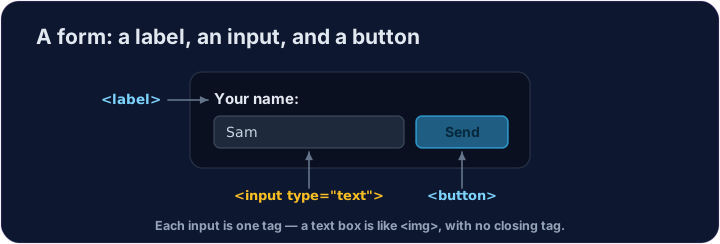
Labels and buttons
- A
<label>is the words next to an input, telling the user what it is for. - A
<button>is something to click — like Send or Search. - We won't actually send anything here — we're just learning the tags.
Português
Rótulos e botões
- Um
<label>são as palavras ao lado de uma entrada, dizendo ao usuário para que serve. - Um
<button>é algo para clicar — como Enviar ou Pesquisar. - Nós não vamos realmente enviar nada aqui — estamos apenas aprendendo as tags.
<label>Your name:</label>
<input type="text">
<button>Send</button>
English
Common mistakes
- Every input should have a matching
<label>. - A button in a form submits it by default — use
type="button"to stop that.
Português
Erros comuns
- Cada entrada deve ter um correspondente
<label>. - Um botão em um formulário o submete por padrão — use
type="button"para parar isso.
English
Now you try
- Inputs and buttons are the building blocks of every form on the web.
- Add a text box, then a button.
Português
Agora você tenta
- Entradas e botões são os blocos de construção de todo formulário na web.
- Adicione uma caixa de texto, depois um botão.
Add a box the user can type in. Use <input type="text"> (a single tag, like <img>). · Adicione uma caixa onde o usuário pode digitar. Use <input type="text"> (uma única tag, como <img>).
Add a button that says Send · Enviar. Use <button>Send</button>. · Adicione um botão que diz Enviar. Use <button>Send</button>.