Drawing with TikZ · Desenhando com TikZ
This page needs a recent browser (with SharedArrayBuffer support). Please update Chrome, Edge, Firefox or Safari to the latest version. · Esta página precisa de um navegador recente (com suporte a SharedArrayBuffer). Por favor, atualize Chrome, Edge, Firefox ou Safari para a versão mais recente.
English
Drawing inside LaTeX
- You can draw diagrams with code using the TikZ package — no image files needed.
- Load it once, then draw inside a
tikzpicture:
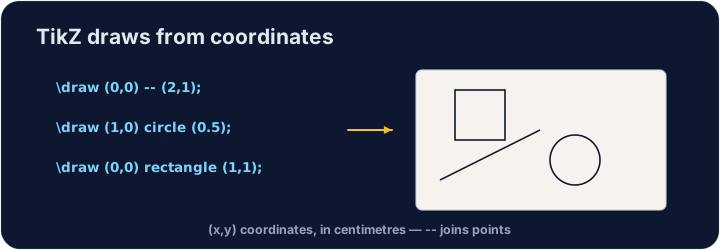
\draw (0,0) -- (2,1);draws a line from one point to another. Every command ends with;.
Português
Desenhando dentro do LaTeX
- Você pode desenhar diagramas com código usando o pacote TikZ — nenhum arquivo de imagem necessário.
- Carregue-o uma vez, depois desenhe dentro de um
tikzpicture:
\usepackage{tikz}
...
\begin{tikzpicture}
  \draw (0,0) -- (2,1);
\end{tikzpicture}
\draw (0,0) -- (2,1);desenha uma linha de um ponto a outro. Cada comando termina com;.
English
Shapes and paths
- Chain points with
--to make any shape;cyclereturns to the start:
Português
Formas e caminhos
- Crie cadeias de pontos com
--para fazer qualquer forma;cycleretorna ao início:
\draw (0,0) -- (2,0) -- (1,1.5) -- cycle;   % a triangle
\draw (0,0) circle (1);                      % a circle, radius 1
\draw (0,0) rectangle (3,2);                 % a box
English
Why code a drawing?
- It stays sharp at any size (it is vector graphics, not a photo).
- It is exact — perfect for geometry, graphs, and circuit diagrams.
- Now draw your own triangle in the task.
Português
Por que codificar um desenho?
- Permanece nítido em qualquer tamanho (é vetorial, não uma foto).
- É exato — perfeito para geometria, gráficos e diagramas de circuitos.
- Agora desenhe seu próprio triângulo na tarefa.
English
Common mistakes
- Every
\drawcommand ends with a semicolon;. - Wrap the drawing in a
tikzpictureenvironment.
Português
Erros comuns
- Todo comando
\drawtermina com ponto e vírgula;. - Envolva o desenho em um ambiente
tikzpicture.
Inside the tikzpicture, \draw a triangle: connect the points (0,0), (3,0) and · e (1.5,2) and close it with cycle. The tikz package is loaded for you. · Dentro de tikzpicture, \draw um triângulo: conecte os pontos (0,0), (3,0) e (1.5,2) e feche-o com cycle. O pacote tikz está carregado para você.
Click Run to compile and preview the PDF. · Clique em Executar para compilar e visualizar o PDF.
Draw two shapes this time. Add a circle · círculo of radius 1 with \draw (0,0) circle (1); and a rectangle with \draw (2,-1) rectangle (4,1);. · Desenhe duas formas desta vez. Adicione um círculo de raio 1 com \draw (0,0) circle (1); e um retângulo com \draw (2,-1) rectangle (4,1);.
Click Run to compile and preview the PDF. · Clique em Executar para compilar e visualizar o PDF.