Bold, italic and emphasis · Negrito, itálico e ênfase
This page needs a recent browser (with SharedArrayBuffer support). Please update Chrome, Edge, Firefox or Safari to the latest version. · Esta página precisa de um navegador recente (com suporte a SharedArrayBuffer). Por favor, atualize Chrome, Edge, Firefox ou Safari para a versão mais recente.
English
Styling words
- To change how words look, you wrap them in a command:
\textbf= bold,\textit= italic,\texttt=code-like.
Português
Estilizando palavras
- Para alterar a aparência das palavras, você as envolve em um comando:
\textbf{bold} and \textit{italic} and \texttt{typewriter}
\textbf= negrito,\textit= itálico,\texttt=code-like.
English
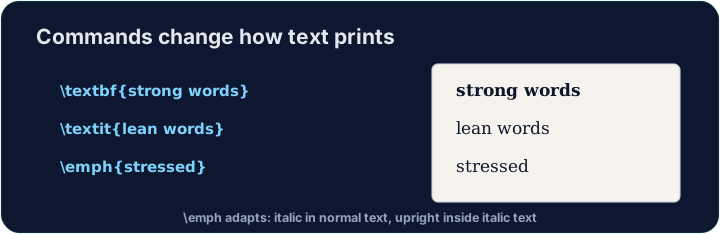
Emphasis the smart way
\emph{...}means "emphasise this" — usually italic, but it flips smartly inside italic text.- Prefer
\emphfor meaning, and\textitwhen you specifically want italic shapes.
Português
Ênfase da maneira inteligente
\emph{...}significa "destaque este" — geralmente itálico, mas muda inteligentemente dentro de texto itálico.- Prefira
\emphpara significado, e\textitquando quiser especificamente formas em itálico.
English
A note on quotes and dashes
- Type opening quotes with two backticks and closing with two apostrophes:
- A dash in a range is
--(en-dash, like 10--20); a pause in a sentence is---(em-dash). - These little touches are what make LaTeX documents look professional.
Português
Uma nota sobre aspas e traços
- Digite aspas de abertura com dois backticks e aspas de fechamento com dois apóstrofes:
- Um traço em um intervalo é
--(traço curto/en-dash, como 10--20); uma pausa em uma frase é---(traço longo/em-dash). - Esses pequenos detalhes são o que tornam documentos LaTeX com aparência profissional.
English
Common mistakes
\textbf{...}is bold,\textit{...}italic,\emph{...}emphasis.- Every opening brace
{needs a matching}.
Português
Erros comuns
\textbf{...}é negrito,\textit{...}itálico,\emph{...}ênfase.- Cada chave de abertura
{precisa de uma chave correspondente}.
Make the word important bold with \textbf{...}, and the word gently italic with \textit{...}. Then Run to see the styles. · Faça a palavra important ficar em negrito com \textbf{...}, e a palavra gently em itálico com \textit{...}. Depois Execute para ver os estilos.
Click Run to compile and preview the PDF. · Clique em Executar para compilar e visualizar o PDF.
Use the right tool for the job. Mark really with \emph{...} (emphasis that flips smartly), and show the file name report.tex in \texttt{...} (typewriter font). · Use a ferramenta certa para o trabalho. Marque realmente com \emph{...} (ênfase que inverte inteligentemente) e mostre o nome do arquivo report.tex em \texttt{...} (fonte monoespaçada).
Click Run to compile and preview the PDF. · Clique em Executar para compilar e visualizar o PDF.