Testing methods
Esta página precisa de um navegador recente (com suporte a SharedArrayBuffer). Por favor, atualize Chrome, Edge, Firefox ou Safari para a versão mais recente.
English
How do you know it works?
- Running a program once and seeing an answer is not testing. Testing means choosing data on purpose and comparing the output with the result you expected.
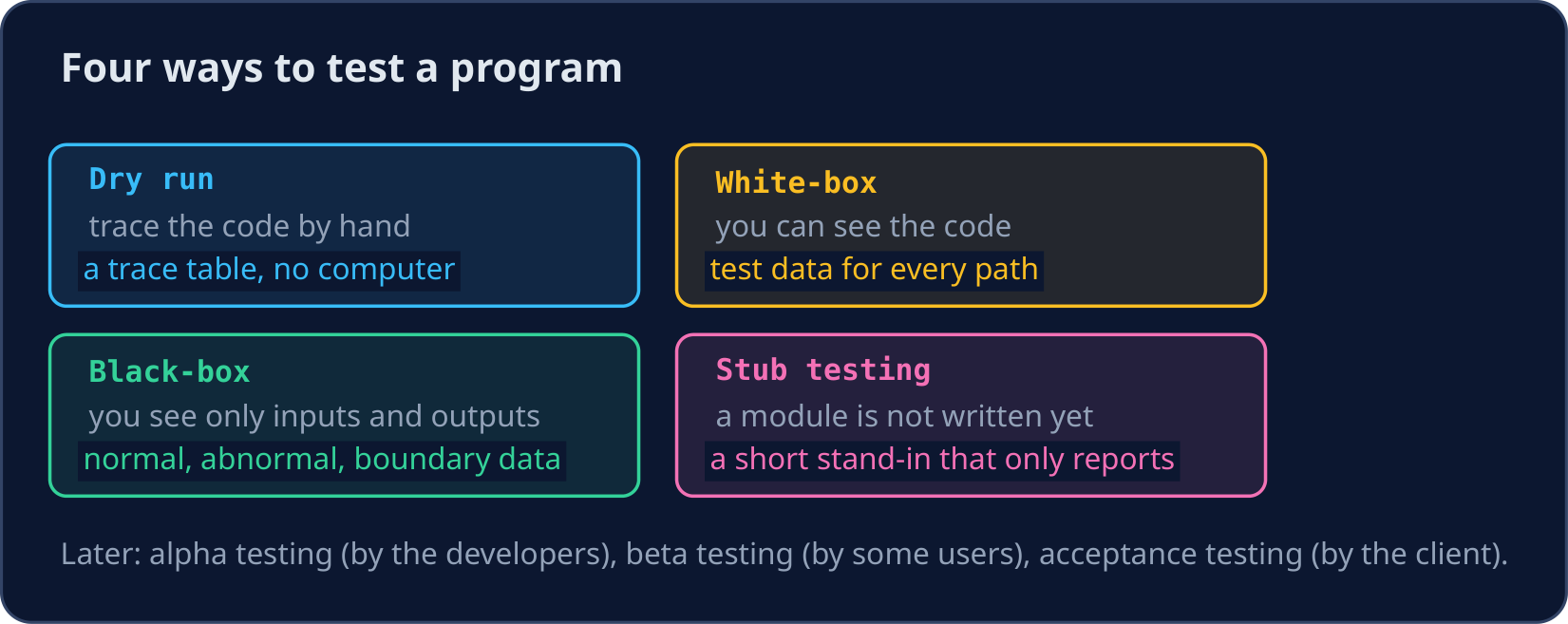
- 9618 Paper 2 names the methods. Each one fits a different moment in the work.
English
Stub testing: test before everything is written
- A stub is a short stand-in for a module that is not written yet. It only reports that it was called, or returns a fixed value.
- With stubs, you can test the main program (the menu, the
CASE, the calls) before the real modules exist.
PROCEDURE ShowMenu()
    OUTPUT "1 Add  2 Delete  3 Quit"
ENDPROCEDURE

PROCEDURE AddItem()
    OUTPUT "AddItem called"
ENDPROCEDURE

PROCEDURE DeleteItem()
    OUTPUT "DeleteItem called"
ENDPROCEDURE

DECLARE Choice : INTEGER
CALL ShowMenu()
Choice ← 2
CASE OF Choice
    1 : CALL AddItem()
    2 : CALL DeleteItem()
    OTHERWISE OUTPUT "Goodbye"
ENDCASE
- The output shows the menu, then
DeleteItem called: theCASEchose the right module. Later, the stub is replaced by the real procedure.
English
White-box: a test for every path
- In white-box testing you can see the code, so you choose data that makes every path run at least once.
Gradehas three paths: Merit, Pass and Fail. One mark for each path is the minimum.
FUNCTION Grade(Mark : INTEGER) RETURNS STRING
    IF Mark >= 70 THEN
        RETURN "Merit"
    ELSE
        IF Mark >= 40 THEN
            RETURN "Pass"
        ELSE
            RETURN "Fail"
        ENDIF
    ENDIF
ENDFUNCTION

OUTPUT Grade(85), " ", Grade(55), " ", Grade(12)
OUTPUT Grade(70), " ", Grade(69), " ", Grade(40), " ", Grade(39)
- The first line uses one mark per path. The second line tests each boundary: 70 and 69, 40 and 39.
English
Black-box: inputs and outputs only
- In black-box testing you do not look at the code. You test the inputs against the specification.
- Choose normal data (
55), abnormal data (-5,"ten"), and boundary data on both sides of each limit (39,40,69,70). - Write the test plan before running: test data, reason, expected result.
| Test data | Type | Expected result |
|---|---|---|
55 |
normal | Pass |
70 |
boundary | Merit |
69 |
boundary | Pass |
-5 |
abnormal | rejected |
English
Dry run, then the later stages
- A dry run is tracing the code by hand with a trace table, before or instead of running it. It finds logic errors that the computer would not report.
- After the program works: alpha testing by the developers, beta testing by a group of real users, then acceptance testing, where the client checks it meets the requirements.
- Errors have three kinds: syntax (breaks the language rules), logic (runs but gives the wrong result) and run-time (crashes while running, such as dividing by zero).
English
Common mistakes
| Wrong | Right | Why |
|---|---|---|
| testing only normal data | add abnormal and boundary data | most errors hide at the limits |
boundary data 70 only |
70 and 69 |
test both sides of each limit |
| a stub that does the real job | a stub that only reports | a stub lets you test the caller now |
| "black-box testing looks at the code" | it uses only inputs and outputs | white-box is the one that looks at the code |
| running the test, then deciding what is right | write the expected result first | otherwise you accept whatever comes out |
English
Now you try
- For each task, write down the expected result before you run anything.
Dificuldade 2/5 · Moedas 140 + pequeno bônus na primeira conclusão hoje
Discount should take 10% off a total of 100 or more. Complete it, then test it with the two boundary values the program already outputs: 100 and 99.5.
Clique em Executar para ver a saída aqui.
Dificuldade 1/5 · Moedas 100 + pequeno bônus na primeira conclusão hoje
A tester chooses data so that every IF branch in the code runs at least once. Which testing method is this? Give the two-word name.
Dificuldade 1/5 · Moedas 100 + pequeno bônus na primeira conclusão hoje
Write a stub for PrintReport: it must only output PrintReport called. The main program then calls it when Choice is 3.
Clique em Executar para ver a saída aqui.