Insert, delete, split and sort
A list that grows and shrinks
- Paper 2 often stores a list in an array that is bigger than the data:
Scores : ARRAY[1:6]with only 4 cells used. - A second variable,
Count, says how many cells hold data. Cells afterCountare spare. - Adding or removing an item means moving other items and changing
Count. This lesson shows four jobs the papers ask for.
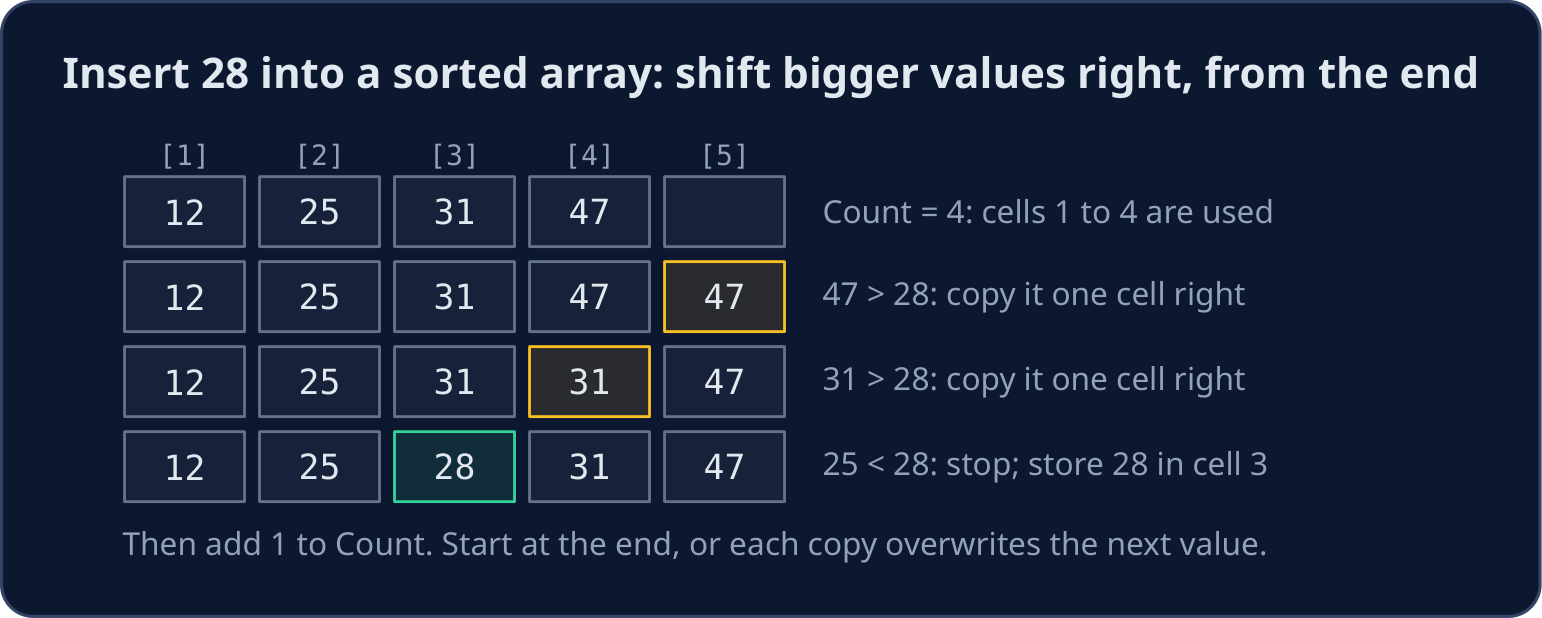
Insert into a sorted array
- Start at the last used cell and move left. Each value bigger than the new one is copied one cell to the right.
- Stop at the first value that is not bigger. The new value goes in the cell just after it.
- Work from the end: if you started at the front, each copy would overwrite the next value before it moved.
- Check first that the array is not full (
Count < 6).
DECLARE Scores : ARRAY[1:6] OF INTEGER
DECLARE Count, NewScore, Index, I : INTEGER
DECLARE Placed : BOOLEAN
Scores[1] ← 12
Scores[2] ← 25
Scores[3] ← 31
Scores[4] ← 47
Count ← 4
NewScore ← 28
Index ← Count
Placed ← FALSE
WHILE Index >= 1 AND NOT Placed
    IF Scores[Index] > NewScore THEN
        Scores[Index + 1] ← Scores[Index]
        Index ← Index - 1
    ELSE
        Placed ← TRUE
    ENDIF
ENDWHILE
Scores[Index + 1] ← NewScore
Count ← Count + 1
FOR I ← 1 TO Count
    OUTPUT Scores[I]
NEXT I
- The output is
12 25 28 31 47, one per line. The flagPlacedstops the loop without readingScores[0], which does not exist.
Delete an item
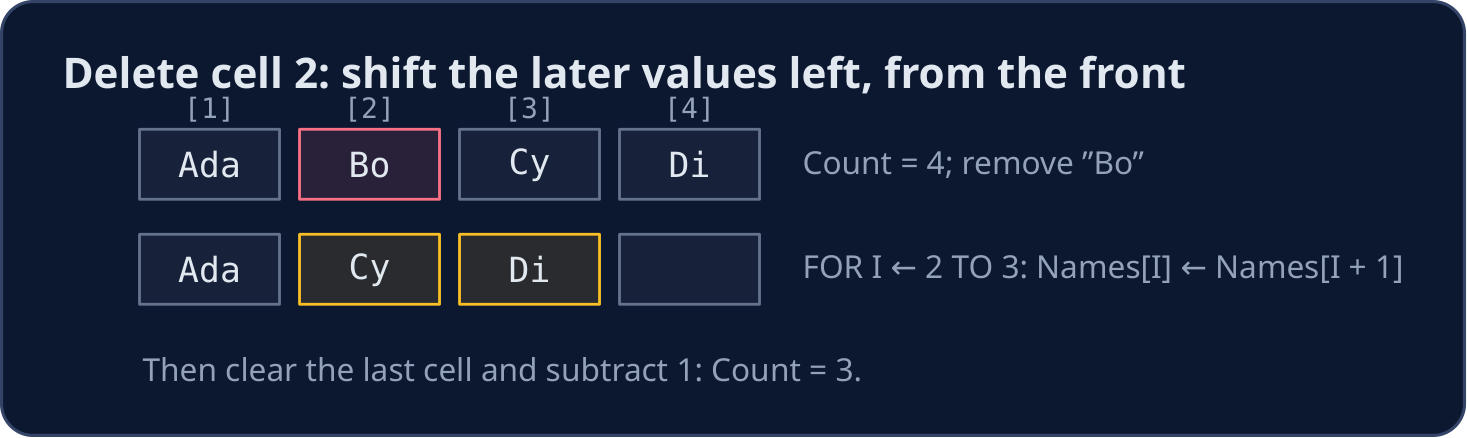
- To delete the item in cell
Position, copy each later value one cell to the left. Work from the front this time. - Then clear the last used cell and subtract 1 from
Count.
DECLARE Names : ARRAY[1:5] OF STRING
DECLARE Count, Position, I : INTEGER
Names[1] ← "Ada"
Names[2] ← "Bo"
Names[3] ← "Cy"
Names[4] ← "Di"
Count ← 4
Position ← 2
FOR I ← Position TO Count - 1
    Names[I] ← Names[I + 1]
NEXT I
Names[Count] ← ""
Count ← Count - 1
FOR I ← 1 TO Count
    OUTPUT Names[I]
NEXT I
- The output is
Ada,Cy,Di.
Split a line at its commas
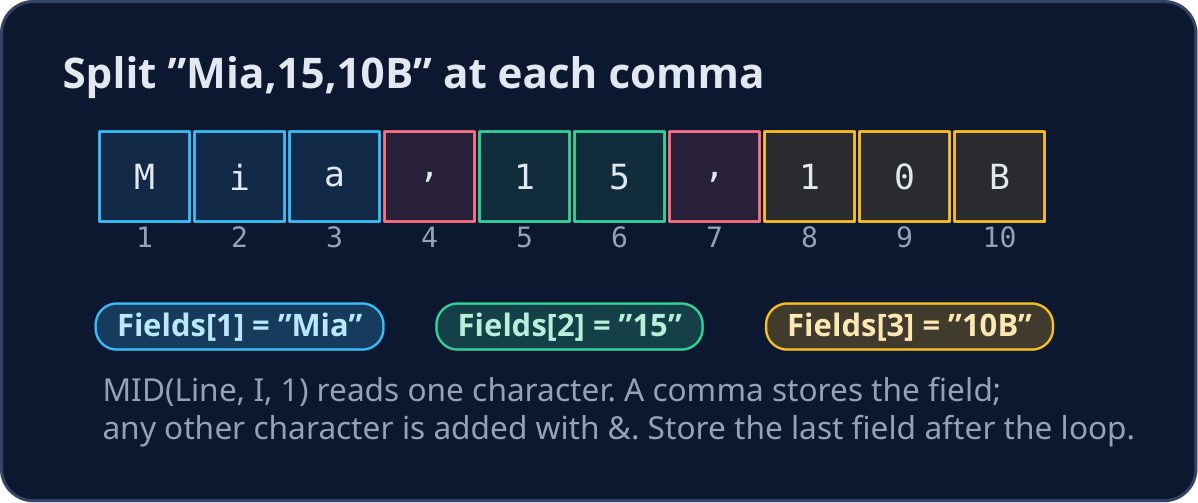
- A file line often holds several fields:
"Mia,15,10B". Your answer may need each part on its own. - Read the line one character at a time with
MID(Line, I, 1). Add each character toFieldwith&. - At a comma, store
Fieldand start a new, empty one. After the loop, store the last field: no comma follows it.
DECLARE Line, Field, Letter : STRING
DECLARE Fields : ARRAY[1:3] OF STRING
DECLARE I, FieldNumber : INTEGER
Line ← "Mia,15,10B"
FieldNumber ← 1
Field ← ""
FOR I ← 1 TO LENGTH(Line)
    Letter ← MID(Line, I, 1)
    IF Letter = "," THEN
        Fields[FieldNumber] ← Field
        FieldNumber ← FieldNumber + 1
        Field ← ""
    ELSE
        Field ← Field & Letter
    ENDIF
NEXT I
Fields[FieldNumber] ← Field
OUTPUT "Name: ", Fields[1]
OUTPUT "Age: ", Fields[2]
OUTPUT "Form: ", Fields[3]
- A field read from a file is a
STRING. UseSTR_TO_NUM(Fields[2])before you calculate with the age.
Sort a 2-D array by one column
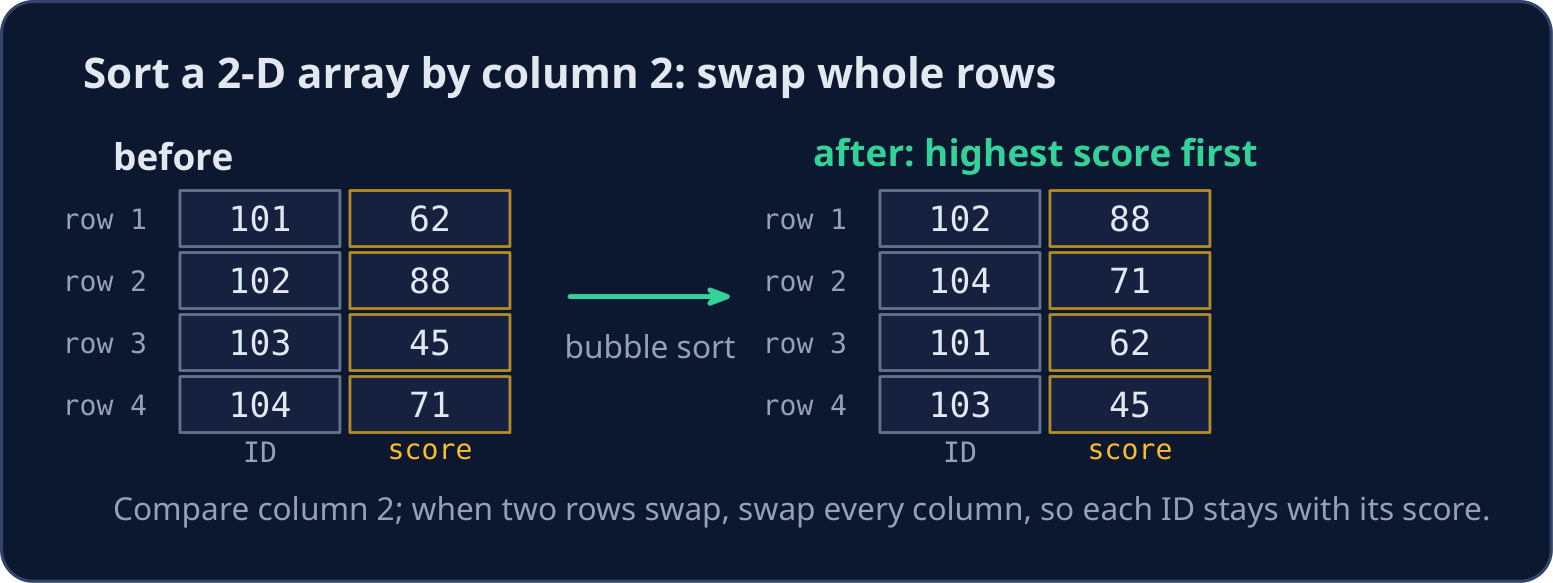
- Each row of
Resultsis one student: column 1 is the ID and column 2 is the score. - Bubble sort compares column 2 of neighbouring rows. When they are in the wrong order, swap every column of the two rows, so each ID stays with its score.
- Here
<puts the highest score first (descending order).
DECLARE Results : ARRAY[1:4, 1:2] OF INTEGER
DECLARE Pass, Row, Column, Temp : INTEGER
Results[1, 1] ← 101
Results[1, 2] ← 62
Results[2, 1] ← 102
Results[2, 2] ← 88
Results[3, 1] ← 103
Results[3, 2] ← 45
Results[4, 1] ← 104
Results[4, 2] ← 71
FOR Pass ← 1 TO 3
    FOR Row ← 1 TO 3
        IF Results[Row, 2] < Results[Row + 1, 2] THEN
            FOR Column ← 1 TO 2
                Temp ← Results[Row, Column]
                Results[Row, Column] ← Results[Row + 1, Column]
                Results[Row + 1, Column] ← Temp
            NEXT Column
        ENDIF
    NEXT Row
NEXT Pass
FOR Row ← 1 TO 4
    OUTPUT Results[Row, 1], " ", Results[Row, 2]
NEXT Row
Common mistakes
| Wrong | Right | Why |
|---|---|---|
| insert by shifting from the front | shift from the last used cell | moving forwards overwrites the values before they move |
forget to change Count |
add 1 after an insert, subtract 1 after a delete | Count decides which cells the program reads |
WHILE Index >= 1 AND Scores[Index] > NewScore |
use a flag such as Placed |
the second test reads Scores[0] when Index reaches 0 |
| forget the field after the last comma | store Field once more after the loop |
the last field has no comma after it |
| swap only column 2 | swap every column of the two rows | otherwise the IDs and scores get mixed up |
Now you try
- Draw the array before and after on paper. Write
Countafter each change.
Independent transfer
The final task splits lines and keeps a count. Plan the fields, then solve it before opening support. Check a line with only one field.
Dificuldade 2/5 · Moedas 140 + pequeno bônus na primeira conclusão hoje
Marks holds 7, 3, 9, 5 and Count is 4. Delete the item in cell 1 by shifting the others left, subtract 1 from Count, then output the items that are left, one per line.
Clique em Executar para ver a saída aqui.
Dificuldade 3/5 · Moedas 200 + pequeno bônus na primeira conclusão hoje
Values holds 10, 30, 40 (Count is 3). Insert NewValue (20) so the array stays in ascending order, then output every value, one per line.
Clique em Executar para ver a saída aqui.
Dificuldade 3/5 · Moedas 200 + pequeno bônus na primeira conclusão hoje
Line contém "red;green;blue". Output each field between the semicolons, one per line.
Clique em Executar para ver a saída aqui.
Dificuldade 4/5 · Moedas 280 + pequeno bônus na primeira conclusão hoje
Read one line of text. Output how many comma-separated fields it has. A line with no comma has 1 field, and two commas side by side still count an empty field between them.
Clique em Executar para ver a saída aqui.