Exception handling
Introduced| English | Meaning |
|---|---|
| exception/ekˈsepʃn/ | An error that occurs during execution: division by zero, a file not found, invalid input, a network that has gone away. |
| exception handling/ekˈsepʃn ˈhændlɪŋ/ | exception handling |
| raise/reɪz/ | To signal an exception so that normal execution can transfer to an appropriate exception handler. |
The check that cannot be written
- A program opens a file. Before opening it, you could check that the file exists, that it is readable, that the disk is present. Suppose every check passes.
- Between the last check and the open, a user pulls out the USB stick. The file existed when you asked and does not exist when you open it, and no amount of checking in advance could have closed that gap.
- Some errors are simply not preventable, because the world changes between the test and the action. What a program can do is respond to them when they happen.
- This lesson is the exception 异常, the TRY structure that handles one, and where in a program an exception should be caught.
What an exception is and why handle it
- An exception is an error that occurs during execution: division by zero, a file not found, invalid input, a network that has gone away.
- Exception handling 异常处理 lets the program detect the error and respond in a controlled way, instead of crashing and losing the user's work.
- Real programs face errors that cannot be prevented in advance, as the hook shows. And without exceptions, every single operation would need its own
IFcheck around it, burying the actual algorithm in error tests. - The third benefit is the one the exam most often asks for: it separates the normal flow from the error handling, so the main path reads cleanly.
An exception is:
Difficulty 1/5 · 100 coins + a small bonus on first completion today
Exceptions are run-time problems (divide by zero, file not found) that handling lets you respond to gracefully.
Why use exception handling rather than checking for every error in advance? Select all that apply.
Difficulty 2/5 · 140 coins + a small bonus on first completion today
The benefits are correctness and clarity. Speed is not one of them; handling adds a little overhead, which is worth paying.
The TRY structure
TRY
    OPENFILE "data.txt" FOR READ
    READFILE "data.txt", line
    CLOSEFILE "data.txt"
EXCEPT FileNotFound
    OUTPUT "Sorry, the file does not exist."
EXCEPT ReadError
    OUTPUT "Sorry, there was an error reading the file."
FINALLY
    OUTPUT "Finished attempting to read."
ENDTRY
- The TRY block holds the code that might fail. If it runs without error, the EXCEPT blocks are skipped entirely.
- If an exception occurs, execution jumps immediately to the first matching EXCEPT block. The rest of the TRY block does not run.
- A FINALLY block runs whether or not an exception happened, which makes it the right place for cleanup such as closing a file.
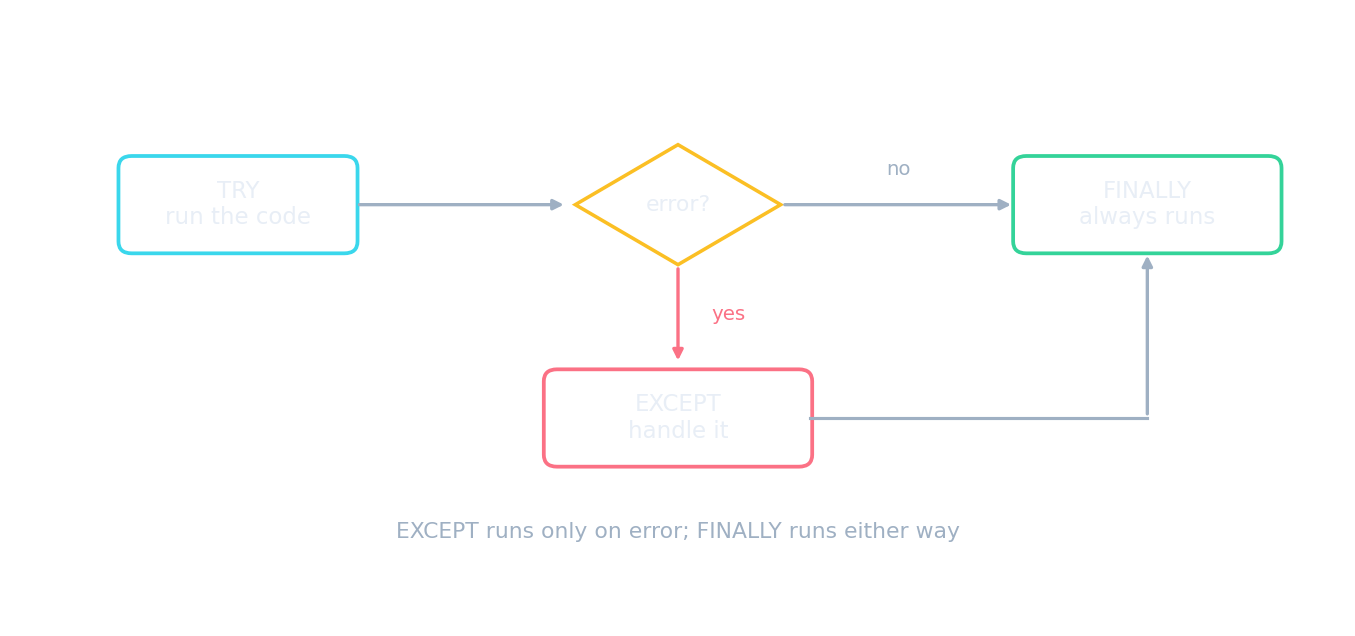
One path when all is well, another when it is not, and one that always runs
How exception handling flows
Step through what happens when code fails. The exception jumps out of the normal flow to a handler, FINALLY cleans up either way, and the program carries on instead of crashing.
Match each exception-handling keyword to its job.
Difficulty 2/5 · 140 coins + a small bonus on first completion today
TRY guards the risky code, EXCEPT catches, FINALLY cleans up either way, RAISE throws an error to be caught.
A FINALLY block:
Difficulty 1/5 · 100 coins + a small bonus on first completion today
FINALLY always runs, making it ideal for cleanup such as closing files.
The block that runs whether or not an exception occurred, making it right for closing files, is ____.
Difficulty 1/5 · 100 coins + a small bonus on first completion today
Cleanup must happen on both paths. Putting CLOSEFILE only in the TRY block means it is skipped exactly when an error left the file open.
Worked example: trace the flow
- In the code above, the file does not exist. State exactly what is output and what is skipped.
OPENFILEraises FileNotFound, so execution leaves the TRY block immediately: theREADFILEandCLOSEFILElines never run.- The
FileNotFoundEXCEPT block runs, outputting "Sorry, the file does not exist." TheReadErrorblock does not run, because only the first matching handler is used. - The FINALLY block runs, outputting "Finished attempting to read."
- The mark most often lost is noticing that the rest of the TRY block is abandoned.
The file in the TRY block does not exist. Put what happens in order.
Difficulty 3/5 · 200 coins + a small bonus on first completion today
Only the first matching handler runs, and FINALLY runs either way. The skipped remainder of the TRY block is the mark most often missed.
Raising an exception
- A subroutine that detects a problem it cannot sensibly deal with can raise 抛出 an exception, passing responsibility to whoever called it:
IF b = 0 THEN RAISE DivideByZero
- This is the right design when the subroutine knows something is wrong but not what should be done about it. A division routine knows the divisor is zero; only the caller knows whether to ask the user again, use a default, or abandon the calculation.
A subroutine uses RAISE to:
Difficulty 1/5 · 100 coins + a small bonus on first completion today
RAISE throws an exception up to the caller, which can catch it with EXCEPT.
Why would a division subroutine RAISE an exception instead of handling a zero divisor itself?
Difficulty 1/5 · 100 coins + a small bonus on first completion today
Ask the user again, use a default, or abandon the calculation: only the calling code has the context to choose.
Where to handle it
- Handle an exception close to where it occurs when the response is simple and local: print a message, use a default, ask the user to try again.
- Handle it higher up when the decision belongs to a larger part of the program: whether to abandon a whole transaction, roll back a change, or tell the user the operation failed.
- The rule of thumb: catch it at the level that has enough information to decide what to do, not at the level that first notices.
Worked example: what not to do
- A student writes
EXCEPT: (do nothing)around a whole program so it never crashes. Explain why this is poor practice. - The exception is swallowed: the program continues as though nothing went wrong, so it carries on with missing or invalid data and produces wrong results instead of an obvious failure.
- A silent failure is harder to diagnose than a crash, because there is no message and no indication of where it happened.
- Catching every exception in one place also means the specific error type is lost, so no sensible response can be chosen. A handler should catch a specific exception and actually respond to it.
Silently "swallowing" an exception (catching it but doing nothing) hides real errors and makes debugging hard — you should handle it or at least log it.
Difficulty 1/5 · 100 coins + a small bonus on first completion today
An empty handler hides the very problems you need to find; always respond or record the error.
Marks that slip away
- When an exception occurs, the rest of the TRY block is skipped. Say so when tracing.
- Only the first matching EXCEPT runs, not all of them.
- FINALLY always runs, error or no error, which is what makes it right for closing files.
- Do not catch an exception and do nothing. A swallowed error is worse than a crash, because the program continues with bad data.
You've got it
- an exception is a run-time error; handling it lets a program respond instead of crashing, covers errors that cannot be prevented in advance, and separates normal code from error handling
- TRY holds the risky code; on an error the rest of it is skipped and the first matching EXCEPT runs; FINALLY runs either way, so cleanup belongs there
- a subroutine that cannot decide the response should RAISE the exception for its caller
- handle it close by for a simple local response, higher up when the decision needs a wider view; never catch it and do nothing