Files
Introduced| English | Meaning |
|---|---|
| file/faɪl/ | A named collection of data stored and managed as a unit. |
| text file/tekst faɪl/ | A file that stores data as a sequence of encoded characters. |
| secondary storage/ˈsekəndəri ˈstɔːrɪdʒ/ | Non-volatile storage used to retain data and programs beyond immediate processing. |
| persistence/pəˈsɪstəns/ | persistence |
| end of file/end ɒv faɪl/ | The condition reached when there is no further data to read from a file's current reading position. |
| separator/ˈsepəreɪtə/ | A character or sequence used to distinguish adjacent data items or fields. |
| sequential/siːˈkwenʃl/ | Describing items or operations handled in a defined order, one after another. |
The game that remembered
- Until 1987, switching off a games console erased everything. Every session started from the first screen; a long game was a long afternoon or nothing.
- The Legend of Zelda shipped with a small battery inside the cartridge that kept a few hundred bytes alive. For the first time a home game could save, and pick up where you left off.
- Every high score, every document, every setting you have ever kept exists for the same reason: RAM forgets when the power goes, and a file 文件 does not.
- This lesson is why files exist and how pseudocode reads and writes a text file, line by line.
Why files
- Variables live in RAM and disappear when the program ends. A file on secondary storage 辅助存储器 keeps data between program runs: persistence 持久性.
- Files let one program's output become another program's input, so data can be shared.
- A file can hold more than fits in memory, and a program can restart from a saved state.

The variable is gone at the end of the run; the file is still there tomorrow
Why does a program write data to a file rather than keeping it in a variable?
Difficulty 1/5 · 100 coins + a small bonus on first completion today
RAM is volatile, so data is lost on exit. A file on secondary storage persists between runs.
Text files and the three modes
- A text file 文本文件 stores data as lines of characters, which a program reads and writes one line at a time, from the start. That sequence of lines is what lets a loop work through it.
OPENFILE … FOR READreads from the first line.FOR WRITEcreates a new file, or overwrites an existing one.FOR APPENDadds new lines at the end, keeping what is there.- Open before use, close after. A file has one mode at a time.
Match each file-open mode to what it does.
Difficulty 2/5 · 140 coins + a small bonus on first completion today
READ reads; WRITE replaces from scratch; APPEND adds to the end without losing what is there.
To add lines to the end of an existing file without losing its contents, open it FOR ____.
Difficulty 1/5 · 100 coins + a small bonus on first completion today
WRITE would start the file empty. APPEND keeps what is there and writes after it.
Reading every line
OPENFILE "data.txt" FOR READ
WHILE NOT EOF("data.txt") DO
    READFILE "data.txt", LineString
    OUTPUT LineString
ENDWHILE
CLOSEFILE "data.txt"
EOFtests for the end of file 文件结束. Test it before each read: reading past the end is an error.CLOSEFILEmatters: buffered data may be lost and other programs locked out of a file left open.
Handling a file: open → use → close
Step through the lifecycle every file follows. The two easy-to-forget parts are testing EOF while reading in a loop, and always closing at the end.
What does EOF test for?
Difficulty 1/5 · 100 coins + a small bonus on first completion today
EOF (end of file) is checked before each read so the loop stops when there is no more data.
Why must you always close a file after using it?
Difficulty 1/5 · 100 coins + a small bonus on first completion today
Closing flushes buffered writes to disk and releases the lock so other programs can use the file.
Writing lines
OPENFILE "log.txt" FOR WRITE
FOR i ← 1 TO 100
    WRITEFILE "log.txt", "Event " & NUM_TO_STR(i)
NEXT i
CLOSEFILE "log.txt"
WRITEstarts the file empty. To add to a log that must keep its history, open itFOR APPENDinstead.- A text file holds strings: a number is converted with
NUM_TO_STRon the way out.
Worked example: the last three lines of a file
- Write a procedure
LastLines(FileName)that outputs the last three lines of a text file, in order.
PROCEDURE LastLines(BYVAL FileName : STRING)
    DECLARE LineX, LineY, LineZ : STRING
    LineX ← ""
    LineY ← ""
    LineZ ← ""
    OPENFILE FileName FOR READ
    WHILE NOT EOF(FileName) DO
        LineX ← LineY
        LineY ← LineZ
        READFILE FileName, LineZ
    ENDWHILE
    CLOSEFILE FileName
    OUTPUT LineX
    OUTPUT LineY
    OUTPUT LineZ
ENDPROCEDURE
- Each new line pushes the previous ones along, so at
EOFthe three variables hold the last three lines; a shorter file outputs empty strings. For the first five lines, count the reads and stop at five or atEOF, whichever comes first. An empty file makesEOFtrue immediately after opening.
Put the steps of the LastLines procedure in order.
Difficulty 3/5 · 200 coins + a small bonus on first completion today
Initialise, open, loop with the shift before the read, close, output. Shifting after the read would lose the newest line.
Fields in a line
- A record is written as one line, its fields joined by a separator 分隔符 character, and each number or Boolean converted with
NUM_TO_STR(and read back withSTR_TO_NUM, or by comparing with"TRUE"). - Choose a separator that can never appear in the data: a comma or
|for names and numbers; never a space when a name may contain one. - Reading back: read the line, split it at the separator, convert each field to its type, store it in the record.
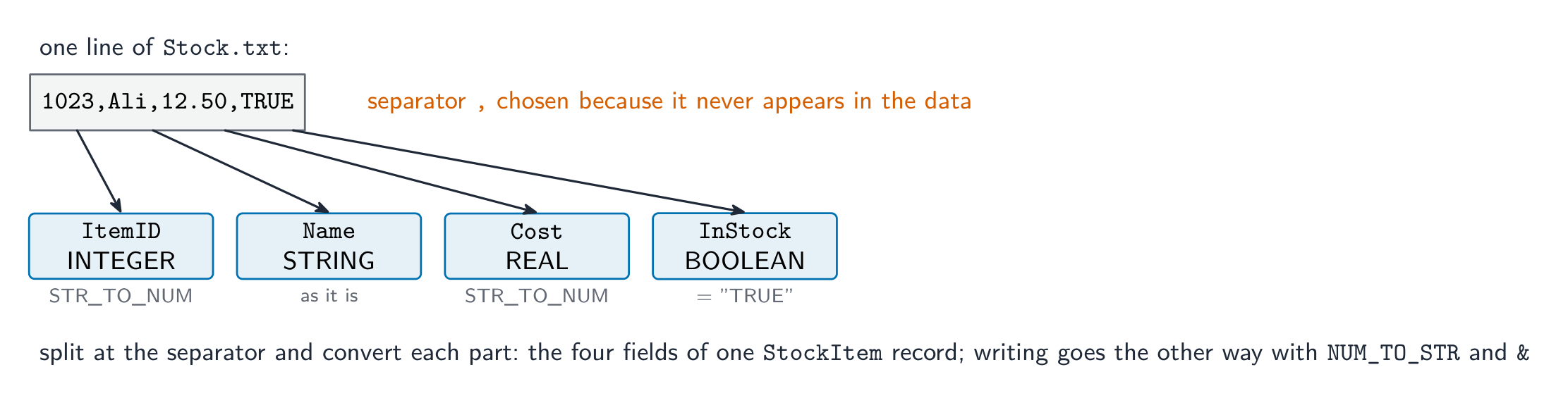
Join with a separator to write; split and convert to read
A line stores a player's full name and score. Which separator is the safest choice?
Difficulty 1/5 · 100 coins + a small bonus on first completion today
The separator must never occur inside a field. A full name contains a space, and a score contains digits.
An INTEGER can be written to a text file directly, without converting it to a string first.
Difficulty 1/5 · 100 coins + a small bonus on first completion today
A text file holds lines of characters. Convert with NUM_TO_STR to write and STR_TO_NUM to read back.
Worked example: save a record, load it back
- A record
Playerhas fieldsName : STRINGandScore : INTEGER. Write pseudocode to append it toscores.txtas one line, and to read one line back into the record.
OPENFILE "scores.txt" FOR APPEND
WRITEFILE "scores.txt", Player.Name & "," & NUM_TO_STR(Player.Score)
CLOSEFILE "scores.txt"

OPENFILE "scores.txt" FOR READ
READFILE "scores.txt", Line
Pos ← POSITION(Line, ",")
Player.Name ← LEFT(Line, Pos - 1)
Player.Score ← STR_TO_NUM(MID(Line, Pos + 1, LENGTH(Line) - Pos))
CLOSEFILE "scores.txt"
- The marks: the right mode, the conversion of the number in both directions, a separator that cannot occur in a name, and both files closed.
To store a record as one line of a text file, a program must: select all that apply.
Difficulty 2/5 · 140 coins + a small bonus on first completion today
Convert, join, write, close. A text file has no binary layout; that is what a binary file would do.
Serial and direct access
- A text file is serial 顺序 (sequential): it is read in order from the start, so finding one line means reading every line before it.
- Direct (random) access jumps straight to a record at a calculated position without reading the others; it needs fixed-length records, which text files do not have.
- For the syllabus, the text-file loop above is the model: open, test
EOF, read, close.
Direct (random) access lets a program jump straight to a record without reading the others first.
Difficulty 1/5 · 100 coins + a small bonus on first completion today
Serial access must read from the start.
Marks that slip away
- Reading past the end. Test
EOFbefore everyREADFILE. - Opening
FOR WRITEwhen the file must keep its contents. That isAPPEND. - Writing a number without
NUM_TO_STR, or reading it back withoutSTR_TO_NUM. A text file holds strings. - Forgetting
CLOSEFILE, or using a file beforeOPENFILE. Both lose the mark for the file handling.
You've got it
- files give persistence: data survives the end of the program, can be shared, and can exceed memory
OPENFILE … FOR READ | WRITE | APPEND→READFILE/WRITEFILE→CLOSEFILE;WRITEoverwrites,APPENDadds at the end- test
EOFbefore each read; convert numbers withNUM_TO_STRout andSTR_TO_NUMback - one record = one line, fields joined by a separator that never appears in the data