Language translators and IDEs
Introduced| English | Meaning |
|---|---|
| compiler/kəmˈpaɪlə/ | Software that translates a program from a source language into another form, commonly machine or intermediate code. |
| source code/sɔːs kəʊd/ | source code |
| translator/trænˈsleɪtə/ | Software that converts a program from one language or representation into another, such as an assembler or compiler. |
| machine code/məˈʃiːn kəʊd/ | Instructions encoded in binary form that a processor can execute directly. |
| assembler/əˈsemblə/ | Software that translates assembly-language instructions into machine code. |
| assembly language/əˈsemblɪ ˈlæŋɡwɪdʒ/ | A low-level programming language using symbolic names for machine instructions and their operands. |
| object code/ˈɒbdʒekt kəʊd/ | Code produced by compilation or assembly, often requiring linking before it forms a complete executable program. |
| executable/ɪɡˈzekjʊtəbl/ | A file containing instructions in a form that a computer can load and run. |
| interpreter/ɪnˈtɜːprɪtə/ | Software that executes a program by processing its instructions at runtime rather than requiring a separate complete native executable first. |
| bytecode/ˈbaɪtkəʊd/ | Intermediate instructions intended for execution by a virtual machine or interpreter rather than directly by a physical processor. |
| portable/ˈpɔːtəbl/ | Describing software that can be transferred to different supported platforms with little or no modification. |
| virtual machine/ˈvɜːtʃuːəl məˈʃiːn/ | A software-defined machine or execution environment that runs programs using an abstracted set of resources or instructions. |
| just-in-time compilation/dʒʌst ɪn taɪm ˌkɒmpɪˈleɪʃn/ | Translating program code into machine code during execution rather than entirely beforehand. |
| integrated development environment/ˈɪntɪɡreɪtɪd dɪˈveləpmənt enˈvaɪrənmənt/ | Software combining tools for writing, running and debugging programs. |
| context-sensitive prompts/ˈkɒntekst ˈsensɪtɪv prɒmpts/ | Editor suggestions or information chosen according to the code and location currently being edited. |
| auto-complete/ˈɔːtəʊ kəmˈpliːt/ | An editor feature that suggests or inserts the remaining characters of a name, keyword or other code element. |
| dynamic syntax checks/daɪˈnæmɪk ˈsɪntæks tʃeks/ | Checks performed while code is being entered or edited to identify violations of the language's grammatical rules. |
| prettyprint/ˈpretɪprɪnt/ | prettyprint |
| breakpoints/ˈbreɪkpɔɪnts/ | Marked execution locations at which a debugger pauses a running program for inspection. |
| single stepping/ˈsɪŋɡl ˈstepɪŋ/ | Running a program one statement or instruction at a time under a debugger to inspect its behaviour. |
| report window/rɪˈpɔːt ˈwɪndəʊ/ | An IDE area displaying information such as program output, errors and warnings. |
Nobody believed the computer could write its own program
- In 1952 Grace Hopper built the first compiler 编译器, a program that turned a programmer's notation into machine instructions. "Nobody believed that," she said later. "I had a running compiler and nobody would touch it. They told me computers could only do arithmetic."
- Every language you have used since rests on that idea: you write source code 源代码 for people, and a translator produces the machine code 机器码 the processor runs.
- There are three kinds of translator and one famous hybrid, and the exam wants you to say which to use when, and why.
- This lesson is the translators, the trade-offs between compiling and interpreting, Java's mixture of both, and the tools an IDE puts around them.
Source code, machine code and the assembler
- The processor executes only machine code. A translator 翻译器 converts a program written for people into it.
- An assembler 汇编器 translates assembly language 汇编语言 into machine code: each mnemonic instruction,
LDD,ADD,JMP, becomes exactly one machine-code instruction, and labels and symbolic addresses are replaced by real addresses. - Assembly is used where the programmer needs direct control of the hardware: device drivers, embedded systems, the innermost loops of a game.
Match each translator to what it does.
Difficulty 2/5 · 140 coins + a small bonus on first completion today
Assembler: assembly→machine code; compiler: all-at-once to an executable; interpreter: line by line at run time.
The compiler
- A compiler translates the whole high-level program into machine code, object code 目标代码, before it is run. It produces an executable 可执行文件 file and reports all the syntax errors together, as a list, at the end of translation.
- It does not run the program. Once the code is clean, the executable runs without the compiler installed, as many times as you like.
- Fast at run time, since nothing is translated while running; but the machine code is tied to one processor and operating system.
The compiler route: source to running program
Step through how a compiler works — translating the whole program once, before it runs. Contrast it with an interpreter, which translates and runs one line at a time.
A compiler differs from an interpreter because it:
Difficulty 1/5 · 100 coins + a small bonus on first completion today
A compiler translates all at once into an executable that runs without the compiler. An interpreter runs line by line.
Put the compiler route in order, from writing code to running it.
Difficulty 3/5 · 200 coins + a small bonus on first completion today
A compiler translates the whole program once into an executable; that file then runs without the compiler.
The interpreter
- An interpreter 解释器 translates one statement of the high-level program at a time and executes it immediately before moving to the next.
- No executable is produced. It stops at the first error it meets and reports it, with the line, so you fix it and run again.
- Both the source code and the interpreter must be present every time the program runs, and each run re-translates, so execution is slower; but the same source runs wherever an interpreter exists.

Translate once and ship, or translate as you go
When does an interpreter report an error?
Difficulty 1/5 · 100 coins + a small bonus on first completion today
An interpreter runs line by line, so it reports an error at the moment it reaches that line — handy during development.
An interpreter produces no stand-alone executable, so the interpreter itself must be installed to run the program.
Difficulty 1/5 · 100 coins + a small bonus on first completion today
An interpreter translates and runs line by line each time — there is no separate executable to ship, unlike a compiler.
Benefits and drawbacks, as the mark scheme lists them
| compiler | interpreter | |
|---|---|---|
| execution speed | fast, already machine code | slower, translated on every run |
| what the user needs | only the executable; the source stays private | the source code and the interpreter |
| finding errors | all listed at once after translation | each reported at its line, as you develop |
| changing the code | recompile the whole program | edit and run again immediately |
| portability | one platform; recompile for each | runs wherever an interpreter exists |
You should choose a compiler when:
Difficulty 1/5 · 100 coins + a small bonus on first completion today
Compiled executables are fast and stand-alone. Interpreters suit quick development and portable scripts.
Which points favour using an interpreter while developing a program? Select all that apply.
Difficulty 2/5 · 140 coins + a small bonus on first completion today
Fast edit-run cycles and errors at their line are the interpreter's strengths. Run-time speed is the compiler's.
Worked example: an interpreter while writing, a compiler when finished
- A developer uses an interpreter while writing a program and a compiler when it is finished. Explain how each is used. [4]
- During development the interpreter runs the partly written program at once, without waiting for a complete translation. When it meets an error it reports the line, so the developer fixes it and runs again immediately: a fast edit-run cycle that makes debugging easier.
- When the program is finished, the compiler translates the whole program into an executable that runs faster, needs no translator on the user's computer, and keeps the source code private.
- Two marks for each tool: what it does, and why that suits that stage.
Java: partially compiled, partially interpreted
- Java source is compiled into bytecode 字节码, a compact, portable 可移植的 intermediate form that is not machine code for any real processor.
- A virtual machine 虚拟机, the JVM, then interprets the bytecode on whatever machine it runs on, or uses just-in-time compilation 即时编译 to turn the busiest parts into native code while the program runs.
- The compile stage catches syntax errors early; the interpret stage lets one bytecode file run anywhere a JVM exists. Java in console mode, a text program run from the command line, is the syllabus's example.

Write once, run anywhere: one bytecode file, one JVM per platform
Java compiles to bytecode that runs on a JVM. The main benefit is:
Difficulty 1/5 · 100 coins + a small bonus on first completion today
Bytecode is platform-independent; any JVM can run it (with JIT giving near-native speed for hot code).
Java's compiler produces platform-independent ____, which a virtual machine then interprets.
Difficulty 1/5 · 100 coins + a small bonus on first completion today
Bytecode is an intermediate form: compiled once, then run by the JVM on any platform. That is what makes Java partially compiled and partially interpreted.
Worked example: why compile to bytecode and then interpret?
- Explain why Java is compiled to bytecode rather than straight to machine code.
- A compiler produces machine code for one processor and operating system, so a program compiled on one machine will not run on another.
- Java's compiler targets a virtual machine instead, so the bytecode is identical everywhere. Each platform supplies its own JVM to interpret it.
- The cost is speed: interpreting bytecode is slower than running native code, which is why the JVM adds just-in-time compilation for the hot parts.
The IDE and its four groups of features
- An integrated development environment 集成开发环境 (IDE) is one application for writing, translating, running and debugging a program. The syllabus groups its features in four.
- For coding: context-sensitive prompts 上下文相关提示 pop up the identifiers, keywords or parameters that fit at that point; auto-complete 自动补全 finishes the name.
- For initial error detection: dynamic syntax checks 动态语法检查 underline a mistake as you type, before translation. For presentation: prettyprint 代码美化 shows keywords, identifiers, strings and comments in different colours with consistent indentation; expand and collapse hides the body of a block so you see the outline.
- For debugging: breakpoints 断点 pause the program at a marked line; single stepping 单步执行 runs one line at a time; a window shows the values of variables and expressions; the report window 报告窗口 lists errors, warnings and output.
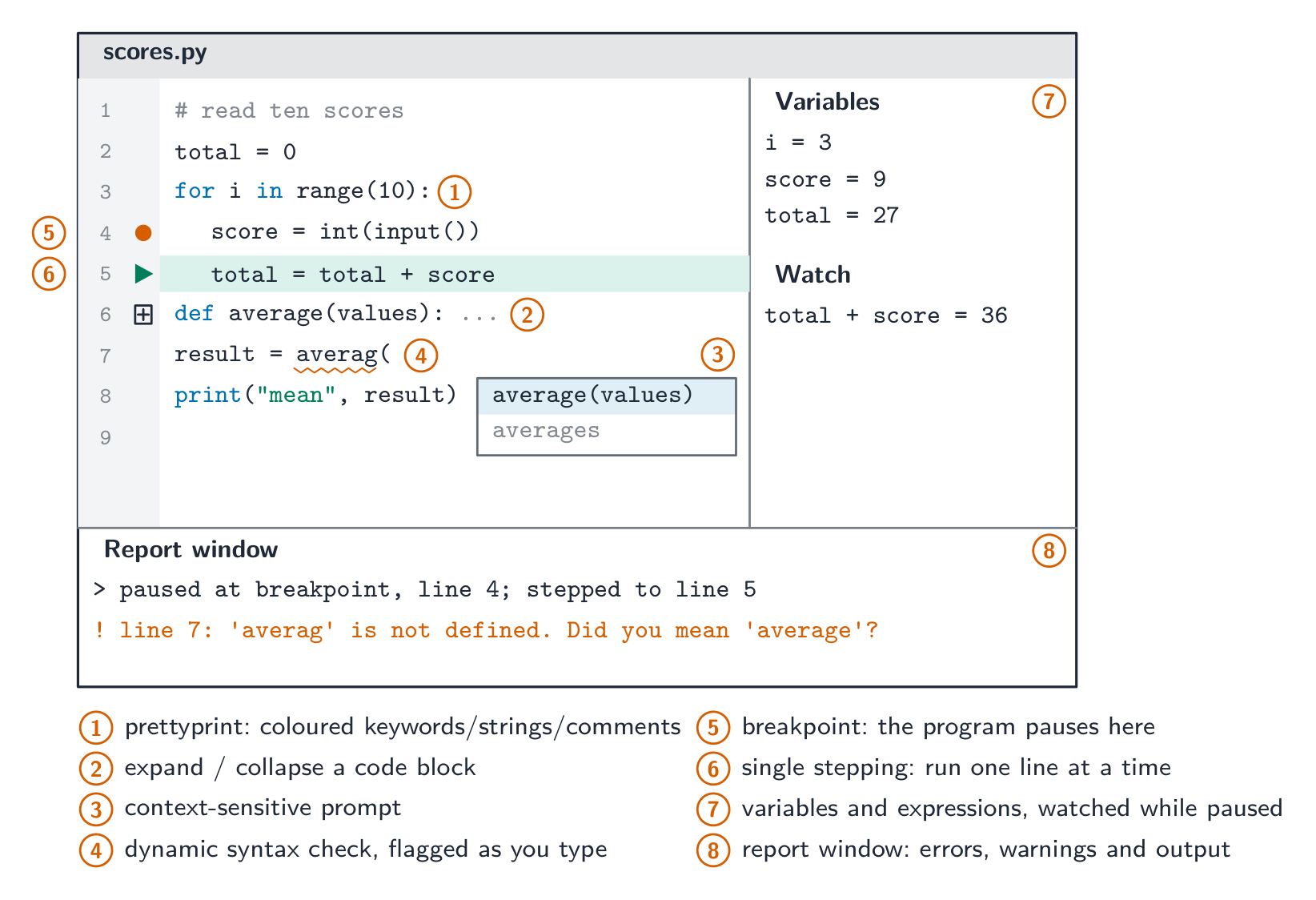
Coding, error detection, presentation, debugging
Which feature is part of an IDE's debugger?
Difficulty 1/5 · 100 coins + a small bonus on first completion today
A debugger lets you set breakpoints, step through code line by line, and inspect variable values.
Match each IDE feature to its syllabus group.
Difficulty 2/5 · 140 coins + a small bonus on first completion today
Coding, initial error detection, presentation, debugging: the four groups the syllabus names, one feature each here.
Worked example: finding the bug in Calculate()
- A function
Calculate()returns an unexpected value. Describe how the debugging features of an IDE help find the cause. [4] - Set a breakpoint on the first line of
Calculate(), so the program pauses there instead of running through. - Single-step through the function one line at a time. After each step, read the values of the variables and of any expression you have asked the IDE to watch, and compare them with what you expected.
- The first line after which a value is wrong is where the logic error is. The report window shows any run-time error messages and output along the way.

Pause, step, inspect
Put the steps of finding a logic error with a debugger in order.
Difficulty 3/5 · 200 coins + a small bonus on first completion today
Pause, step, inspect, compare, locate. Each is one of the debugging features the syllabus lists.
Marks that slip away
- A compiler does not run the program. It translates the whole of it and produces an executable.
- An interpreter stops at the first error; a compiler lists them all. Do not swap these.
- "Faster" needs "at run time", and "portable" needs "the same source runs wherever an interpreter exists".
- Sort IDE features into the syllabus's four groups: a breakpoint is debugging, prettyprint is presentation, a context-sensitive prompt is coding. Bytecode is not machine code.
You've got it
- assembler: one assembly instruction to one machine-code instruction · compiler: the whole program, before it runs, an executable, all errors listed · interpreter: one statement at a time, executed at once, stops at the first error, no executable
- compiler for speed, distribution and privacy of the source; interpreter for a fast edit-run cycle, portability and beginners
- Java compiles to portable bytecode that a JVM interprets or JIT-compiles: partially compiled, partially interpreted
- IDE features in four groups: coding (context-sensitive prompts), initial error detection (dynamic syntax checks), presentation (prettyprint, expand and collapse), debugging (breakpoints, single stepping, variables, report window)