Mini-project: a profile card
This page needs a recent browser (with SharedArrayBuffer support). Please update Chrome, Edge, Firefox or Safari to the latest version. · 이 페이지는 최신 브라우저(SharedArrayBuffer 지원)가 필요합니다. Chrome, Edge, Firefox 또는 Safari를 최신 버전으로 업데이트해 주세요.
English
Your mini-project
- Time to put it all together and build a profile card.
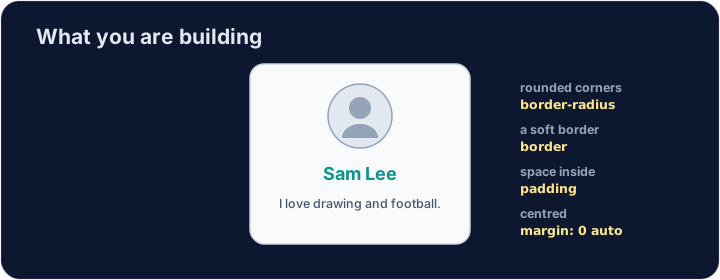
- Here is what you are aiming for:
한국어
미니 프로젝트
- 이제 모든 것을 종합하여 프로필 카드를 만들어 볼 시간입니다.
- 목표하는 결과물은 다음과 같습니다:
<style>
  .card { width: 280px; margin: 0 auto; padding: 20px; text-align: center;
          background-color: #f8fafc; border: 1px solid #cbd5e1; border-radius: 12px; }
  h2 { color: teal; margin: 8px 0; }
</style>
<div class="card">
  <img src="/static/code/web-basics/cat.svg" alt="My avatar" width="120">
  <h2>Sam Lee</h2>
  <p>I love drawing and football.</p>
</div>
English
What you've learned
- HTML: headings, paragraphs, lists, links, images, tables, forms, page structure.
- CSS: colours, text, the box model, spacing, sizing, and rows with Flexbox.
- That is the real foundation of every web page. You can build things now. 🎉
한국어
배운 내용
- HTML: 제목, 문단, 목록, 링크, 이미지, 표, 폼, 페이지 구조.
- CSS: 색상, 텍스트, 박스 모델, 간격, 크기, 플렉스로 행 만들기.
- 이것이 모든 웹 페이지의 진정한 기반입니다. 이제 물건을 만들 수 있습니다. 🎉
English
Common mistakes
- Build and check one piece at a time.
- Keep the HTML structure and the CSS styling separate.
한국어
흔한 실수
- 하나씩 만들고 확인하세요.
- HTML 구조와 CSS 스타일을 분리해 두세요.
English
Build your card
- The card's layout is already styled, so you can focus on filling it in.
- Each task adds one piece — content, a picture, then colour. Press ▶ often!
한국어
카드 만들기
- 카드 레이아웃은 이미 스타일이 되어 있으므로 채우기에 집중할 수 있습니다.
- 각 작업은 내용, 그림, 색상 등 한 조각을 추가합니다. ▶ 버튼을 자주 누르세요!
Start your card. Inside the .card, add an <h2> with a name and a <p> with one line about you.
Add a picture above the name. Add an <img src="/static/code/web-basics/cat.svg"> with alt text, just inside the card.
Finish it with a splash of colour. Give the h2 a colour you like, e.g. h2 { color: teal; }.