Showing and hiding (display) · 보이기 및 숨기기 (display)
This page needs a recent browser (with SharedArrayBuffer support). Please update Chrome, Edge, Firefox or Safari to the latest version. · 이 페이지는 최신 브라우저(SharedArrayBuffer 지원)가 필요합니다. Chrome, Edge, Firefox 또는 Safari를 최신 버전으로 업데이트해 주세요.
English
How boxes flow
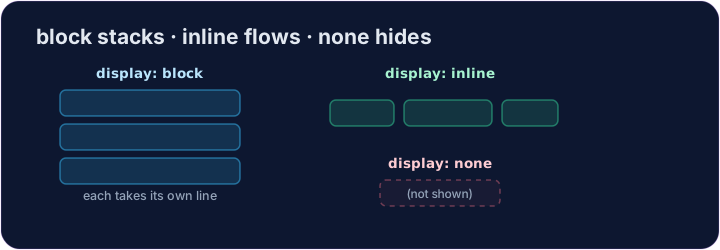
- Some elements are block: they stack on top of each other and fill the width —
<div>,<p>,<h1>. - Some are inline: they sit side by side, taking only as much room as they need —
<span>,<a>,<strong>. displaylets you change which way an element behaves.
한국어
박스의 흐름
- 일부 요소는 블록: 서로 쌓여 전체 너비를 차지합니다 —
<div>,<p>,<h1>. - 일부는 인라인: 나란히 배치되어 필요한 만큼만 공간을 사용합니다 —
<span>,<a>,<strong>. display는 요소의 동작 방향을 변경할 수 있게 해줍니다.
English
display: none
display: none;removes an element from the page completely.- It's how menus, pop-ups, and "read more" sections stay hidden until needed.
- The element is still in your HTML — it just isn't shown.
한국어
display: none
display: none;은 요소를 페이지에서 완전히 제거합니다.- 메뉴, 팝업, "더 보기" 섹션 등이 필요할 때까지 숨겨지는 방법입니다.
- 요소는 여전히 HTML에 존재하지만 표시되지 않습니다.
<style>
  .pill { display: inline; background-color: #def; padding: 6px; }
  .gone { display: none; }
</style>
<span class="pill">Visible</span>
<span class="gone">You can't see me</span>
English
Common mistakes
display: noneremoves the element and its space;visibility: hiddenkeeps its space.blockstarts a new line;inlinedoes not.
한국어
흔한 실수
display: none은 요소와 그 공간을 제거하고,visibility: hidden은 공간을 유지합니다.block은 새로운 줄을 시작하고,inline은 시작하지 않습니다.
English
Now you try
display: nonehides;display: blockmakes an element take its own line.- Hide one element, then change how another displays.
한국어
이제 직접 해보기
display: none은 숨기고,display: block은 요소를 자체 줄을 차지하도록 만듭니다.- 한 요소를 숨긴 후 다른 요소의 표시 방식을 변경하세요.
Hide the secret message. Add .secret { display: none; }. · 비밀 메시지를 숨기십시오. .secret { display: none; }를 추가하십시오.
Make each label sit on its own line. Add .label { display: block; }. · 각 레이블이 자체 줄에 오도록 하십시오. .label { display: block; }를 추가하십시오.