Selectors — class and id · 선택자 — 클래스와 ID
This page needs a recent browser (with SharedArrayBuffer support). Please update Chrome, Edge, Firefox or Safari to the latest version. · 이 페이지는 최신 브라우저(SharedArrayBuffer 지원)가 필요합니다. Chrome, Edge, Firefox 또는 Safari를 최신 버전으로 업데이트해 주세요.
English
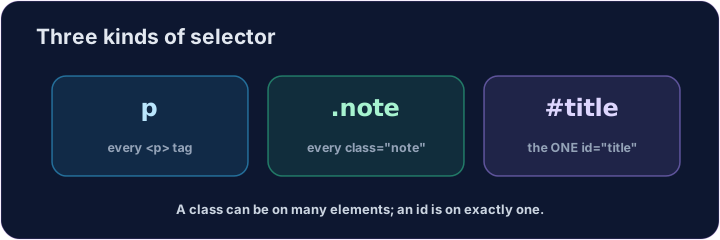
Three kinds of selector
- A selector says which elements a rule changes.
- By tag:
p { ... }changes every<p>. - That is the kind you used last lesson.
한국어
세 가지 종류의 선택자
- 선택자는 어떤 요소에 규칙을 적용할지 지정합니다.
- 태그로:
p { ... }가 모든<p>를 변경합니다. - 이것이 지난 수업에서 사용했던 타입입니다.
English
By class and by id
- By class:
.note { ... }changes every element withclass="note". A dot.means class. - By id:
#title { ... }changes the one element withid="title". A hash#means id. - A class can be on many elements; an id should be on one.
한국어
클래스 및 ID 기준
- 클래스로:
.note { ... }가class="note"가 있는 모든 요소를 변경합니다. 점.는 클래스를 의미합니다. - ID로:
#title { ... }가id="title"가 있는 단 하나의 요소를 변경합니다. 해시 기호#는 ID를 의미합니다. - 클래스는 여러 요소에 사용할 수 있지만, ID는 단 하나의 요소에만 사용해야 합니다.
<style>
  .note { color: green; }
  #title { color: purple; }
</style>
<h1 id="title">My page</h1>
<p class="note">This is a note.</p>
<p>This is normal.</p>
English
Common mistakes
- A class selector starts with
., an id selector with#. - Reuse a class on many elements; an id appears once per page.
한국어
흔한 실수
- 클래스 선택자는
.로 시작하고, ID 선택자는#로 시작합니다. - 여러 요소에 클래스를 재사용할 수 있으며, ID는 페이지당 한 번만 나타납니다.
English
Now you try
- Match the dot
.to a class, and the hash#to an id. - Style a class, then style an id.
한국어
이제 직접 해보기
- 점
.는 클래스와, 해시 기호#는 ID와 매칭됩니다. - 먼저 스타일을 지정한 클래스를 설정한 후, ID를 설정하세요.
Style the note. Add a rule for the note class: .note { color: green; } (a dot means class). · 메모를 스타일링하십시오. note 클래스에 대한 규칙 .note { color: green; }을 추가하십시오 (점(.)은 클래스를 의미합니다).
Style the title. Add a rule for the title id: #title { color: purple; } (a hash means id). · 제목을 스일링하십시오. title ID에 대한 규칙 #title { color: purple; }을 추가하십시오 (#는 ID를 의미합니다).