Add some style · 스타일 추가하기
This page needs a recent browser (with SharedArrayBuffer support). Please update Chrome, Edge, Firefox or Safari to the latest version. · 이 페이지는 최신 브라우저(SharedArrayBuffer 지원)가 필요합니다. Chrome, Edge, Firefox 또는 Safari를 최신 버전으로 업데이트해 주세요.
English
Adding style
- HTML gives your page its content. CSS makes it look good.
- The easiest way to add CSS is a
<style>block near the top of your page. - Inside it, you write rules that change how things look.
한국어
스타일 추가하기
- HTML이 페이지의 내용을 담당하고, CSS가 이를 아름답게 만듭니다.
- CSS를 추가하는 가장 쉬운 방법은 페이지 상단에
<style>블록을 배치하는 것입니다. - 내부에서 시각적 변화를 주지는 rules(규칙)를 작성합니다.
English
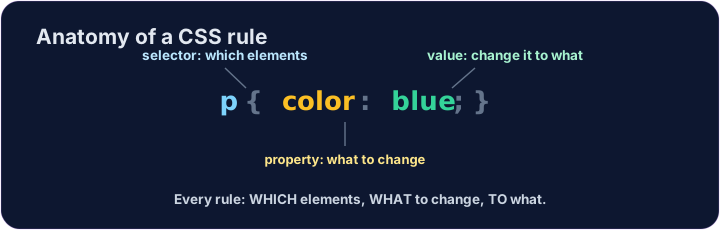
A CSS rule
- A rule has three parts:
p { color: blue; } pis the selector — which tags to change (here, every paragraph).coloris the property — what to change.blueis the value — what to change it to. (Together,color: blue;is one declaration.)
한국어
CSS 규칙
- 하나의 규칙은 세 가지部分组成로 구성됩니다:
p { color: blue; } p는 selector(선택자) — 변경할 태그(여기서는 모든 문장)를 지정합니다.color는 property(속성) — 무엇을 변경할지 지정합니다.blue는 value(값) — 어떻게 변경할지를 지정합니다. (함께color: blue;는 하나의 declaration(선언)입니다.)
<style>
  p { color: blue; }
</style>
<p>Now I am blue.</p>
<p>So am I!</p>
English
Common mistakes
- Link the CSS file, or put rules inside a
<style>block. - Each CSS rule ends with a semicolon
;.
한국어
흔한 실수
- CSS 파일을 연결하거나, 규칙들을
<style>블록 내부에 넣으십시오. - 각 CSS 규칙은 세미콜론
;로 끝납니다.
English
Now you try
- Write your rules inside the
<style>block. - Colour your paragraphs, then your heading.
한국어
이제 직접 해보기
- 규칙들을
<style>블록 내부에 작성하십시오. - 먼저 문장의 색상을 지정하고, 그다음 제목의 색상을 지정하십시오.
Make every paragraph blue. Inside the <style> block, add the rule p { color: blue; }. · 모든 문단을 blue(파란색)로 만드십시오. <style> 블록 내에서 규칙 p { color: blue; }을 추가하십시오.
Now colour the heading too. Add a rule h1 { color: red; }. · 이제 제목도 색칠하십시오. 규칙 h1 { color: red; }를 추가하십시오.