This page needs a recent browser (with SharedArrayBuffer support). Please update Chrome, Edge, Firefox or Safari to the latest version. · 이 페이지는 최신 브라우저(SharedArrayBuffer 지원)가 필요합니다. Chrome, Edge, Firefox 또는 Safari를 최신 버전으로 업데이트해 주세요.
English
Forms
- A form lets people type things in — a name, a message, a search.
- The boxes you type in are called inputs.
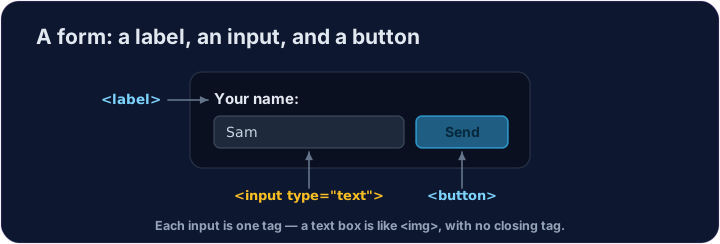
- A text box is
<input type="text">— a single tag, like<img>.
한국어
폼
- 폼(form) 은 사용자가 이름, 메시지, 검색어 등을 입력할 수 있게 합니다.
- 사용자가 입력하는 상자들을 입력 필드(inputs) 라고 부릅니다.
- 텍스트 상자는
<input type="text">입니다.<img>과 같이 단일 태그입니다.
English
Labels and buttons
- A
<label>is the words next to an input, telling the user what it is for. - A
<button>is something to click — like Send or Search. - We won't actually send anything here — we're just learning the tags.
한국어
라벨과 버튼
<label>은 입력 필드 옆에 있는 단어로, 사용자에게 해당 필드의 용도를 알려줍니다.<button>은 클릭해야 하는 요소입니다. 전송(Send) 또는 검색(Search) 버튼 등이 해당됩니다.- 여기서는 실제로 데이터를 전송하지 않습니다. 단순히 태그를 학습하기 위함입니다.
<label>Your name:</label>
<input type="text">
<button>Send</button>
English
Common mistakes
- Every input should have a matching
<label>. - A button in a form submits it by default — use
type="button"to stop that.
한국어
흔한 실수
- 모든 입력 필드에는 대응되는
<label>이 있어야 합니다. - 폼 내의 버튼은 기본적으로 폼을 제출합니다. 이를 방지하려면
type="button"을 사용하십시오.
English
Now you try
- Inputs and buttons are the building blocks of every form on the web.
- Add a text box, then a button.
한국어
이제 직접 해보기
- 입력 필드와 버튼은 웹상의 모든 폼을 구성하는 기본 요소입니다.
- 텍스트 상자 하나를 추가한 후, 버튼을 추가하십시오.
Add a box the user can type in. Use <input type="text"> (a single tag, like <img>).
Add a button that says Send. Use <button>Send</button>.