This page needs a recent browser (with SharedArrayBuffer support). Please update Chrome, Edge, Firefox or Safari to the latest version. · 이 페이지는 최신 브라우저(SharedArrayBuffer 지원)가 필요합니다. Chrome, Edge, Firefox 또는 Safari를 최신 버전으로 업데이트해 주세요.
English
Images
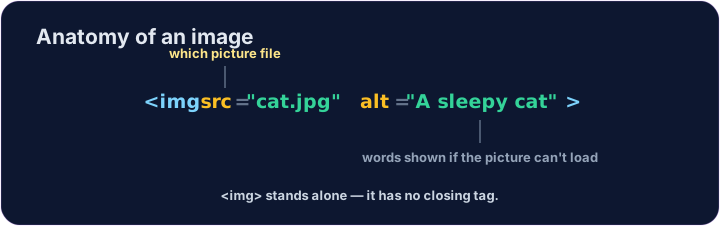
- Show a picture with the
<img>tag. <img>is a single tag — no closing tag, like<br>.- It needs two attributes:
src(where the picture is) andalt(a description).
한국어
이미지
<img>태그로 사진을 표시합니다.<img>는 단일 tag —<br>처럼 종료 태그가 없습니다.- 두 가지 속성이 필요합니다:
src(사진 위치)와alt(설명).
<img src="/static/code/web-basics/cat.svg" alt="A cartoon cat">
English
Why alt text matters
altis text that describes the picture.- It shows if the image cannot load, and screen readers read it aloud.
- Always add a short, clear
alt— it makes your page kinder to everyone.
한국어
alt 텍스트의 중요성
alt는 사진을 설명하는 텍스트입니다.- 이미지가 로드되지 않을 때 표시되며, 스크린 리더가 읽어줍니다.
- 항상 짧고 명확한
alt를 추가하세요 — 모든 사람을 위한 배려가 됩니다.
English
Common mistakes
- An image needs
src(the file) andalt(a description). <img>has no separate closing tag.
한국어
흔한 실수
- 이미지에는
src(파일)와alt(설명)이 필요합니다. <img>는 별도의 종료 태그가 없습니다.
English
Now you try
- The picture lives at
/static/code/web-basics/cat.svg. - Show it, then add
alttext to an image.
한국어
이제 직접 해보기
- 사진은
/static/code/web-basics/cat.svg에 위치합니다. - 이미지를 표시한 후 image에
alt텍스트를 추가하세요.
Show the cat picture. Add an <img> with src="/static/code/web-basics/cat.svg".
This image has no description. Add an alt attribute that describes it, like alt="A cartoon cat".