This page needs a recent browser (with SharedArrayBuffer support). Please update Chrome, Edge, Firefox or Safari to the latest version. · 이 페이지는 최신 브라우저(SharedArrayBuffer 지원)가 필요합니다. Chrome, Edge, Firefox 또는 Safari를 최신 버전으로 업데이트해 주세요.
English
Links
- A link takes you to another page when you click it.
- Use the
<a>tag (astands for anchor). - The web address goes in
href:<a href="...">.
한국어
링크
- 링크(link) 를 클릭하면 다른 페이지로 이동합니다.
<a>태그(a은 앵커 anchor)를 사용하세요.- 웹 주소는
href에 넣습니다:<a href="...">.
<a href="https://example.com">Visit Example</a>
English
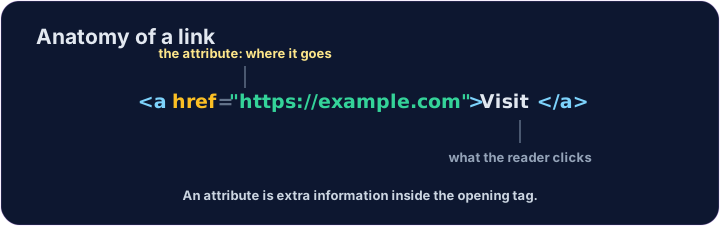
href is an attribute
href="..."is an attribute — extra information inside the opening tag.- The text between
<a>and</a>is what the reader sees and clicks. - Use the full address, starting with
https://.
한국어
href는 속성(attribute)입니다
href="..."는 속성 — 시작 태그 안의 추가 정보입니다.<a>와</a>사이의 텍스트가 독자가 보고 클릭하는 내용입니다.https://로 시작하는 전체 주소를 사용하세요.
<p>Need facts? <a href="https://wikipedia.org">Look it up</a> now.</p>
English
Common mistakes
- A link needs an
href. - Open a link in a new tab with
target="_blank".
한국어
흔한 실수
- 링크에는 반드시
href가 필요합니다. target="_blank"를 사용하면 새로운 탭에서 링크를 엽니다.
English
Now you try
- A link can stand alone, or sit inside a sentence.
- Build one of each below.
한국어
이제 직접 해보기
- 링크는 문장 안에 있어도 되며, 단독으로 존재해도 됩니다.
- 아래에 각각 하나씩 만들어 보세요.
Add a link to https://example.com with the words Visit Example.
Turn the words look it up into a link to https://wikipedia.org, without breaking the sentence.