Inserting rows · 행 삽입
Adding rows with INSERT
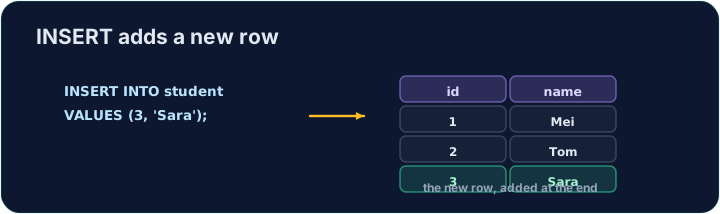
INSERT adds a new row to a table. List the columns, then a matching set of VALUES:
Text goes in single quotes; numbers do not. The values must line up with the columns, in the same order.
INSERT로 행 추가
INSERT은 테이블에 새로운 행을 추가합니다. 열을 나열한 후, 그에 맞는 VALUES의 세트를 나열합니다:
INSERT INTO product (code, title, price, in_stock)
VALUES ('P04', 'Ruler', 1.20, 75);
텍스트는 단일 인용부호를并使用; 숫자는 그렇지 않습니다. 값은 열과 같은 순서로 일관되어야 합니다.
Seeing the effect
INSERT changes the data but returns no rows itself, so Run just reports how many rows changed. To see the new row, run a SELECT afterwards.
The checker does this for you: it runs your INSERT, then reads the table back to confirm your row is there.
효과 보기
INSERT은 데이터를 변경하지만 자체적으로 행을 반환하지 않으므로 Run은 변경된 행 수만 보고합니다. 새 행을 보려면 이후에 SELECT을 실행하십시오.
체크러는 이를 자동으로 수행합니다: 당신의 INSERT을 실행한 후 테이블을 다시 읽어서该行이 존재함을 확인합니다.
Common mistakes
- The values must line up with the columns in order and type.
- Quote text values with single quotes.
흔한 실수
- 값은 열과 순서 및 타입에 따라 일관되어야 합니다.
- 텍스트 값을 단일 인용부호로 묶으십시오.
Add a new product to the product table: code 'P04', title 'Ruler', price 1.20, in_stock 75. · product 테이블에 새로운 제품을 추가하십시오: 코드 'P04', 제목 'Ruler', 가격 1.20, 재고 상태 75.
Click Run to see the output here. · 출력을 보려면 '실행'을 클릭하세요.
Add a new customer to the customer table: id 5, name 'Eve', city 'York'. List the columns you are filling, then give the matching VALUES. · customer 테이블에 새로운 고객을 추가하십시오: id 5, name 'Eve', city 'York'. 채우려는 열을 나열한 후, 그에 대응하는 VALUES을 제공하십시오.
Click Run to see the output here. · 출력을 보려면 '실행'을 클릭하세요.