Grouping with GROUP BY · GROUP BY를 이용한 그룹화
Grouping rows with GROUP BY
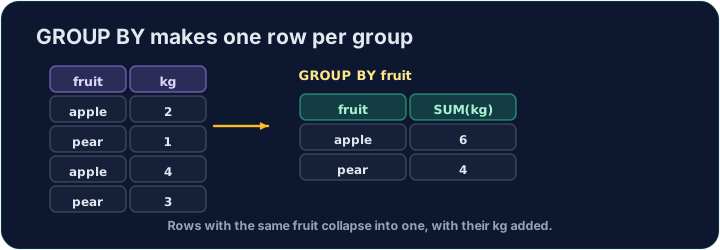
An aggregate like AVG normally summarises the whole table into one number. GROUP BY splits the rows into groups that share a value, and gives one summary row per group:
SELECT form, COUNT(*) AS n, ROUND(AVG(score), 2) AS avg_score
FROM student
GROUP BY form;
This gives one row for each form, with that form's count and average.
Filtering groups with HAVING
WHERE filters rows before grouping. To filter the groups themselves — using an aggregate — use HAVING:
SELECT form, COUNT(*) AS n
FROM student
GROUP BY form
HAVING COUNT(*) >= 3;
This keeps only forms with 3 or more students. (WHERE cannot test COUNT(*); HAVING can.)
Common mistakes
- Filter groups with
HAVING, rows withWHERE. - A plain column beside an aggregate must be in
GROUP BY.
For each form, show the form, the number of students as n, and the average score (2 d.p.) as avg_score. Group by form. · 각 form에 대해 학급, 학생 수를 n로, 평균 점수(소수점 2자리)를 avg_score로 표시하십시오. form으로 그룹화하십시오.
Click Run to see the output here. · 출력을 보려면 '실행'을 클릭하세요.
Show each form and its student count n, but only for forms with 3 or more students. Use HAVING. · 각 form과 그에 해당하는 학생 수 n를 표시하되, 3명 이상인 학급만 포함하십시오. HAVING를 사용하십시오.
Click Run to see the output here. · 출력을 보려면 '실행'을 클릭하세요.