Getting input · 입력 받기
Ask the user with input
input()waits for the user to type a line and press Enter.- It gives back what they typed. Store it in a variable.
- Join two strings together with
+.
input으로 사용자 묻기
input()은 사용자가 줄을 입력하고 Enter를 누를 때까지 기다립니다.- 사용자가 입력한 내용을 반환합니다. 변수에 저장하세요.
- 두 문자열을
+으로 결합할 수 있습니다.
name = input()
print("Welcome, " + name)
When your program waits
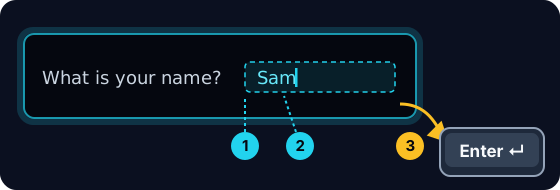
- When you press Run, the program stops at
input()and waits for you. - A highlighted box appears under the code: type here, then press Enter.
- Click the box, type your answer and press Enter. Then the program continues.
프로그램이 기다릴 때
- 실행을 누르면 프로그램이
input()에서 멈추고 사용자를 기다립니다. - 코드 아래에 강조된 상자가 나타납니다: 여기에 입력한 후 Enter 키를 누르세요.
- 상자를 클릭하고 답을 입력한 후 Enter를 누르세요. 그러면 프로그램이 계속 실행됩니다.
input always gives a string
- Whatever the user types comes back as a string.
- Even if they type
5, you get the text"5", not the number. - So
"5" + "5"is"55"(joined text), not10.
input은 항상 문자열을 반환합니다
- 사용자가 입력한 내용은 무조건 문자열로 반환됩니다.
- 사용자가
5을 입력하더라도, 숫자가 아닌 텍스트"5"이 반환됩니다. - 따라서
"5" + "5"는"55"(합쳐진 텍스트)이며,10가 아닙니다.
print("5" + "5") # 55 — joined text, not the number 10
Turn text into a number
int(...)turns text into a whole number:int("5")→5.float(...)turns text into a decimal:float("2.5")→2.5.- Convert first, then you can do maths.
텍스트를 숫자로 변환하기
int(...)는 텍스트를 정수로 변환합니다:int("5")→5.float(...)은 텍스트를 부동소수점 수로 변환합니다:float("2.5")→2.5.- 먼저 변환한 후 산술 연산을 수행할 수 있습니다.
age = int(input())
print(age + 1)
Common mistakes
input()always returns a string, so wrap it inint(...)before doing maths.- The text inside
input("...")is the prompt shown to the user.
흔한 실수
input()은 항상 문자열을 반환하므로, 산술 연산 전에int(...)으로 감싸야 합니다.input("...")안의 텍스트는 사용자에게 표시되는 프롬프트입니다.
Now you try
- When you Run, type the input yourself in the box and press Enter.
- Check answer types the task's input for you, so just read it with
input(). - Each task needs only one
input().
이제 직접 해보기
- 실행할 때 상자에 입력을 직접 입력하고 Enter를 누르십시오.
- 정답 확인은 작업의 입력을 자동으로 입력하므로,
input()으로 읽기만 하면 됩니다. - 각 작업에는 단 하나의
input()만 필요합니다.
Input → process → output · 입력 → 처리 → 출력
Most programs follow one shape: get input, do something, show output. · 대부분의 프로그램은 하나의 형태를 따릅니다: 입력 받기, 작업 수행, 출력 표시.
Read a name with input(), then print Hi, then the name then !. For the input Sam, the output should be Hi, Sam!. · input()으로 이름을 읽고, Hi, 을 출력한 후 이름과 !을 출력하세요. 입력 Sam에 대해 출력은 Hi, Sam!이어야 합니다.
Click Run to see the output here. · 출력을 보려면 '실행'을 클릭하세요.
Read a whole number with input(), convert it with int(...), then print the number plus 100. For input 7, the output should be 107. · input()로 정수를 읽어들이고, int(...)로 변환한 뒤, 숫자에 100을 더한 결과를 출력하십시오. 입력 7에 대한 출력은 107이어야 합니다.
Click Run to see the output here. · 출력을 보려면 '실행'을 클릭하세요.
Read a whole number, convert it with int(...), then print its square (the number times itself). For input 5, the output should be 25. · 정수를 읽어들이고, int(...)로 변환한 뒤, 제곱(self times itself)을 출력하십시오. 입력 5에 대한 출력은 25이어야 합니다.
Click Run to see the output here. · 출력을 보려면 '실행'을 클릭하세요.
Read the width, then the height, each with int(input()). Print the area on one line and the perimeter on the next. For the inputs 3 and 5 the output is Area: 15 and Perimeter: 16. · int(input())을 사용하여 너비(width) 를 입력받고, 다음에 높이(height) 를 입력받으십시오. 면적을 한 줄에, 둘레를 다음 줄에 출력하십시오. 입력값이 3과 5일 때 출력 결과는 Area: 15과 Perimeter: 16이어야 합니다.
Click Run to see the output here. · 출력을 보려면 '실행'을 클릭하세요.