Night 18: Your pet's ID card
이미 Python 또는 의사 코드로 이날의 학습을 마쳤습니다. 두 언어 모두에서 완료한 것으로 인정됩니다. 원하면 다시 연습하세요.
이 페이지는 최신 브라우저(SharedArrayBuffer 지원)가 필요합니다. Chrome, Edge, Firefox 또는 Safari를 최신 버전으로 업데이트해 주세요.
English
Tonight: your pet's ID card
- Your pet needs an ID card with its name, age and food.
- You will learn one thing: records.
Words for tonight
| Word | Meaning |
|---|---|
| record | one card that keeps several facts together |
| field | one fact on the card, like Age |
| type | the plan: which fields every card has |
English
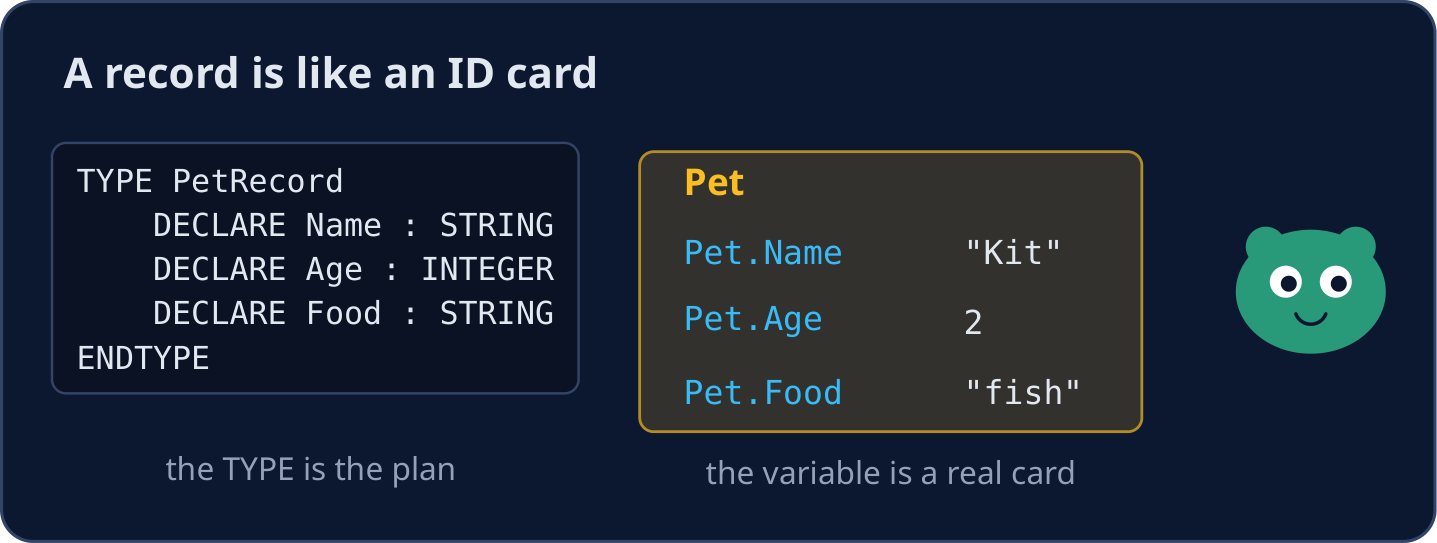
Plan the card with TYPE
TYPE…ENDTYPEsays which fields the card has. Each field has a name and a type.- Then
DECLAREa variable of that type: a real card.
TYPE PetRecord
    DECLARE Name : STRING
    DECLARE Age : INTEGER
    DECLARE Food : STRING
ENDTYPE

DECLARE Pet : PetRecord
Pet.Name ← "Kit"
Pet.Age ← 2
Pet.Food ← "fish"
OUTPUT Pet.Name, " eats ", Pet.Food
English
Use a field with a dot
Pet.Agemeans: theAgefield ofPet. It works like a variable.
TYPE PetRecord
    DECLARE Name : STRING
    DECLARE Age : INTEGER
ENDTYPE

DECLARE Pet : PetRecord
Pet.Name ← "Kit"
Pet.Age ← 2
Pet.Age ← Pet.Age + 1
OUTPUT Pet.Name, " is now ", Pet.Age
English
Common mistakes
| Wrong | Right | Why |
|---|---|---|
PetRecord.Name ← "Kit" |
Pet.Name ← "Kit" |
the type is only the plan; store in the variable |
OUTPUT Pet |
OUTPUT Pet.Name |
output one field at a time |
forget ENDTYPE |
ENDTYPE after the fields |
only DECLARE lines go inside the type |
- Now make your pet's ID card!
난이도 2/5 · 140코인 + 오늘 첫 완료 시 작은 보너스 추가
Define a record type PetRecord with three fields: Name : STRING, Age : INTEGER, Food : STRING. Declare Pet : PetRecord, store Kit, 2 및 fish, and output Pet.Name.
출력을 보려면 '실행'을 클릭하세요.
난이도 2/5 · 140코인 + 오늘 첫 완료 시 작은 보너스 추가
It is Kit's birthday! Add 1 to Pet.Age. Then output the new age: 3.
출력을 보려면 '실행'을 클릭하세요.
난이도 2/5 · 140코인 + 오늘 첫 완료 시 작은 보너스 추가
Kit has a new toy. Add a field Toy : STRING to the type, store ball in it, and output Kit plays with ball using the fields.
출력을 보려면 '실행'을 클릭하세요.
난이도 3/5 · 200코인 + 오늘 첫 완료 시 작은 보너스 추가
Read a field name with INPUT. Use CASE OF to output that field: name, age 또는 food. For anything else, output No such thing.
출력을 보려면 '실행'을 클릭하세요.