Programs and processes
This page needs a recent browser (with SharedArrayBuffer support). Please update Chrome, Edge, Firefox or Safari to the latest version. · 이 페이지는 최신 브라우저(SharedArrayBuffer 지원)가 필요합니다. Chrome, Edge, Firefox 또는 Safari를 최신 버전으로 업데이트해 주세요.
English
What is a process?
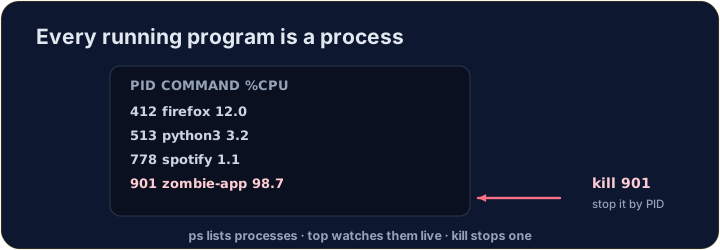
- A process is a running program. Your browser, your editor, and the shell itself are all processes.
- Each has a number — a PID (process ID) — that the system uses to keep track of it.
- (These commands talk to the real operating system, so they aren't part of our simulator — but here is what you'll use on a real machine.)
한국어
프로세스란 무엇인가?
- 프로세스는 실행 중인 프로그램입니다. 브라우저, 에디터, 셸 자체가 모두 프로세스입니다.
- 시스템은 이를 추적하기 위해 각 프로세스에 번호인 PID(프로세스 ID)를 부여합니다.
- (이 명령들은 실제 운영체제와 소통하므로 시뮬레이터의 일부가 아닙니다 — 하지만 실제 기계에서 사용할 것들입니다.)
English
Seeing what is running
pslists your processes;ps auxlists all of them.top(or the nicerhtop) shows a live view that updates every second — handy to spot a program using too much CPU or memory:
- Press
qto quittop.
한국어
실행 중인 것 보기
ps는 당신의 프로세스를 나열하고;ps aux는 모든 프로세스를 나열합니다.top(또는 더 나은htop)은 매 초마다 업데이트되는 실시간视图를 보여줍니다 — CPU나 메모리를 너무 많이 사용하는 프로그램을 발견하는 데 유용합니다:
top
q을 눌러top을 종료합니다.
English
Stopping a process
- If a program is frozen, you can stop it. In the terminal, Ctrl-C stops the program running right now.
- For another process, find its PID with
psand thenkillit:
killpolitely asks the process to stop;kill -9forces it. Use force only as a last resort.
한국어
프로세스 종료
- 프로그램이 멈췄다면 종료할 수 있습니다. 터미널에서 Ctrl-C는 현재 실행 중인 프로그램을 멈춥니다.
- 다른 프로세스의 경우,
ps으로 PID를 찾아서 이후kill을 실행하세요:
kill 1234
kill은 정중히 프로세스 종료를 요청합니다;kill -9은 강제로 멈춥니다..force는 마지막 수단으로만 사용하세요.
English
Now you try
ps,topandkilltalk to the real OS, so they are not in our simulator.- Instead, a snapshot of
psoutput is saved inprocesses.txt. Use the file tools you already know —grepandwc— to find the CPU-hog and count the processes.
한국어
이제 직접 해보기
ps,top및kill은 실제 OS와 소통하므로 시뮬레이터에 포함되어 있지 않습니다.- 대신,
ps출력의 스냅샷이processes.txt에 저장됩니다. 이미 아는 파일 도구들을 사용하여 —grep과wc— CPU를 많이 쓰는 것을 찾고 프로세스를 세어보세요.
English
Common mistakes
pslists running processes;killstops one by its PID.- A trailing
&runs a command in the background.
한국어
흔한 실수
ps은 실행 중인 프로세스를 나열하고,kill은 PID로 하나를 종료합니다.- 뒤따르는
&는 명령을 백그라운드에서 실행합니다.
You cannot run ps in this simulator, but a teammate saved its output to processes.txt (each line is PID name cpu%). Find the frozen, CPU-hogging firefox line with grep firefox processes.txt.
How many processes were running when the snapshot was taken? Count the lines with cat processes.txt | wc -l.