File permissions
This page needs a recent browser (with SharedArrayBuffer support). Please update Chrome, Edge, Firefox or Safari to the latest version. · 이 페이지는 최신 브라우저(SharedArrayBuffer 지원)가 필요합니다. Chrome, Edge, Firefox 또는 Safari를 최신 버전으로 업데이트해 주세요.
English
Who can do what
- Every file has permissions that say who may read, write, or execute it.
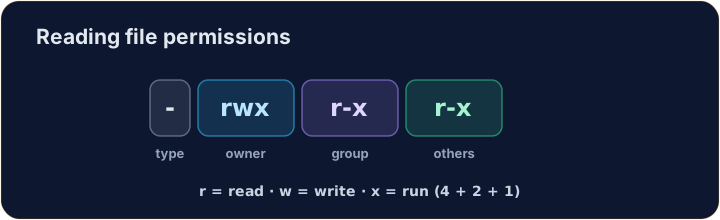
ls -lshows them on the left of each line:
- You see something like
-rwxr-xr-x. Read it in groups of three.
한국어
누가 무엇을 할 수 있는지
- 모든 파일에는 namespace who may read, write, or execute it을 알려주는 권한이 있습니다.
ls -l는 각 줄의 왼쪽에 이를 표시합니다:
ls -l script.sh
-rwxr-xr-x와 같은 것을 봅니다. 세 글자씩 읽으세요.
English
Reading the flags
- The ten characters are: type, then owner, group, others:
r= read,w= write,x= execute,-= not allowed. So the owner here can do everything; others can read and run.
한국어
마크 읽기
- 열 개의 문자는 다음과 같습니다: 유형, 그리고 소유주, 그룹, 기타:
-  rwx  r-x  r-x
file owner group others
r= 읽기,w= 쓰기,x= 실행,-= 허용되지 않음. 따라서 여기서 소유주는 모든 것을 할 수 있으며, 기타는 읽고 실행할 수 있습니다.
English
Changing permissions
chmodchanges the mode. Numbers are a quick way:r=4, w=2, x=1, added per group:
7= 4+2+1 (rwx) for the owner;5= 4+1 (r-x) for group and others.755is the classic "runnable program".
한국어
권한 변경
chmod는 change permission mode를 의미합니다. 숫자는 빠른 방법입니다: 그룹마다r=4, w=2, x=1을 더하세요:
chmod 755 script.sh
7= 4+2+1 (rwx)은 소유자에게;5= 4+1 (r-x)은 그룹 및 기타 사용자에게.755은 고전적인 "실행 가능한 프로그램"입니다.
English
Common mistakes
chmodsets read, write and execute for user, group and others.- You need execute permission to run a script.
한국어
흔한 실수
chmod는 사용자, 그룹, 기타에게 읽기, 쓰기, 실행을 설정합니다.- 스크립트를 실행하려면 실행 권한이 필요합니다.
Explore · 탐색하기
File permissions (chmod)
Owner / group / others each get rwx — the octal is just those bits.
Make script.sh runnable by giving it permissions 755 with chmod 755 script.sh. The check shows ls -l so you can see the new rwx flags.
secret.key holds a private key, so no one but you should read it. Give it permission 600 with chmod 600 secret.key — owner read+write, group and others nothing.