Reading files
This page needs a recent browser (with SharedArrayBuffer support). Please update Chrome, Edge, Firefox or Safari to the latest version. · 이 페이지는 최신 브라우저(SharedArrayBuffer 지원)가 필요합니다. Chrome, Edge, Firefox 또는 Safari를 최신 버전으로 업데이트해 주세요.
English
Reading a file
catprints a file's contents straight to the screen:
- It is named after "concatenate" — it can also join several files together.
한국어
파일 읽기
cat는 파일의 내용을 화면에 직접 출력합니다:
cat poem.txt
- 'concatenate'에서 유래된 이름이며, 여러 파일을 연결하는 데에도 사용할 수 있습니다.
English
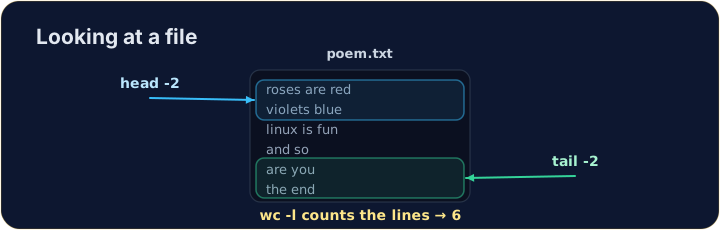
Just the start or end
- For a long file you often want only a peek:
headshows the first lines,tailshows the last lines.
- The
-noption chooses how many lines.
한국어
앞부분이나 뒷부분만 보기
- 긴 파일에서는部分内容만 빠르게 확인하고 싶을 때가 많습니다:
head는 첫 번째 줄을,tail는 마지막 줄을 표시합니다.
head -n 2 poem.txt
tail -n 1 poem.txt
-n옵션은 줄 수를 선택합니다.
English
Counting
wc(word count) measures a file. The most useful option is-lfor lines:
wc -wcounts words andwc -ccounts characters. Now try the tasks.
한국어
카운팅
wc(word count)는 파일을 측정합니다. 가장 유용한 옵션은 줄을 세기 위한-l입니다:
wc -l poem.txt
wc -w는 단어를 세고wc -c은 문자를 세습니다. 이제 과제를 시도해 보십시오.
English
Common mistakes
catprints a whole file at once; uselessto scroll a large one.- Press Tab to complete a long file name.
한국어
흔한 실수
cat는 전체 파일을 한 번에 출력하며, 큰 파일을 스크롤하려면less을 사용하십시오.- Tab을 눌러 긴 파일 이름을 완성하십시오.
Use cat to print the whole contents of poem.txt.
How many lines does the poem have? Use wc -l poem.txt to count them.