Moving around · 이동하기
This page needs a recent browser (with SharedArrayBuffer support). Please update Chrome, Edge, Firefox or Safari to the latest version. · 이 페이지는 최신 브라우저(SharedArrayBuffer 지원)가 필요합니다. Chrome, Edge, Firefox 또는 Safari를 최신 버전으로 업데이트해 주세요.
English
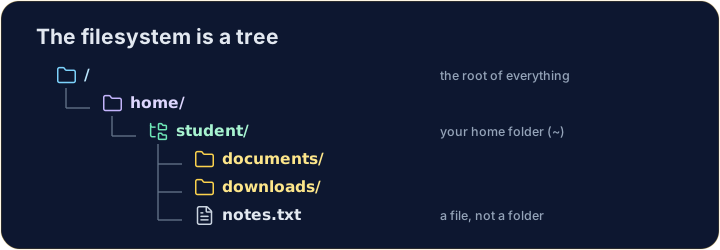
The filesystem is a tree
- Folders (called directories) hold files and other folders, like branches on a tree.
- The very top is
/, the root. Your personal folder is your home, written~.
한국어
파일 시스템은 나무 구조입니다
- 폴더(디렉토리라고도 함)는 파일과 다른 폴더를 포함하며, 이는 나무의 가지와 같습니다.
- 가장 상단에는
/인 루트가 있습니다. 사용자의 개인 폴더는 홈으로,~로 표기됩니다.
English
Looking and moving
lslists what is in the current folder.cdchanges directory — it moves you into a folder:
- After
cd documents, you are inside documents. Runpwdany time to check where you are.
한국어
탐색 및 이동
ls는 현재 폴더에 있는 내용을 나열합니다.cd는 디렉토리를 변경하여 특정 폴더로 이동합니다:
ls
cd documents
cd documents실행 후 드래프츠 폴더 내부에 위치하게 됩니다. 언제든当前位置을 확인하려면pwd를 실행하십시오.
English
Handy shortcuts
cd ..goes up one level (to the parent folder).cdwith nothing, orcd ~, jumps straight back to your home.- A path can be relative (
documents/work) or absolute (starts with/, like/home/student).
한국어
유용한 단축 명령어
cd ..는 한 단계 위로 이동(상위 폴더로 이동)합니다.cd를 인자 없이 호출하거나,cd ~를 실행하면 바로 홈으로 이동합니다.- 경로는 상대 경로(
documents/work) 또는 절대 경로(/로 시작하는 경로, 예:/home/student)일 수 있습니다.
English
Common mistakes
cdwith no argument goes to your home folder;cd ..goes up one level.pwdshows the folder you are in.
한국어
흔한 실수
cd는 인자를 주지 않으면 홈 폴더로 이동하고,cd ..는 한 단계 위로 이동합니다.pwd는 현재 위치인 폴더를 표시합니다.
Explore · 탐색하기
Moving around the tree · 트리 이동하기
The filesystem is one tree; an absolute path is the trail from /. · 파일 시스템은 하나의 트리이며, 절대 경로는 /로부터 시작되는 경로입니다.
Use ls (list) to see what is in your home folder. · 홈 폴더의 내용을 보기 위해 ls(list)를 사용하십시오.
Move into the documents folder with cd documents, then run pwd to prove you are there. · documents 폴더로 이동하기 위해 cd documents를 사용하고, 그곳에 있음을 증명하기 위해 pwd를 실행하십시오.