Capstone: a one-page report · 마무리: 한 페이지 리포트
This page needs a recent browser (with SharedArrayBuffer support). Please update Chrome, Edge, Firefox or Safari to the latest version. · 이 페이지는 최신 브라우저(SharedArrayBuffer 지원)가 필요합니다. Chrome, Edge, Firefox 또는 Safari를 최신 버전으로 업데이트해 주세요.
English
Putting it all together
- You now know the core of LaTeX: structure, formatting, maths, lists, and more.
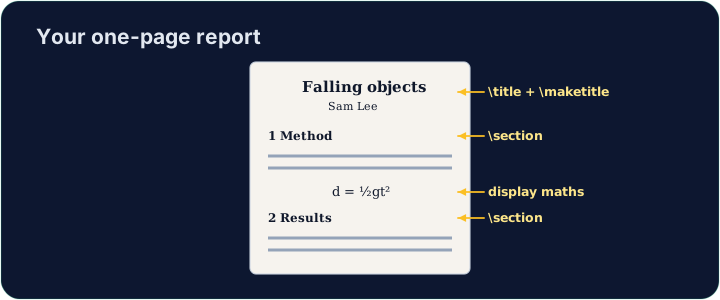
- A real document is just these pieces, combined. Let's build a small report.
한국어
통합하기
- 이제 LaTeX의 핵심을 이해했습니다: 구조, 서식, 수학, 목록 등.
- 실제 문서는 이 요소들이 결합된 것입니다.的小型 리포트를 만들어 보겠습니다.
English
Your toolkit recap
- Structure:
\section,\maketitle. - Text:
\textbf,\emph. - Maths:
$ ... $,\frac,\sqrt. - Lists:
itemizeandenumerate.
한국어
도구 모음 요약
- 구조:
\section,\maketitle. - 텍스트:
\textbf,\emph. - 수학:
$ ... $,\frac,\sqrt. - 목록:
itemize및enumerate.
English
Build the report
- The starter has a title block ready. Add a
\section, a bulleted list, and one inline formula. - Run often to watch the PDF take shape — that fast feedback is the joy of LaTeX.
- When it looks good, press Check. Congratulations — you can write LaTeX!
한국어
보고서 만들기
- 스터에는 제목 블록이 미리 준비되어 있습니다.
\section를 추가하고, 불릿 목록과 인라인 수식을 하나 넣으세요. - 자주 실행하여 PDF가 어떻게 완성되는지 확인하세요 — 이 빠른 피드백이 LaTeX의 즐거움입니다.
- 잘 보이면 Check를 누르십시오. 축하합니다 — 이제 LaTeX을 쓸 수 있습니다!
English
Common mistakes
- Build the document in parts and compile often.
- A single missing
}or$can stop the whole compile — read the first error.
한국어
흔한 실수
- 문서를 부분별로 만들고 자주 컴파일하십시오.
- 하나의
}나$가 누락되면 전체 컴파일이 중단될 수 있으므로 첫 번째 오류를 반드시 읽어보십시오.
Finish this report using what you have learned. Add at least one \section, a bulleted list (\begin{itemize} with \items), and one inline formula in $ ... $. Then Run to admire your PDF. · 배운 내용을 사용하여 이 리포트를 완성하십시오. 적어도 하나의 \section, 불릿 목록(\begin{itemize}과 \items), 그리고 inline 수식 $ ... $ 하나를 추가하십시오. 그런 다음 실행하여 PDF를 감상하십시오.
Click Run to compile and preview the PDF. · PDF를 컴파일하고 미리보기하려면 '실행'을 클릭하세요.
Polish the report. Break one section into a \subsection, and add a short numbered enumerate list of next steps. Small structure like this is what makes a report readable. · 리포트를 다듬으십시오. 하나의 섹션을 \subsection로 나누고, 다음 단계에 대한 짧은 번호 매기기 enumerate 목록을 추가하십시오. 이러한 작은 구조 변화가 리포트를 읽기 쉽게 만듭니다.
Click Run to compile and preview the PDF. · PDF를 컴파일하고 미리보기하려면 '실행'을 클릭하세요.