Colour and links · 색상 및 링크
This page needs a recent browser (with SharedArrayBuffer support). Please update Chrome, Edge, Firefox or Safari to the latest version. · 이 페이지는 최신 브라우저(SharedArrayBuffer 지원)가 필요합니다. Chrome, Edge, Firefox 또는 Safari를 최신 버전으로 업데이트해 주세요.
English
Adding colour
- The
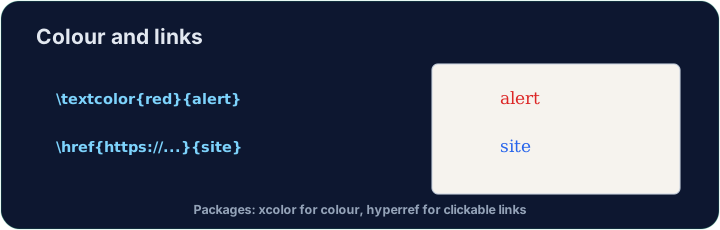
xcolorpackage lets you colour text. Load it, then wrap words:
- Built-in names include
red,blue,green,orange,gray, and more.
한국어
색상 추가
xcolor패키지를 사용하면 텍스트에 색상을 적용할 수 있습니다. 패키지를 로드한 후 단어를 감싸세요:
\usepackage{xcolor}
...
\textcolor{red}{This is red} and \textcolor{blue}{this is blue}.
- 내장된 색상 이름으로는
red,blue,green,orange,gray등이 있습니다.
English
Highlights and your own colours
\colorbox{yellow}{text}puts a highlight behind the words.- You can even mix your own:
\textcolor{red!60}{...}is 60% red (lighter).
한국어
하이라이트 및 사용자 지정 색상
\colorbox{yellow}{text}는 단어 뒤에 하이라이트 배경을 삽입합니다.- 사용자 지정 색상도 만들 수 있습니다:
\textcolor{red!60}{...}는 60% 붉은색(더 연한 톤)입니다.
English
Clickable links
- The
hyperrefpackage turns cross-references and web addresses into clickable links:
- Load
hyperreflast in your preamble — it likes to have the final word.
한국어
클릭 가능한 링크
hyperref패키지는 크로스 리퍼런스 및 웹 주소를 클릭 가능한 링크로 변환합니다:
\usepackage{hyperref}
...
Visit \href{https://ctan.org}{CTAN} for packages.
- preamble에서
hyperref를 마지막으로 로드하십시오 — 마지막 palavra를 Prefer합니다.
English
Common mistakes
- Load
xcolorfor colour andhyperreffor clickable links. - Load
hyperreflast among your packages.
한국어
흔한 실수
- 색상은
xcolor를, 클릭 가능한 링크는hyperref를 로드하십시오. - 패키지 중
hyperref를 마지막으로 로드하십시오.
Load xcolor, then make the word warning red with \textcolor{red}{warning}. You need both the package and the command. · xcolor를 로드한 뒤, 단어 warning을 \textcolor{red}{warning}로 빨간색으로 만들십시오. 패키지와 명령어 모두 필요합니다.
Click Run to compile and preview the PDF. · PDF를 컴파일하고 미리보기하려면 '실행'을 클릭하세요.
Make a clickable link. Load hyperref, then turn the word CTAN into a link with \href{https://ctan.org}{CTAN}. Load hyperref last in the preamble. · 클릭 가능한 링크를 만드십시오. 먼저 hyperref를 로드한 뒤, CTAN이라는 단어를 \href{https://ctan.org}{CTAN}로 변환하여 링크로 만들십시오. 마지막으로 프롤루그에서 hyperref를 로드하십시오.
Click Run to compile and preview the PDF. · PDF를 컴파일하고 미리보기하려면 '실행'을 클릭하세요.