Drawing with TikZ
This page needs a recent browser (with SharedArrayBuffer support). Please update Chrome, Edge, Firefox or Safari to the latest version. · 이 페이지는 최신 브라우저(SharedArrayBuffer 지원)가 필요합니다. Chrome, Edge, Firefox 또는 Safari를 최신 버전으로 업데이트해 주세요.
English
Drawing inside LaTeX
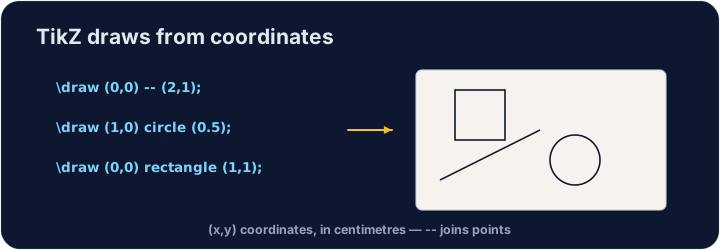
- You can draw diagrams with code using the TikZ package — no image files needed.
- Load it once, then draw inside a
tikzpicture:
\draw (0,0) -- (2,1);draws a line from one point to another. Every command ends with;.
한국어
LaTeX 내부 도형 그리기
- 이미지 파일 없이 코드를 사용하여 TikZ 패키지로 다이어그램을 그릴 수 있습니다.
- 한 번 로드한 후,
tikzpicture내부에서 그리세요:
\usepackage{tikz}
...
\begin{tikzpicture}
  \draw (0,0) -- (2,1);
\end{tikzpicture}
\draw (0,0) -- (2,1);는 한 점에서 다른 점까지 선을 그립니다. 모든 명령어는;로 끝납니다.
English
Shapes and paths
- Chain points with
--to make any shape;cyclereturns to the start:
한국어
형태와 경로
--로 점을 연결하여 어떤 형태든 만들 수 있으며,cycle는 시작점으로 돌아갑니다:
\draw (0,0) -- (2,0) -- (1,1.5) -- cycle;   % a triangle
\draw (0,0) circle (1);                      % a circle, radius 1
\draw (0,0) rectangle (3,2);                 % a box
English
Why code a drawing?
- It stays sharp at any size (it is vector graphics, not a photo).
- It is exact — perfect for geometry, graphs, and circuit diagrams.
- Now draw your own triangle in the task.
한국어
왜 코드로 그림을 그립니까?
- 크기에 상관없이 ** 선명하게 유지**됩니다(사진이 아닌 벡터 그래픽이기 때문입니다).
- ** 정확**합니다 — 기하, 그래프, 회로도 등에 완벽합니다.
- 이제 아래 작업에서 직접 삼각형을 그려보세요.
English
Common mistakes
- Every
\drawcommand ends with a semicolon;. - Wrap the drawing in a
tikzpictureenvironment.
한국어
흔한 실수
- 모든
\draw명령어는 세미콜론;로 끝납니다. - 그림을
tikzpicture환경으로 감싸세요.
Inside the tikzpicture, \draw a triangle: connect the points (0,0), (3,0) and (1.5,2) and close it with cycle. The tikz package is loaded for you.
Click Run to compile and preview the PDF. · PDF를 컴파일하고 미리보기하려면 '실행'을 클릭하세요.
Draw two shapes this time. Add a circle of radius 1 with \draw (0,0) circle (1); and a rectangle with \draw (2,-1) rectangle (4,1);.
Click Run to compile and preview the PDF. · PDF를 컴파일하고 미리보기하려면 '실행'을 클릭하세요.