Aligning equations
This page needs a recent browser (with SharedArrayBuffer support). Please update Chrome, Edge, Firefox or Safari to the latest version. · 이 페이지는 최신 브라우저(SharedArrayBuffer 지원)가 필요합니다. Chrome, Edge, Firefox 또는 Safari를 최신 버전으로 업데이트해 주세요.
English
Lining equations up
- When you show working, readers like the
=signs to line up. Thealign*environment does this:
- The
&marks where to align (just before each=), and\\ends each line.
한국어
식을 정렬하기
- 계산 과정을 보일 때, 독자는
=기호가 정렬되기를 좋아합니다.align*환경이 이를 수행합니다:
\begin{align*}
  y &= 2(x + 3) \\
  y &= 2x + 6
\end{align*}
&는 정렬 위치를 표시하며(각=바로 직전),\\은 각 줄을 끝냅니다.
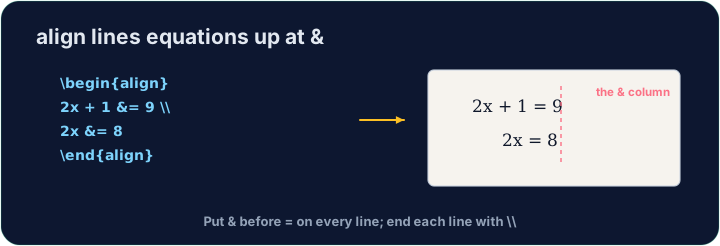
English
Numbered or not
align*(with the star) gives no equation numbers.- Drop the star —
align— and LaTeX numbers each line(1),(2), … for you to refer to.
한국어
번호 매기기 여부
align*(별표 포함)는 식 번호를 부여하지 않습니다.- 별표를 제거하면 —
align— LaTeX가 각 줄에(1),(2), … 등의 번호를 붙여 주므로 참고할 수 있습니다.
English
Matrices
amsmathalso gives matrices.bmatrixdraws square brackets:
- Again
&separates columns and\\separates rows — the same idea as alignment.
한국어
행렬
amsmath또한 행렬을 제공합니다.bmatrix는 사각 괄호를 그립니다:
\[
  \begin{bmatrix} 1 & 2 \\ 3 & 4 \end{bmatrix}
\]
- 다시 말해
&는 열을,\\는 줄을 분리합니다 — 정렬과 동일한 원리입니다.
English
Common mistakes
- In
align, line up on&and end each line with\\. - Use
align*when you do not want equation numbers.
한국어
흔한 실수
align내에서&에 맞춰 정렬하고 각 줄을\\으로 끝내세요.- 식 번호가 필요 없을 때는
align*를 사용하세요.
Show the two steps lined up at the = sign. Put them in an align* environment, with & just before each = and \\ between the lines.
Click Run to compile and preview the PDF. · PDF를 컴파일하고 미리보기하려면 '실행'을 클릭하세요.
Draw a 2×2 matrix with bmatrix (square brackets). Separate columns with & and rows with \\, e.g. \begin{bmatrix} 1 & 2 \\ 3 & 4 \end{bmatrix}.
Click Run to compile and preview the PDF. · PDF를 컴파일하고 미리보기하려면 '실행'을 클릭하세요.