Fractions, roots and sums · 분수, 루트 및 합계
This page needs a recent browser (with SharedArrayBuffer support). Please update Chrome, Edge, Firefox or Safari to the latest version. · 이 페이지는 최신 브라우저(SharedArrayBuffer 지원)가 필요합니다. Chrome, Edge, Firefox 또는 Safari를 최신 버전으로 업데이트해 주세요.
English
A maths toolkit: amsmath
- For serious maths, load the
amsmathpackage once in the preamble:
- It adds better fractions, alignment, and dozens of symbols. Almost every maths document uses it.
한국어
수학 도구상자: amsmath
- 심도 있는 수식을 위해 preamble에서
amsmath패키지를 한 번 로드하세요:
\usepackage{amsmath}
- 더 나은 분수, 정렬 및 수십 가지 기호를 추가합니다. 거의 모든 수학 문서에서 사용합니다.
English
Fractions and roots
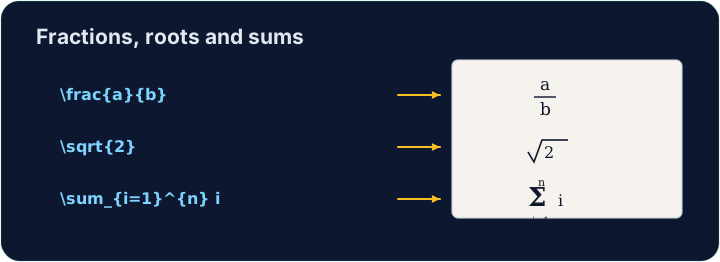
- A fraction is
\frac{top}{bottom}; a square root is\sqrt{...}:
- They nest happily:
\sqrt{\frac{1}{n}}is the square root of one-over-n.
한국어
분수와 루트
- 분수는
\frac{top}{bottom}이며, 제곱근은\sqrt{...}입니다:
\[ \frac{a + b}{2} \qquad \sqrt{x^2 + y^2} \]
- 이들을嵌套하여 쉽게 쓸 수 있습니다:
\sqrt{\frac{1}{n}}는 1/n의 제곱근입니다.
English
Sums and integrals
- These grow to the right size automatically:
- The
_sets the lower limit and^the upper limit — the same keys as powers.
한국어
합과 적분
- 이들은 자동으로 적절한 크기로 커집니다:
\[ \sum_{i=1}^{n} i \qquad \int_0^1 x^2 \, dx \]
_는 하한을,^는 상한을 설정합니다 — 지수와 동일한 키입니다.
English
Common mistakes
\frac{a}{b},\sqrt{x}and\sumonly work in math mode.- Put them inside
$...$or\[ ... \].
한국어
흔한 실수
\frac{a}{b},\sqrt{x}및\sum은 수학 모드에서만 작동합니다.- 이들을
$...$또는\[ ... \]내부에 넣으세요.
Write a fraction in the display equation. Replace the comment with \frac{1}{2} so the equation reads one-half. The amsmath package is already loaded for you. · 디스플레이 방정식에 **분수(fraction)**를 쓰세요. 주석 대신 \frac{1}{2}를 입력하여 방정식이 '한 분의 일'로 보이게 하세요. amsmath 패키지는 이미 로드되어 있습니다.
Click Run to compile and preview the PDF. · PDF를 컴파일하고 미리보기하려면 '실행'을 클릭하세요.
Now use two more maths tools. In the display equation write a square root \sqrt{...} and a sum \sum, for example \[ \sqrt{2} + \sum_{i=1}^{n} i \]. · 이제 수학 도구 두 개를 더 사용하세요. 디스플레이 방정식에 제곱근 \sqrt{...}와 합계 \sum를 쓰세요. 예시: \[ \sqrt{2} + \sum_{i=1}^{n} i \].
Click Run to compile and preview the PDF. · PDF를 컴파일하고 미리보기하려면 '실행'을 클릭하세요.