Bulleted and numbered lists · 불릿 목록 및 번호 매기기 목록
This page needs a recent browser (with SharedArrayBuffer support). Please update Chrome, Edge, Firefox or Safari to the latest version. · 이 페이지는 최신 브라우저(SharedArrayBuffer 지원)가 필요합니다. Chrome, Edge, Firefox 또는 Safari를 최신 버전으로 업데이트해 주세요.
English
Bulleted lists
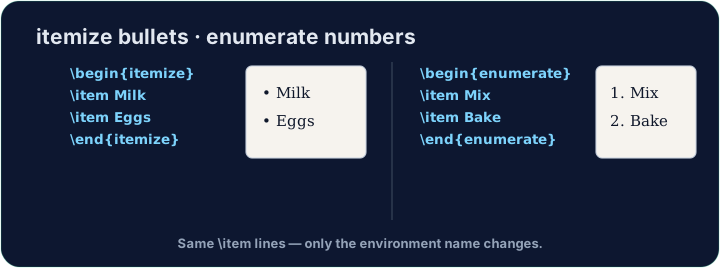
- A bulleted list is an environment — it opens with
\beginand closes with\end:
- Every entry starts with
\item. The bullets and spacing are handled for you.
한국어
불릿 목록
- 불릿 목록은 **환경(environment)**입니다 —
\begin으로 열고\end으로 닫습니다:
\begin{itemize}
  \item First thing
  \item Second thing
\end{itemize}
- 모든 항목은
\item으로 시작합니다. 불릿과 간격은 자동으로 처리됩니다.
English
Numbered lists
- Want 1, 2, 3 instead of bullets? Use
enumerate— everything else is the same:
- The numbers are automatic, so you can reorder items freely.
한국어
번호 목록
- 불릿 대신 1, 2, 3을 원하나요?
enumerate을 사용하세요 — 나머지는 동일합니다:
\begin{enumerate}
  \item Wake up
  \item Have breakfast
\end{enumerate}
- 번호가 자동화되어 있으므로 항목 순서를 자유롭게 변경할 수 있습니다.
English
Lists inside lists
- Put a list inside an
\itemto make sub-points. LaTeX indents them and changes the bullet style. - Now try turning a few lines into a tidy bulleted list.
한국어
중첩 목록
\item안에 목록을 넣어 **하위 항목(sub-points)**을 만드세요. LaTeX가 자동으로 들여쓰기하고 불릿 스타일을 변경합니다.- 이제 몇 줄을 깔끔한 불릿 목록으로 바꿔보십시오.
English
Common mistakes
- Use
itemizefor bullets andenumeratefor numbers; each entry starts with\item. - Close the list with
\end{itemize}(orenumerate).
한국어
흔한 실수
itemize는 글머리 기호로,enumerate는 숫자 목록으로 사용합니다. 각 항목은\item로 시작합니다.- 목록을
\end{itemize}(또는enumerate)로 마무리합니다.
Turn the three foods into a bulleted list. Wrap them in \begin{itemize} … \end{itemize} and put \item before each one. · 세 가지 음식을 **불릿 목록(bulleted list)**으로 만드세요. \begin{itemize} … \end{itemize}로 감싸고 각 항목 앞에 \item을 넣으세요.
Click Run to compile and preview the PDF. · PDF를 컴파일하고 미리보기하려면 '실행'을 클릭하세요.
Order matters here, so use a numbered list. Wrap the three steps in \begin{enumerate} … \end{enumerate} with an \item before each. LaTeX numbers them 1, 2, 3 for you. · 순서가 중요하므로 **번호 매기기 목록(numbered list)**을 사용하세요. 세 가지 단계들을 \begin{enumerate} … \end{enumerate}로 감싸고 각 앞에 \item을 넣으세요. LaTeX가 1, 2, 3으로 자동으로 번호를 매겨줍니다.
Click Run to compile and preview the PDF. · PDF를 컴파일하고 미리보기하려면 '실행'을 클릭하세요.