Sections and titles · 섹션과 제목
This page needs a recent browser (with SharedArrayBuffer support). Please update Chrome, Edge, Firefox or Safari to the latest version. · 이 페이지는 최신 브라우저(SharedArrayBuffer 지원)가 필요합니다. Chrome, Edge, Firefox 또는 Safari를 최신 버전으로 업데이트해 주세요.
English
Organising with sections
- Real documents are split into sections so readers can follow them.
- The command is simple:
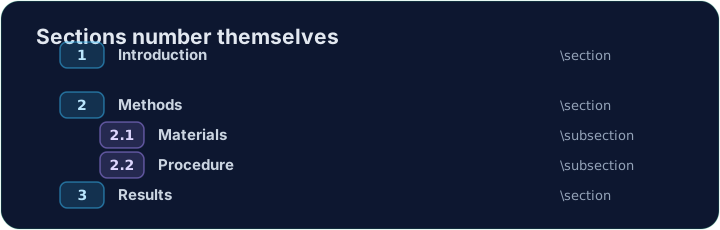
- LaTeX numbers it automatically (1, 2, 3 …) — you never count by hand.
한국어
섹션으로 정리하기
- 실제 문서는 독자가 따라갈 수 있도록 섹션으로 나뉩니다.
- 명령어는 간단합니다:
\section{Introduction}
- LaTeX가 자동으로 번호를 매깁니다(1, 2, 3 …) — 손으로 세지 않아도 됩니다.
English
Smaller pieces
- Inside a section you can add subsections:
- These become 2.1, 2.2, and so on. Add or remove one and everything renumbers itself.
한국어
작은 조각들
- 섹션 안에는 **하위 섹션(subsections)**을 추가할 수 있습니다:
\section{Methods}
\subsection{Materials}
\subsection{Procedure}
- 이들은 2.1, 2.2 등으로 변합니다. 하나를 추가하거나 삭제하면 전체가 자동으로 재번호가 됩니다.
English
A title block
- A report usually starts with a title, an author, and a date.
- You declare them in the preamble, then print them with
\maketitle:
\maketitlemust go inside the body, as its first line.
한국어
제목 블록
- 보고서는 보통 제목, 저자, 날짜로 시작합니다.
- 이들을 프롤로그에서 선언한 후,
\maketitle으로 출력합니다:
\documentclass{article}
\title{My First Report}
\author{Pat Lee}
\begin{document}
\maketitle
...
\end{document}
\maketitle은 본문 내부에, 첫 줄로 placement되어야 합니다.
English
Common mistakes
\section{...}numbers automatically; use\section*{...}for no number.\maketitleneeds\title{...}and\author{...}set first.
한국어
흔한 실수
\section{...}은 자동으로 번호가 매겨집니다; 번호 없이 사용하고 싶다면\section*{...}을 사용하세요.\maketitle를 사용하려면 먼저\title{...}와\author{...}를 설정해야 합니다.
Organise this report by adding a section heading. Put \section{Introduction} at the start of the body, then Run. Notice LaTeX numbers it for you. · 섹션 제목을 추가하여 이 보고서를 정리하세요. 본문 시작 부분에 \section{Introduction}를 넣고 **Run(실행)**을 누르세요. LaTeX가 자동으로 번호를 매겨주는 것을 확인하세요.
Click Run to compile and preview the PDF. · PDF를 컴파일하고 미리보기하려면 '실행'을 클릭하세요.
Give the document a title block. Add \title{...} and \author{...} in the preamble, then \maketitle as the first line of the body. · 문서에 **제목 블록(title block)**을 주세요. 서두(preamble)에 \title{...}와 \author{...}를 추가하고, 본문 첫 줄에 \maketitle를 배치하세요.
Click Run to compile and preview the PDF. · PDF를 컴파일하고 미리보기하려면 '실행'을 클릭하세요.