Your first document · 첫 번째 문서 만들기
This page needs a recent browser (with SharedArrayBuffer support). Please update Chrome, Edge, Firefox or Safari to the latest version. · 이 페이지는 최신 브라우저(SharedArrayBuffer 지원)가 필요합니다. Chrome, Edge, Firefox 또는 Safari를 최신 버전으로 업데이트해 주세요.
English
Your first LaTeX document
- LaTeX lets you make beautiful documents — reports, books, and especially maths.
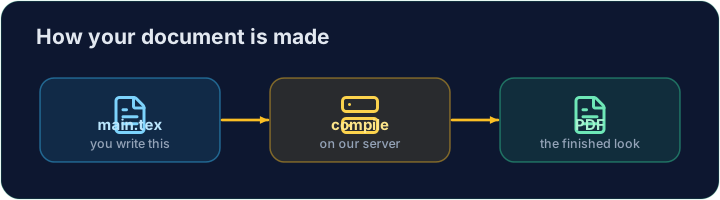
- You write plain text with commands, and the computer turns it into a polished PDF.
- Your LaTeX is compiled on our server — press Run and the PDF appears next to your code.
한국어
첫 LaTeX 문서 만들기
- LaTeX은 아름다운 문서를 만들 수 있게 해줍니다 — 보고서, 책, 특히 수학 분야에 적합합니다.
- 명령어를 사용하여 평문본을 작성하면 컴퓨터가 이를 정제된 PDF로 변환합니다.
- 여러분의 LaTeX는 우리의 서버에서 컴파일됩니다 — Run을 누르면 PDF가 코드 옆에 나타납니다.
English
The shape of every document
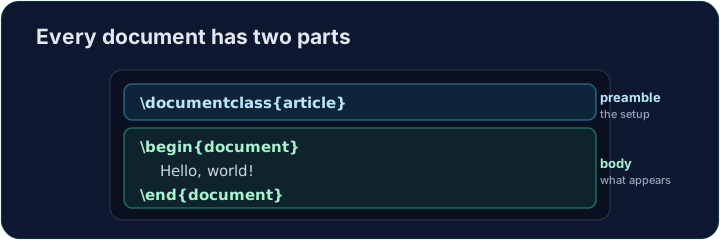
- Every document has two parts — a preamble and a body:
\documentclass{article}is the preamble: it sets the kind of document.- Everything between
\begin{document}and\end{document}is the body — the part that actually appears in the PDF.
한국어
모든 문서의 형태
- 모든 문서는 두 부분으로 나뉩니다 — *전체(프롤로그)*와 본문:
\documentclass{article}
\begin{document}
Hello, world!
\end{document}
\documentclass{article}은 **전체(preamble)**입니다 — 문서의 유형을 설정합니다.\begin{document}과\end{document}사이 모든 내용은 **본문(body)**입니다 — 실제로 PDF에 표시되는 부분입니다.
English
Now you try
- Below is a document skeleton. Add a greeting in the body.
- Press Run to compile it and see the PDF, then Check when you think it is right.
한국어
이제 직접 해보기
- 아래는 문서 골격입니다. 본문에 인사를 추가하세요.
- 컴파일하여 PDF를 보려면 Run을 누르고, 적절하다고 생각되면 Check를 누르세요.
English
Common mistakes
- A document needs
\documentclass{...}and a\begin{document} ... \end{document}. - The text you want to see goes inside the document environment.
한국어
흔한 실수
- 문서는
\documentclass{...}과\begin{document} ... \end{document}이 필요합니다. - 보고 싶은 텍스트는 문서 환경(document environment) 내부에 들어갑니다.
The skeleton below is a complete LaTeX document. Replace the comment in the body with a greeting (any text containing the word Hello), then click Run to compile it and see the PDF. · 아래 골격은 완전한 LaTeX 문서입니다. **본문(body)**의 주석을 인사의 말(Hello라는 단어가 포함된 텍스트)로 교체한 뒤 Run(실행) 버튼을 클릭하여 컴파일하고 PDF를 확인하세요.
Click Run to compile and preview the PDF. · PDF를 컴파일하고 미리보기하려면 '실행'을 클릭하세요.
Options in square brackets change the whole document. Make the text bigger by adding the [12pt] option: \documentclass[12pt]{article}. Run and see every letter grow. · 사각 괄호 안의 옵션은 전체 문서에 영향을 미칩니다. 텍스트 크기를 키우려면 [12pt] 옵션을 추가하십시오: \documentclass[12pt]{article}. 실행하여 모든 글자가 커지는 것을 확인하십시오.
Click Run to compile and preview the PDF. · PDF를 컴파일하고 미리보기하려면 '실행'을 클릭하세요.