INPUT and data types · INPUT과 데이터 타입
This page needs a recent browser (with SharedArrayBuffer support). Please update Chrome, Edge, Firefox or Safari to the latest version. · 이 페이지는 최신 브라우저(SharedArrayBuffer 지원)가 필요합니다. Chrome, Edge, Firefox 또는 Safari를 최신 버전으로 업데이트해 주세요.
INPUT reads what the user types
INPUTreads one line the user types and stores it in a variable.- Pair it with
OUTPUTto talk to the user.
INPUT Name
OUTPUT "Hello, ", Name
DECLARE the type so numbers work
- Text typed in is a string by default.
DECLAREa variable asINTEGER(orREAL) soINPUTreads a number.
DECLARE Age : INTEGER
INPUT Age
OUTPUT Age + 1
The five data types
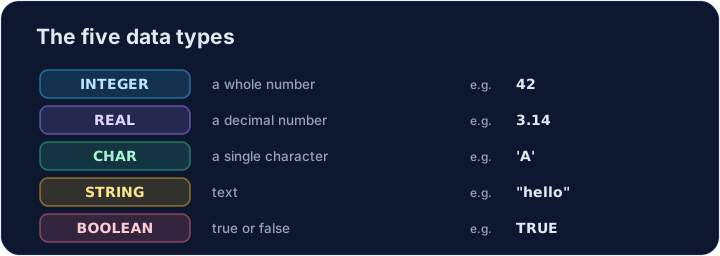
- Every value has a type. The 2026–2028 syllabus uses five: INTEGER, REAL, CHAR, STRING and BOOLEAN.
DECLARE Price : REAL
DECLARE Letter : CHAR
DECLARE Passed : BOOLEAN
Price ← 2.50
Letter ← 'A'
Passed ← TRUE
OUTPUT Price, " ", Letter, " ", Passed
Watch out
- Without
DECLARE ... : INTEGER,INPUTkeeps the value as a string, soAge + 1would fail. CHARholds one character in single quotes ('A');STRINGholds many in double quotes.
Common mistakes
INPUT xreads a value intox.- Choose the right type: INTEGER, REAL, STRING, BOOLEAN or CHAR.
Now you try
- Each task reads one input with
INPUT. - Press Check answer to test it.
Read a name with INPUT, then output Hi, followed by the name. For input Sam, output Hi, Sam. · INPUT를 사용하여 이름을 읽은 후, 이름 앞에 Hi, 을 출력합니다. 입력이 Sam일 때 출력되는 값은 Hi, Sam입니다.
Click Run to see the output here. · 출력을 보려면 '실행'을 클릭하세요.
DECLARE N as INTEGER, read it with INPUT, then output N + 1. For input 9, output 10. · DECLARE N를 변수 INTEGER로 선언하고, 이를 INPUT로 읽은 후, 결과물 N + 1을 출력하십시오. 입력값이 9일 때, 출력 결과는 10가 되어야 합니다.
Click Run to see the output here. · 출력을 보려면 '실행'을 클릭하세요.
Read an INTEGER N, then output N doubled (times 2). For input 6, output 12. · INTEGER N을 읽고, 이를 두 배(×2)하여 N을 출력합니다. 입력이 6일 때 출력되는 값은 12입니다.
Click Run to see the output here. · 출력을 보려면 '실행'을 클릭하세요.