Hashing and digital signatures · 해싱 및 디지털 서명
This page needs a recent browser (with SharedArrayBuffer support). Please update Chrome, Edge, Firefox or Safari to the latest version. · 이 페이지는 최신 브라우저(SharedArrayBuffer 지원)가 필요합니다. Chrome, Edge, Firefox 또는 Safari를 최신 버전으로 업데이트해 주세요.
English
Hashing protects integrity
- We hashed passwords for secrecy. Hashing also protects integrity — proving data was not changed.
- Change even one character of the input, and the hash changes completely.
한국어
해시는 무결성을 보호합니다
- 우리는 비밀번호의 비밀성을 위해 해싱을 사용했습니다. 해싱은 또한 무결성을 보호하여 데이터가 변조되지 않았음을 증명합니다.
- 입력값의 문자 하나를 바꾸더라도 해시 값은 완전히 달라집니다.
import hashlib
print(hashlib.sha256(b"hello").hexdigest()[:16])
print(hashlib.sha256(b"hellp").hexdigest()[:16])   # totally different
English
Checking a download
- Websites publish the hash of a file. After downloading, you hash your copy and compare.
- If the two hashes match, the file arrived intact. If not, it was corrupted or tampered with.
한국어
다운로드 검증하기
- 웹사이트는 파일의 해시 값을 게시합니다. 다운로드 후 사용자 본인이 해시 계산하여 비교합니다.
- 두 해시가 일치하면 파일이 완전하게 도착했습니다. 그렇지 않으면 손상되거나 조작되었음을 의미합니다.
English
Digital signatures
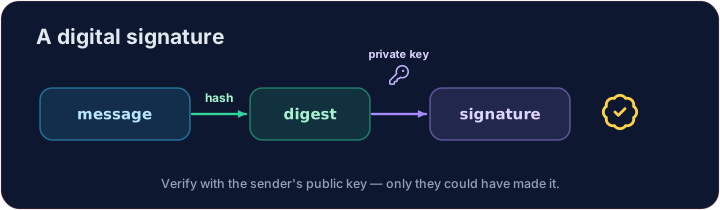
- A digital signature proves who sent something and that it was not changed.
- The sender hashes the message and encrypts that hash with their private key.
- Anyone can check it with the sender's public key — only the real sender could have made it.
한국어
디지털 서명
- 디지털 서명은 누가 보냈는지 증명하고 동시에 변조되지 않았음을 보여줍니다.
- 송신자는 메시지를 해시한 뒤, 그 해시값을 자신의 개인 키로 암호화합니다.
- 누구나 sender의 공용密钥로 이를 확인할 수 있습니다 — 오직 진짜 sender만이 이를 생성할 수 있었습니다.
English
Your turn
- Compare the hashes of an original and a received message.
Truemeans the message is intact.
Covers: A-Level 17.1 (digital certification), 6.2 (integrity).
한국어
직접 해보기
- 원본과 수신된 메시지의 해시를 비교합니다.
True일 경우 메시지가 완전함을 의미합니다.
내용: A-Level 17.1 (디지털 인증), 6.2 (무결성).
English
Common mistakes
- A hash is one-way — you cannot get the original back from it.
- A digital signature proves who sent a message and that it was not changed.
한국어
흔한 실수
- 해시는 일방적입니다. 해시값으로부터 원본 데이터를 복원할 수 없습니다.
- 디지털 서명은 namespace是谁发送了消息以及它未被篡改的证明。
Explore · 탐색하기
Hashing & signatures · 해싱 & 서명
A hash is one-way and avalanches — perfect for fingerprints. · 해시는 일방적이며 폭풍처럼 변함 — 지문에 완벽합니다.
Check whether a received message is unchanged. Hash both original and received with SHA-256 and print whether the two digests are equal (True or False). · 수신된 메시지가 변하지 않았는지 확인하세요. SHA-256로 original과 received을 해시하여 두 디제스트가 같은지 print으로 확인하세요 (True 또는 False).
Click Run to see the output here. · 출력을 보려면 '실행'을 클릭하세요.
This time an attacker edited the message in transit. Hash both versions and print TAMPERED if the digests differ, else OK — one changed character is enough to catch. · 이번에는 공격자가 전송 중 메시지를 수정했습니다. 두 버전을 모두 해시하고 디제스트가 다르면 TAMPERED을 출력하고, 같으면 OK을 출력하세요 — 한 글자만 바뀌어도 잡을 수 있습니다.
Click Run to see the output here. · 출력을 보려면 '실행'을 클릭하세요.