Encoding is not encryption · 인코딩은 암호화가 아닙니다
This page needs a recent browser (with SharedArrayBuffer support). Please update Chrome, Edge, Firefox or Safari to the latest version. · 이 페이지는 최신 브라우저(SharedArrayBuffer 지원)가 필요합니다. Chrome, Edge, Firefox 또는 Safari를 최신 버전으로 업데이트해 주세요.
A common mix-up
- People often say "encoded" when they mean "encrypted". They are not the same.
- Encoding changes the format of data so it can be stored or sent — it is not secret.
- Encryption changes data so that only someone with the key can read it — it is secret.
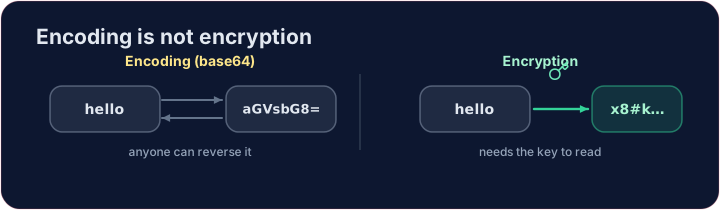
Base64 — a famous encoding
- Base64 rewrites bytes using 64 safe characters. It is used to put images or files inside text (like email).
import base64
secret = base64.b64encode(b"hello").decode()
print(secret)            # aGVsbG8=
print(base64.b64decode(secret).decode())   # back to hello
- Anyone can decode it — no key needed. So base64 hides nothing.
Why this matters for security
- If a website "protects" your password with base64, it is not protected at all.
- Real protection needs encryption (with a key) or hashing (one-way). Encoding is just a costume.
Try it
- Encode
helloto base64 below. Then imagine decoding it — and remember it is not a secret.
Covers: foundation for IGCSE 2.3 / A-Level 17.1 (encryption).
Common mistakes
- Base64 is encoding — anyone can reverse it, so it gives no security.
- Encoding changes the format; encryption protects the content.
Use base64 to encode the word hello. Encode its bytes and print the result as text. (Notice: anyone can decode it — encoding is not secret.) · base64를 사용하여 단어 hello을 인코딩하십시오. 바이트를 인코딩하고 결과물을 텍스트로 print하십시오. (참고: 누구나解码할 수 있습니다 — 인코딩은 비밀이 아닙니다.)
Click Run to see the output here. · 출력을 보려면 '실행'을 클릭하세요.
An app 'protected' a message as base64 — prove that protects nothing. Decode captured with base64.b64decode and print the text. No key needed. · 어떤 앱이 메시지를 base64로 '보호'했습니다 — 그것이何も 보호하지 않음을 증명하십시오. captured를 base64.b64decode으로 디코딩하고 텍스트를 출력하십시오. 키가 필요 없습니다.
Click Run to see the output here. · 출력을 보려면 '실행'을 클릭하세요.