Defending a system · 시스템 방어
This page needs a recent browser (with SharedArrayBuffer support). Please update Chrome, Edge, Firefox or Safari to the latest version. · 이 페이지는 최신 브라우저(SharedArrayBuffer 지원)가 필요합니다. Chrome, Edge, Firefox 또는 Safari를 최신 버전으로 업데이트해 주세요.
English
Walls at the edge
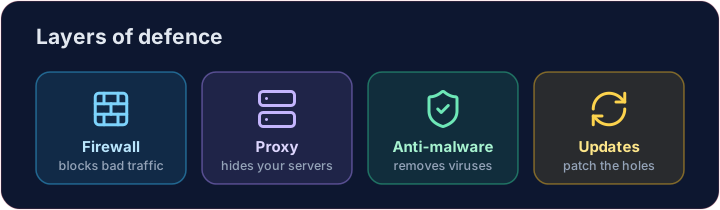
- A firewall sits between your network and the internet, blocking traffic that breaks the rules.
- A proxy server stands in front of your servers, hiding them and filtering requests.
- Together they keep unwanted visitors out before they reach anything important.
한국어
가장자리의 장벽
- 방화벽(Firewall) 은 사용자 네트워크와 인터넷 사이에 위치하여 규칙을 위반하는 트래픽을 차단합니다.
- 프로кси 서버(Proxy server) 는 사용자 서버 앞에 위치하여 서버를 숨기고 요청을 필터링합니다.
- 이 둘은 불필요한 방문자가 중요한 것에 도달하기 전에 외부에 머물도록 유지합니다.
English
Software defences
- Anti-malware (anti-virus / anti-spyware) scans for and removes known malware.
- Automatic updates patch weaknesses as soon as fixes are released — most attacks use old, known holes.
한국어
소프트웨어 방어
- **안티-말웨어(An anti-virus / anti-spyware)**는 알려진 말웨어를 검색하고 제거합니다.
- 자동 업데이트는 수정안이 출시되자마자 약점을 패치합니다 — 대부분의 공격은 오래된, 알려진 구멍을 이용합니다.
English
Limiting the damage
- Access levels give each person only the rights they need — a student cannot change a teacher's grades.
- Privacy settings control who can see your data on a service.
- If one account is broken into, good access levels stop the attacker reaching everything.
한국어
피해 최소화
- 접근 수준(Access levels) 은 각 사람에게 필요한 권한만 부여합니다 — 학생은 교사의 성적을 변경할 수 없습니다.
- **개인정보 설정(Privacy settings)**은 서비스에서谁的数据를 볼 수 있는지 통제합니다.
- 한 계정이 침투당하면, 적절한 접근 수준은 공격자가 모든 것에 도달하는 것을 막아줍니다.
English
Smart habits
- Check the URL of a link before clicking, and the spelling and tone of messages.
- Look for HTTPS (the padlock) before entering a password — that is encryption at work, which we'll cover soon.
Covers: IGCSE 5.3 (solutions), A-Level 6.1 (security measures).
한국어
스마트한 습관
- 클릭하기 전 URL을 확인하고, 메신저의 표기법과 톤을 확인하십시오.
- 비밀번호 입력 전 HTTPS(자물쇠 아이콘)가 있는지 확인하십시오. 이는 곧 설명할 암호화가 작동하는 것입니다.
적용: IGCSE 5.3 (해결책), A-Level 6.1 (보안 조치).
English
Now you try
- First act as a firewall: let the allowed ports through and collect everything else in a blocked list.
- Then match each threat to the defence that stops it.
한국어
이제 직접 해보기
- 먼저 방화벽 역할을 하되 허용된 포트는 통과시키고 나머지는 차단 목록에 수집하십시오.
- 이후 각 위협에 대해 이를 방지하는 방어 수단을 매칭하십시오.
English
Common mistakes
- Use layers: firewall, updates, anti-malware and backups.
- No single measure is enough — this is defence in depth.
한국어
흔한 실수
- 계층을 사용하십시오: 방화벽, 업데이트, 악성코드 방지 및 백업.
- 단일 조치는 충분하지 않습니다. 이것이 심층 방어(Defence in Depth)입니다.
Act as a firewall. Only ports in allowed may pass. Build a list blocked of every requested port that is not allowed, and print it. · 방화벽 역할을 하십시오. allowed에 있는 포트만 통과할 수 있습니다. 허용되지 않는 모든 요청 포트에 대한 목록 blocked을 생성하고 출력하십시오.
Click Run to see the output here. · 출력을 보려면 '실행'을 클릭하세요.
Match each problem to the defence that stops it: anti-malware, updates or access levels. · 각 문제를 이를 방지하는 방어 전략과 매칭하십시오: anti-malware, updates 또는 access levels.
Click Run to see the output here. · 출력을 보려면 '실행'을 클릭하세요.