텍스트 파일
이 페이지는 최신 브라우저(SharedArrayBuffer 지원)가 필요합니다. Chrome, Edge, Firefox 또는 Safari를 최신 버전으로 업데이트해 주세요.
English
Data that stays after the program ends
- A variable is lost when the program stops. A text file keeps its lines, so the next run can read them.
- AS topic 10.3 asks for pseudocode that writes, appends and reads a text file of one or more lines.
- Every file job has the same three parts: open it in one mode, use it, close it.
English
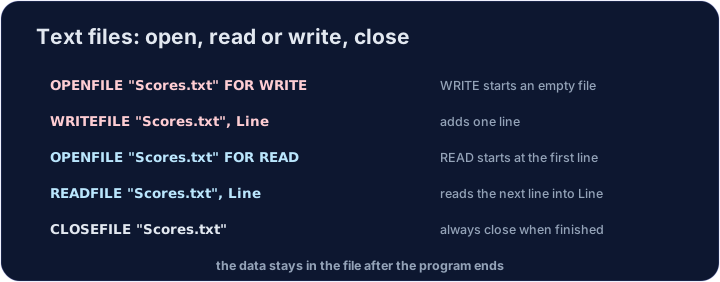
The four statements and the three modes
| Statement | What it does |
|---|---|
OPENFILE "Diary.txt" FOR WRITE |
starts the file empty: anything already in it is lost |
OPENFILE "Diary.txt" FOR APPEND |
keeps the old lines and adds new ones at the end |
OPENFILE "Diary.txt" FOR READ |
reads from the first line |
WRITEFILE "Diary.txt", Text |
writes one line |
READFILE "Diary.txt", Text |
reads the next line into a STRING variable |
CLOSEFILE "Diary.txt" |
finishes with the file |
- A file is open in one mode at a time. To change mode, close it and open it again.
English
DECLARE Entry : STRING
OPENFILE "Diary.txt" FOR WRITE
WRITEFILE "Diary.txt", "Monday: rain"
CLOSEFILE "Diary.txt"
OPENFILE "Diary.txt" FOR APPEND
WRITEFILE "Diary.txt", "Tuesday: sun"
CLOSEFILE "Diary.txt"
OPENFILE "Diary.txt" FOR READ
READFILE "Diary.txt", Entry
OUTPUT "First line: ", Entry
CLOSEFILE "Diary.txt"
- Each
READFILEreads one line. This program reads only the first line, so it outputsFirst line: Monday: rain. - Had the second
OPENFILEusedWRITE, the file would hold onlyTuesday: sun.
English
EOF tells you when to stop
- You rarely know how many lines a file has.
EOF("Diary.txt")isTRUEwhen no line is left to read. WHILE NOT EOF(...)tests before eachREADFILE, so an empty file runs the loop zero times.
| Pass | EOF before the read |
READFILE gets |
Output |
|---|---|---|---|
| 1 | FALSE |
Monday: rain |
Monday: rain |
| 2 | FALSE |
Tuesday: sun |
Tuesday: sun |
| – | TRUE: the loop stops |
– | – |
English
DECLARE Entry : STRING
DECLARE Count : INTEGER
OPENFILE "Diary.txt" FOR WRITE
WRITEFILE "Diary.txt", "Monday: rain"
WRITEFILE "Diary.txt", "Tuesday: sun"
WRITEFILE "Diary.txt", "Wednesday: wind"
CLOSEFILE "Diary.txt"
Count ← 0
OPENFILE "Diary.txt" FOR READ
WHILE NOT EOF("Diary.txt")
    READFILE "Diary.txt", Entry
    Count ← Count + 1
    OUTPUT Count, ". ", Entry
ENDWHILE
CLOSEFILE "Diary.txt"
OUTPUT Count, " lines"
Count ← 0sits before the loop, so an empty file still gives0 lines.
English
Numbers in a file are text
READFILEalways gives aSTRING."7" + "5"is not arithmetic.STR_TO_NUMfrom the insert turns the line into a number before you add it.
English
DECLARE Line : STRING
DECLARE Total : REAL
OPENFILE "Steps.txt" FOR WRITE
WRITEFILE "Steps.txt", "4200"
WRITEFILE "Steps.txt", "6100"
WRITEFILE "Steps.txt", "5300"
CLOSEFILE "Steps.txt"
Total ← 0
OPENFILE "Steps.txt" FOR READ
WHILE NOT EOF("Steps.txt")
    READFILE "Steps.txt", Line
    Total ← Total + STR_TO_NUM(Line)
ENDWHILE
CLOSEFILE "Steps.txt"
OUTPUT "Total steps: ", Total
- To write a number, turn it into text first:
WRITEFILE "Steps.txt", NUM_TO_STR(Total).
English
Watch out
- Declare the
STRINGvariable beforeREADFILEuses it. - The file name in
READFILE,WRITEFILE,EOFandCLOSEFILEmust match theOPENFILEname exactly. - Random files (
OPENFILE … FOR RANDOM) are A2. This lesson does not use them.
English
Common mistakes
| Wrong | Right | Why |
|---|---|---|
OPENFILE Diary.txt FOR READ |
OPENFILE "Diary.txt" FOR READ |
a file name is text, so it needs double quotes |
READFILE "Diary.txt", Entry after FOR WRITE |
close, then OPENFILE "Diary.txt" FOR READ |
you can read only a file opened for READ |
OPENFILE "Diary.txt" FOR WRITE to add a line |
FOR APPEND |
WRITE empties the file first |
WHILE EOF("Diary.txt") |
WHILE NOT EOF("Diary.txt") |
EOF is TRUE at the end, so the loop would never start |
READFILE once, before the loop only |
READFILE inside the loop |
one READFILE reads one line |
Total ← Total + Line |
Total ← Total + STR_TO_NUM(Line) |
a line from a file is a STRING |
no CLOSEFILE |
CLOSEFILE when finished |
the file stays open, and lines can be lost |
English
Now you try
- The tasks use
Note.txtandList.txt. Write the lines, close the file, open it again forREAD, then output what you read.
English
Independent transfer
The final task has no supplied algorithm. Plan its inputs, processing and outputs, then solve it before opening support. Check more than the sample case.
난이도 2/5 · 140코인 + 오늘 첫 완료 시 작은 보너스 추가
Write Hello 부터 Note.txt, read it back into LineOfText, and output it.
출력을 보려면 '실행'을 클릭하세요.
난이도 2/5 · 140코인 + 오늘 첫 완료 시 작은 보너스 추가
Write a 및 b 부터 List.txt, then output both lines using WHILE NOT EOF.
출력을 보려면 '실행'을 클릭하세요.
난이도 2/5 · 140코인 + 오늘 첫 완료 시 작은 보너스 추가
Write one 부터 Note.txt, close it, APPEND the line two, then read both lines with WHILE NOT EOF and output them.
출력을 보려면 '실행'을 클릭하세요.
난이도 3/5 · 200코인 + 오늘 첫 완료 시 작은 보너스 추가
The checker supplies names.txt. Output only lines whose length is at least 4. If none qualify, output none. Open for READ and close it.
출력을 보려면 '실행'을 클릭하세요.