The exam reference sheet: lists and the robot
이 페이지는 최신 브라우저(SharedArrayBuffer 지원)가 필요합니다. Chrome, Edge, Firefox 또는 Safari를 최신 버전으로 업데이트해 주세요.
English
The exam's own pseudocode
- The AP CSP exam does not use Python. Its questions are written in the Exam Reference Sheet language, and you get the sheet in the exam.
- Most of it maps straight onto Python:
←is=,DISPLAY(x)isprint(x),FOR EACH item IN aListisfor item in a_list:. - Two parts need practice: the list procedures, where the first item is index 1, and the robot on a grid.
| Reference sheet | Python |
|---|---|
aList[1] (the first item) |
a_list[0] |
APPEND(aList, value) |
a_list.append(value) |
INSERT(aList, i, value) |
a_list.insert(i - 1, value) |
REMOVE(aList, i) |
a_list.pop(i - 1) |
LENGTH(aList) |
len(a_list) |
REPEAT n TIMES { } |
for _ in range(n): |
REPEAT UNTIL (condition) { } |
while not condition: |
RANDOM(a, b) |
random.randint(a, b) |
English
List procedures change the list
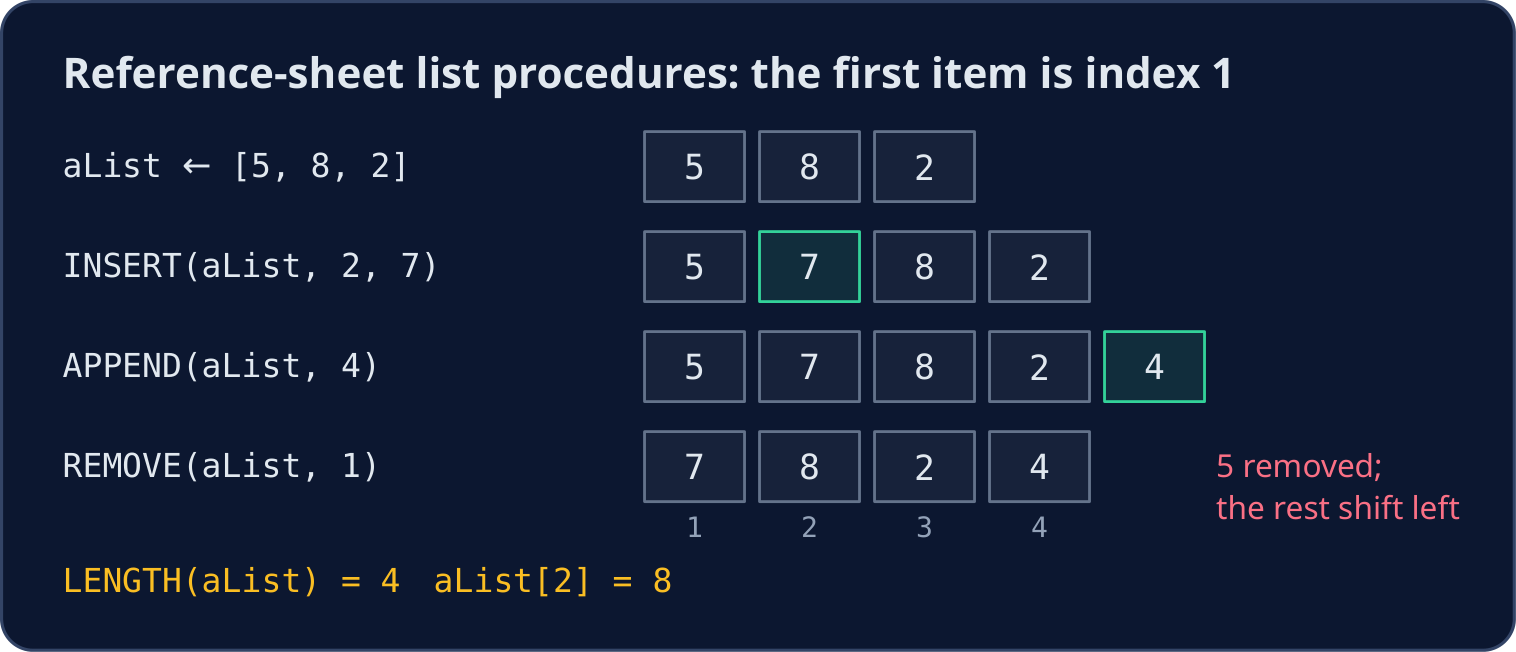
INSERT(aList, i, value)putsvalueat indexi. The item that was there, and every item after it, moves one place right.APPEND(aList, value)addsvalueat the end.REMOVE(aList, i)takes out the item at indexi. Every item after it moves one place left.- An index below 1 or above
LENGTH(aList)is an error, and the program stops.
English
aList ← [5, 8, 2]
INSERT(aList, 2, 7)
APPEND(aList, 4)
REMOVE(aList, 1)
DISPLAY(LENGTH(aList))
DISPLAY(aList[2])
- The program displays
4, then8. Trace questions like this are worth practising: write the list again after every line.
a_list = [5, 8, 2]
a_list.insert(2 - 1, 7)   # INSERT(aList, 2, 7)
a_list.append(4)          # APPEND(aList, 4)
a_list.pop(1 - 1)         # REMOVE(aList, 1)
print(len(a_list), a_list[2 - 1])
- The same steps in Python print
4 8. Every exam index needs- 1in Python.
English
The robot on a grid
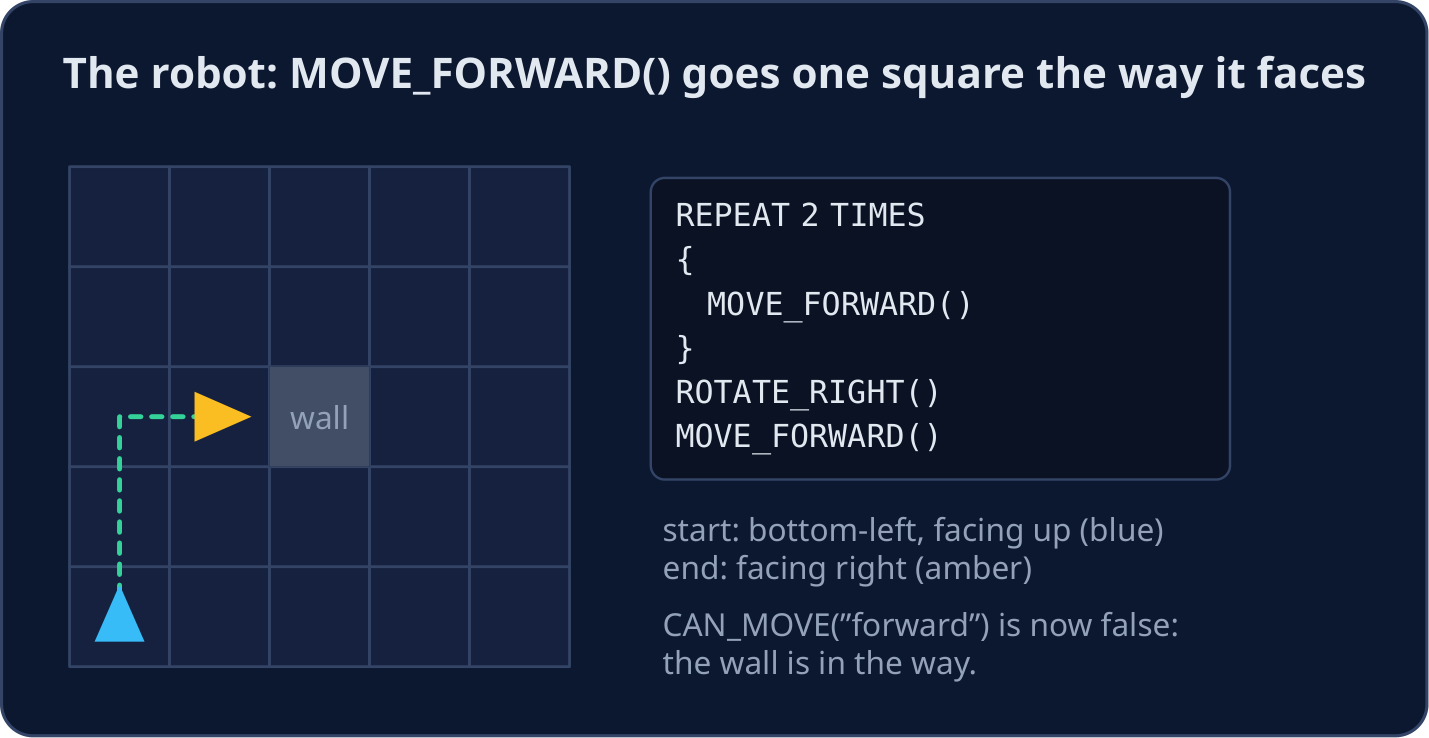
- Some questions show a robot (a triangle) on a grid of squares. The triangle points the way the robot faces.
MOVE_FORWARD()moves one square in that direction.ROTATE_LEFT()andROTATE_RIGHT()turn it 90 degrees without moving.CAN_MOVE(direction)is true when the square in that direction ("forward","left","right"or"backward") is open and on the grid.- If the robot tries to move into a wall or off the grid, it stays where it is and the program ends.
English
Reading a robot program
- Follow the robot one statement at a time. Write down its square and the direction it faces after each line.
- A common exam program keeps going until the goal:
REPEAT UNTIL (GoalReached())
{
    IF (CAN_MOVE("forward"))
    {
        MOVE_FORWARD()
    }
    ELSE
    {
        ROTATE_LEFT()
    }
}
- When the way ahead is open, the robot moves. When it is blocked, it turns left and tries again. Check that it can never turn round and round forever.
English
Common mistakes
| Wrong | Right | Why |
|---|---|---|
aList[0] is the first item |
aList[1] is the first item |
reference-sheet lists start at 1 |
INSERT replaces the item at i |
it moves that item one place right | the list gets longer by one |
REMOVE(aList, 4) removes the value 4 |
it removes the item at index 4 | the second argument is a position |
ROTATE_RIGHT() moves the robot |
it only turns the robot | only MOVE_FORWARD() changes the square |
REPEAT UNTIL (x > 5) runs while x > 5 |
it runs until x > 5 |
the loop stops when the condition becomes true |
English
Now you try
- The tasks are in Python. Trace the reference-sheet code on paper, then write the answer as a Python value.
- Press Check answer to test your code.
난이도 2/5 · 140코인 + 오늘 첫 완료 시 작은 보너스 추가
Trace this reference-sheet code: aList ← [3, 6, 9], then APPEND(aList, 12), then REMOVE(aList, 2), then INSERT(aList, 1, 0). Set the Python variable final to the list at the end.
출력을 보려면 '실행'을 클릭하세요.
난이도 3/5 · 200코인 + 오늘 첫 완료 시 작은 보너스 추가
A robot faces up. It runs MOVE_FORWARD(), ROTATE_RIGHT(), ROTATE_RIGHT(), MOVE_FORWARD(), ROTATE_LEFT(). Set facing to the direction it faces at the end: "up", "down", "left" 또는 "right". Set moved_back 부터 True if it is back on its starting square, otherwise False.
출력을 보려면 '실행'을 클릭하세요.
난이도 3/5 · 200코인 + 오늘 첫 완료 시 작은 보너스 추가
Write a Python function cb_remove(a_list, i) that works like the reference sheet's REMOVE(aList, i): i counts from 1. It removes that item from the list (changing the list) and returns nothing.
출력을 보려면 '실행'을 클릭하세요.