Polymorphism: dynamic dispatch and toString()
This page needs a recent browser (with SharedArrayBuffer support). Please update Chrome, Edge, Firefox or Safari to the latest version. · 이 페이지는 최신 브라우저(SharedArrayBuffer 지원)가 필요합니다. Chrome, Edge, Firefox 또는 Safari를 최신 버전으로 업데이트해 주세요.
English
Polymorphism: one type, many behaviours
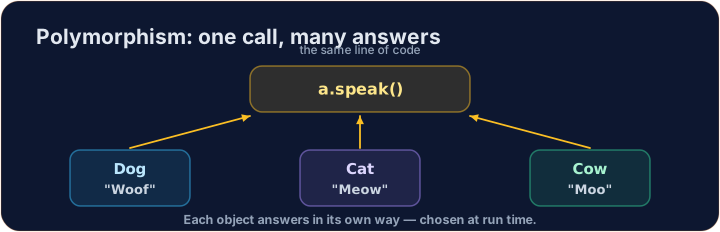
- Polymorphism means "many forms": one superclass type, many subclass behaviours.
- You can hold a
Dogor aCatin anAnimalvariable, because each is-anAnimal. - When you call a method, the object's real type decides which version runs.
한국어
다형성: 하나의 타입, 여러 행동
- 다형성은 '다양한 형태'를 의미합니다: 하나의 슈퍼클래스 타입, 여러 서브클래스 행동.
Dog이나Cat을Animal변수에 담을 수 있으며, 이는 각각 is-anAnimal이기 때문입니다.- 메소드를 호출할 때, 객체의 실제 타입이 어떤 버전이 실행될지 결정합니다.
English
Dynamic dispatch
- The variable's type (
Animal) decides which methods you are allowed to call. - But at run time, the actual object (
Dog) decides which overridden version runs. - This run-time choice is called dynamic dispatch — it is the heart of polymorphism.
한국어
동적 디스패치 (Dynamic dispatch)
- 변수의 type(
Animal)은 당신이 호출할 수 있는 메소드를 결정합니다. - 하지만 실행 시점에는 실제 객체(
Dog)가 오버라이드된 버전을 선택하여 실행합니다. - 이 실행 시점의 선택을 동적 디스패치라고 하며, 이는 다형성의 핵심입니다.
public class Main {
    public static void main(String[] args) {
        Animal[] zoo = { new Dog(), new Cat(), new Dog() };
        for (Animal a : zoo) {
            System.out.println(a.speak());   // Woof, then Meow, then Woof
        }
    }
}

class Animal {
    public String speak() { return "some sound"; }
}
class Dog extends Animal {
    public String speak() { return "Woof"; }
}
class Cat extends Animal {
    public String speak() { return "Meow"; }
}
English
One loop handles every subclass
- The loop above never asks "is this a Dog or a Cat?" — it just calls
speak(). - Each object answers in its own way. That keeps the loop short and general.
- Add a brand-new subclass later and the same loop works on it, unchanged.
한국어
하나의 루프가 모든 서브클래스를 처리합니다
- 위 루프는 "이것은 강아지인가 고양이인가?"라고 묻지 않습니다. 단순히
speak()을 호출할 뿐입니다. - 각 객체가 자신의 방식으로 응답합니다. 이로 인해 루프는 짧고 보편적입니다.
- 나중에 완전히 새로운 서브클래스를 추가하더라도 변경되지 않은 같은 루프가 작동합니다.
English
toString(): every object inherits it from Object
- Every class in Java secretly extends a class called
Object, which has atoString(). - Override
toString()to say how your object should look as text. - Java calls it automatically when you print an object or join it with
+.
한국어
toString(): 모든 객체가 Object로부터 이를 상속받습니다
- 자바(Java)의 모든 클래스는 숨겨진名为
Object인 class를 확장(extends)하며, 이 class에는toString()이 있습니다. - 오버라이드
toString()를 통해 객체가 텍스트로 어떻게 보여져야 하는지 정의하세요. - 객체를 출력하거나
+와 결합할 때 Java는 이를 자동으로 호출합니다.
public class Main {
    public static void main(String[] args) {
        Object x = new Fraction(3, 4);
        System.out.println(x);              // 3/4   -- toString() runs
        System.out.println("ratio " + x);   // ratio 3/4
    }
}

class Fraction {
    private int numerator;
    private int denominator;
    public Fraction(int numerator, int denominator) {
        this.numerator = numerator;
        this.denominator = denominator;
    }
    public String toString() {
        return numerator + "/" + denominator;
    }
}
English
Common mistakes
- The actual object's method runs at run time (dynamic dispatch), not the variable's type.
- Override
toString()for readable output.
한국어
흔한 실수
- 실제 객체의 method가 실행 시점에 실행됩니다(동적 디스패치). 변수의 type이 아닙니다.
- 가독성 높은 출력을 위해
toString()를 오버라이드하십시오.
English
Now you try
- Use a superclass array, add a new subclass, and override
toString(). - A hidden Harness checks that the right version runs for each object.
- Press Run to compile, then Check answer. Your code runs on the server, so even the first run is fast.
한국어
이제 직접 해보기
- 슈퍼클래스 배열을 사용하고, 새로운 서브클래스를 추가하며,
toString()를 오버라이드하십시오. - 숨겨진 Harness가 각 객체에 대해 올바른 버전이 실행되는지 확인합니다.
- Run을 눌러 컴파일한 후 Check answer를 누르십시오. 코드가 서버에서 실행되므로 첫 실행도 빠릅니다.
Animal, Dog, and Cat are written for you. Complete the static method Zoo.chorus(Animal[] animals) so it returns every animal's sound joined by single spaces. Example: a Dog, Cat, Dog array gives "Woof Meow Woof". An empty array gives "". Loop and call speak() — let polymorphism pick the right sound.
Click Run to see the output here. · 출력을 보려면 '실행'을 클릭하세요.
Animal, Dog, Cat, and a working Zoo.chorus are written for you. Add a class Cow that extends Animal and overrides speak() to return "Moo". Notice the existing chorus loop handles your new Cow with no changes.
Click Run to see the output here. · 출력을 보려면 '실행'을 클릭하세요.
Complete Fraction by overriding toString() so it returns the fraction as "numerator/denominator" — for 3 and 4 it returns "3/4". Java calls toString() automatically when you print a Fraction or join it with +.
Click Run to see the output here. · 출력을 보려면 '실행'을 클릭하세요.