이 페이지는 최신 브라우저(SharedArrayBuffer 지원)가 필요합니다. Chrome, Edge, Firefox 또는 Safari를 최신 버전으로 업데이트해 주세요.
객체 사용하기
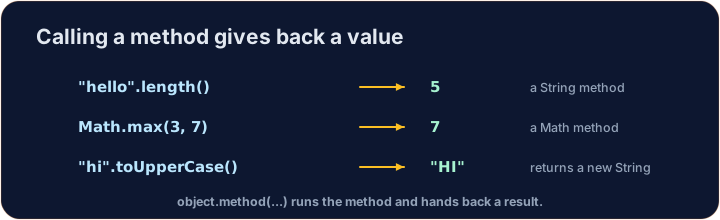
- 객체는 동작 방법을 아는 값입니다. 점 기호
.을 사용하여 해당 메서드를 호출합니다. String은 객체입니다.Math,Integer, 그리고Double은 사용 준비가 된 도구들을 제공합니다.- 이번 수업에서는 객체를 만들고 그들의 메서드를 사용하는 법을 배웁니다.
new로 객체 만들기
- 일부 객체는
new키워드와 생성자(constructor) 를 사용하여 만들어집니다. String은 특별합니다:Quotes를 사용하여 직접 쓸 수 있으며, 예로는"hi"과 같습니다.- 또한
new String("...")을 사용하여 별도의String객체를 만들 수 있지만, Quotes가 정상적인 방법입니다.
English
public class Main {
    public static void main(String[] args) {
        String greeting = "Hello";
        String copy = new String("Hello");
        System.out.println(greeting);
        System.out.println(copy);
    }
}
String 메서드
s.length()—s에 있는 문자의 개수입니다.s.charAt(i)— 위치i에 있는 문자입니다(첫 번째 위치는 0입니다).s.substring(a, b)—a부터 시작하여b은 포함하지 않고 끝나는 부분입니다.s.indexOf("x")—"x"의 첫 번째 위치입니다. 못 찾으면-1을 반환합니다.
English
public class Main {
    public static void main(String[] args) {
        String word = "computer";
        System.out.println(word.length());        // 8
        System.out.println(word.charAt(0));        // c
        System.out.println(word.substring(0, 4));  // comp
        System.out.println(word.indexOf("put"));   // 3
    }
}
문자열 비교
- 두 Strings가 같은 문자를 가는지 확인하려면
s.equals(other)을 사용하십시오. - Strings를 비교할 때
==을 사용하지 마십시오. 틀린 결과를 줄 수 있습니다. 이유는 3강에서 배웁니다. s.compareTo(other)는 두 값이 같을 때0을 반환하며,s이 순서상 먼저 올 때는 음수를, 나중 올 때는 양수를 반환합니다.
English
public class Main {
    public static void main(String[] args) {
        String a = "cat";
        String b = "cat";
        String c = "dog";
        System.out.println(a.equals(b));   // true
        System.out.println(a.equals(c));   // false
        System.out.println(a.compareTo(c)); // negative: "cat" is before "dog"
    }
}
수학 메서드
Math은 수학 도구(math tools)를 포함합니다. 이 도구들은Math자체에서 호출되며, 예를 들어Math.abs(-5)처럼 말입니다.Math.abs(x)—x의 크기로 부호를 뺀 값입니다.Math.pow(b, e)—b의e승입니다(double를 반환).Math.sqrt(x)—x의 제곱근입니다 (결과로double를 반환합니다).Math.random()—0.0부터 (1.0은 포함하지 않고)double사이의 무작위 숫자를 반환합니다.
English
public class Main {
    public static void main(String[] args) {
        System.out.println(Math.abs(-7));       // 7
        System.out.println(Math.pow(2, 3));     // 8.0
        System.out.println(Math.sqrt(9));       // 3.0
        // Math.random() changes each run, so we do not print it here.
    }
}
랩퍼와 오토박싱
int과double은 기본 유형입니다. 이 객체 버전은 각각Integer과Double입니다.- Java가 자동으로 이 두 가지 사이를 전환해 줍니다. 이를 오토박싱이라고 합니다.
Integer.parseInt("42")는 문자열을int으로 변환합니다.Double.parseDouble("3.5")은 문자열을double으로 변환합니다.
English
public class Main {
    public static void main(String[] args) {
        Integer boxed = 10;        // int -> Integer (autoboxing)
        int back = boxed;          // Integer -> int (unboxing)
        int n = Integer.parseInt("42");
        double d = Double.parseDouble("3.5");
        System.out.println(back + n);   // 52
        System.out.println(d);          // 3.5
    }
}
흔한 실수
- Strings(그리고 다른 객체)를 비교할 때는
==이 아닌.equals()를 사용하세요. Math.random()는0이상1미만의 값을 반환합니다.
이제 직접 해보기
- 각 과제는 클래스 골격을 미리 채워 놓으므로, 코드를 main 내부에 작성하거나 제시된 메서드를 완성하십시오.
- 전체 프로그램의 경우 Run이 컴파일하고 실행합니다. 메서드 또는 클래스 과제의 경우 Check answer가 제공된 테스트와 함께 코드를 컴파일하여 결과를 표시합니다.
- 코드는 서버에서 컴파일되고 실행되므로 첫 실행에서도 빠릅니다.
난이도 1/5 · 100코인 + 오늘 첫 완료 시 작은 보너스 추가
The String word is "programming". Print its length on the first line, then print the first 4 letters (use substring(0, 4)) on the second line.
출력을 보려면 '실행'을 클릭하세요.
난이도 1/5 · 100코인 + 오늘 첫 완료 시 작은 보너스 추가
Complete hypotenuse(double a, double b) so it returns the length of the longest side of a right triangle: the square root of a*a + b*b. Use Math.sqrt 및 Math.pow (or a*a).
출력을 보려면 '실행'을 클릭하세요.
난이도 1/5 · 100코인 + 오늘 첫 완료 시 작은 보너스 추가
Complete sameWord(String a, String b) so it returns true when the two Strings have the same letters, and false otherwise. Use .equals (not ==).
출력을 보려면 '실행'을 클릭하세요.