이 페이지는 최신 브라우저(SharedArrayBuffer 지원)가 필요합니다. Chrome, Edge, Firefox 또는 Safari를 최신 버전으로 업데이트해 주세요.
English
Searching a list
- Searching means finding whether a value is in a list, and where.
- The usual answer is the index of the value, or
-1if it is missing. - Two classic methods are linear search and binary search.
English
Linear search
- Check each item in turn, from the start.
- Stop as soon as you find a match.
- It works on any list, sorted or not.
English
names = ["Sam", "Mia", "Leo"]
target = "Mia"
found = -1
for i in range(len(names)):
    if names[i] == target:
        found = i
        break
print(found)
English
Binary search
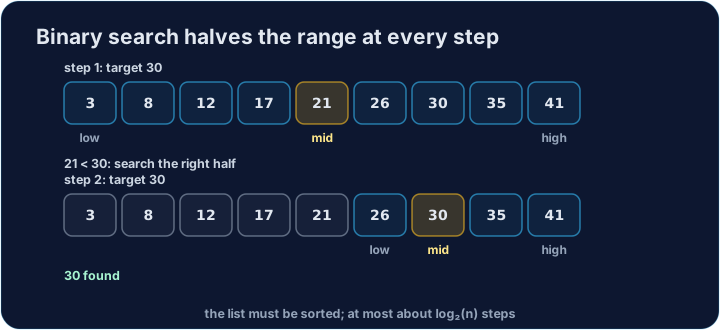
- Binary search needs a sorted list.
- Look at the middle item. If it is the target, stop.
- If the target is smaller, search the left half; if bigger, the right half.
English
data = [2, 4, 6, 8, 10]
target = 8
low = 0
high = len(data) - 1
found = -1
while low <= high:
    mid = (low + high) // 2
    if data[mid] == target:
        found = mid
        break
    elif data[mid] < target:
        low = mid + 1
    else:
        high = mid - 1
print(found)
English
Compare them
- Linear search may check every item — slow for a long list.
- Binary search throws away half the list each step, so it is much faster.
- But binary search only works if the data is already sorted.
English
In Cambridge pseudocode
- Note
DIVis whole-number division (Python's//). - Cambridge arrays usually run from 1 to
n, the number of items.LENGTH()is for strings, so the loops usen.
// Linear search — stop at the first match
found ← -1
i ← 1
WHILE i <= n AND found = -1
    IF list[i] = target THEN
        found ← i
    ENDIF
    i ← i + 1
ENDWHILE

// Binary search (list must be sorted)
found ← -1
low ← 1
high ← n
WHILE low <= high AND found = -1
    MiddleIndex ← (low + high) DIV 2
    IF list[MiddleIndex] = target THEN
        found ← MiddleIndex
    ELSE
        IF list[MiddleIndex] < target THEN
            low ← MiddleIndex + 1
        ELSE
            high ← MiddleIndex - 1
        ENDIF
    ENDIF
ENDWHILE
English
Common mistakes
- Binary search needs a sorted list; it halves the range each step.
- Linear search works on any list but is slower.
English
Now you try
- Return the index of the value, or
-1when it is not found. - Press Check answer to test your code.
탐색하기
선형 검색 대 이진 검색
이진 탐색은 매 단계마다 리스트를 반으로 나누어 — 비교 횟수가 훨씬 적습니다.
난이도 3/5 · 200코인 + 오늘 첫 완료 시 작은 보너스 추가
linear_search(items, target)을 작성하여 target의 인덱스를 items에서 찾아 반환하거나, 없으면 -1을 반환하세요. 항목을 하나씩 확인합니다.
출력을 보려면 '실행'을 클릭하세요.
난이도 3/5 · 200코인 + 오늘 첫 완료 시 작은 보너스 추가
정렬된 리스트용 binary_search(items, target)을 작성하세요. target의 인덱스를 반환하거나, 없으면 -1을 반환합니다. 매 단계마다 범위를 반으로 줄입니다.
출력을 보려면 '실행'을 클릭하세요.
난이도 3/5 · 200코인 + 오늘 첫 완료 시 작은 보너스 추가
first_negative(items)을 작성하여 리스트를 스캔하여 0보다 작은 첫 번째 숫자의 인덱스를 반환하거나, 없으면 -1을 반환합니다.
출력을 보려면 '실행'을 클릭하세요.