Add some style · スタイルを追加する
This page needs a recent browser (with SharedArrayBuffer support). Please update Chrome, Edge, Firefox or Safari to the latest version. · このページには最新のブラウザ(SharedArrayBuffer対応)が必要です。Chrome、Edge、Firefox、Safariを最新バージョンに更新してください。
English
Adding style
- HTML gives your page its content. CSS makes it look good.
- The easiest way to add CSS is a
<style>block near the top of your page. - Inside it, you write rules that change how things look.
日本語
スタイルの追加
- HTML がページにコンテンツを提供します。CSS がそれを美しくします。
- CSS を追加する最も簡単な方法は、ページの上部近くにある
<style>ブロックを使うことです。 - その中に書き込むことで、ルールが書かれ、要素の外観が変わります。
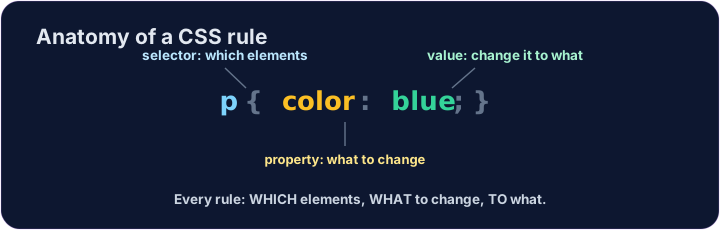
English
A CSS rule
- A rule has three parts:
p { color: blue; } pis the selector — which tags to change (here, every paragraph).coloris the property — what to change.blueis the value — what to change it to. (Together,color: blue;is one declaration.)
日本語
CSS ルール
- ルールには3つの部分组成があります:
p { color: blue; } pはセレクタです。変更対象のタグを指定します(ここではすべての段落)。colorはプロパティです。何を変更するかを指定します。blueは値です。何を設定するかの値を指定します。(これら全体、つまりcolor: blue;は一つの宣言となります。)
<style>
  p { color: blue; }
</style>
<p>Now I am blue.</p>
<p>So am I!</p>
English
Common mistakes
- Link the CSS file, or put rules inside a
<style>block. - Each CSS rule ends with a semicolon
;.
日本語
よくあるミス
- CSSファイルをリンクさせるか、ルールを
<style>ブロック内に記述します。 - 各CSSルールの末尾にはセミコロン
;を置きます。
English
Now you try
- Write your rules inside the
<style>block. - Colour your paragraphs, then your heading.
日本語
あなたも試してみよう
- ルールは
<style>ブロックの内部に記述してください。 - まず段落の色を指定し、その後見出しを指定します。
Make every paragraph blue. Inside the <style> block, add the rule p { color: blue; }. · すべての段落を青にしてください。<style>ブロック内でp { color: blue; }ルールを追加してください。
Now colour the heading too. Add a rule h1 { color: red; }. · 見出しにも色を付けましょう。h1 { color: red; }ルールを追加してください。