Forms · 形態
This page needs a recent browser (with SharedArrayBuffer support). Please update Chrome, Edge, Firefox or Safari to the latest version. · このページには最新のブラウザ(SharedArrayBuffer対応)が必要です。Chrome、Edge、Firefox、Safariを最新バージョンに更新してください。
English
Forms
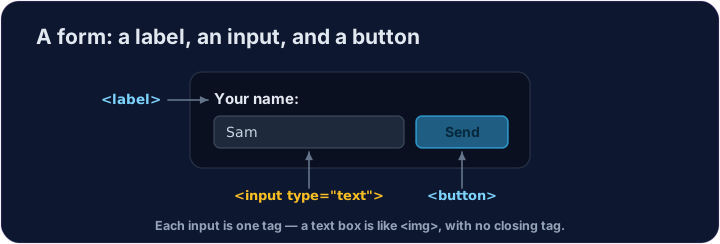
- A form lets people type things in — a name, a message, a search.
- The boxes you type in are called inputs.
- A text box is
<input type="text">— a single tag, like<img>.
日本語
フォーム
- フォーム は、名前やメッセージ、検索キーワードなどのテキストを入力するためのものです。
- テキストを入力するボックスは 入力フィールド(inputs) と呼ばれます。
- テキストボックスは
<input type="text">で表され、<img>のような単一のタグです。
English
Labels and buttons
- A
<label>is the words next to an input, telling the user what it is for. - A
<button>is something to click — like Send or Search. - We won't actually send anything here — we're just learning the tags.
日本語
ラベルとボタン
<label>は入力フィールドの横にある文字列であり、ユーザーにその目的を知らせるためのものです。<button>はクリック対象となる要素で、送信 や 検索 のようなボタンです。- 今回は実際にデータを送信することはありません。ただ、タグの使い方を学習しているだけです。
<label>Your name:</label>
<input type="text">
<button>Send</button>
English
Common mistakes
- Every input should have a matching
<label>. - A button in a form submits it by default — use
type="button"to stop that.
日本語
よくあるミス
- 各入力フィールドには、対応する
<label>が必ず必要です。 - フォーム内のボタンはデフォルトで送信処理を行いますが、それを阻止するには
type="button"を使用します。
English
Now you try
- Inputs and buttons are the building blocks of every form on the web.
- Add a text box, then a button.
日本語
あなたも試してみよう
- 入力フィールドとボタンは、Web上のあらゆるフォームを構成する基本要素です。
- テキストボックスを追加し、次にボタンを追加します。
Add a box the user can type in. Use <input type="text"> (a single tag, like <img>). · ユーザーが入力できるボックスを追加してください。<input type="text">(<img>のような単一タグ)を使用してください。
Add a button that says Send. Use <button>Send</button>. · Sendと表示されるボタンを追加してください。<button>Send</button>を使用してください。