This page needs a recent browser (with SharedArrayBuffer support). Please update Chrome, Edge, Firefox or Safari to the latest version. · このページには最新のブラウザ(SharedArrayBuffer対応)が必要です。Chrome、Edge、Firefox、Safariを最新バージョンに更新してください。
English
Images
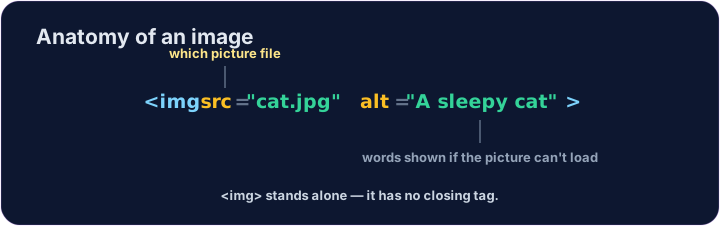
- Show a picture with the
<img>tag. <img>is a single tag — no closing tag, like<br>.- It needs two attributes:
src(where the picture is) andalt(a description).
日本語
画像
<img>タグを使って絵を表示します。<img>は 単一タグ です —<br>と同様に闭じタグがありません。- 2つの属性が必要です:
src(絵の場所)とalt(説明)。
<img src="/static/code/web-basics/cat.svg" alt="A cartoon cat">
English
Why alt text matters
altis text that describes the picture.- It shows if the image cannot load, and screen readers read it aloud.
- Always add a short, clear
alt— it makes your page kinder to everyone.
日本語
alt テキストが重要な理由
altは絵を 説明する テキストです。- 画像が読み込めない時に表示され、スクリーンリーダーが 読み上げます。
- 常に短く明確な
altを追加してください — 誰にとっても優しいページになります。
English
Common mistakes
- An image needs
src(the file) andalt(a description). <img>has no separate closing tag.
日本語
よくあるミス
- 画像には
src(ファイル)とalt(説明)が必要です。 <img>に独立した闭じタグはありません。
English
Now you try
- The picture lives at
/static/code/web-basics/cat.svg. - Show it, then add
alttext to an image.
日本語
あなたも試してみよう
- 絵の場所は
/static/code/web-basics/cat.svgです。 - 表示したら、画像に
altテキストを追加します。
Show the cat picture. Add an <img> with src="/static/code/web-basics/cat.svg".
This image has no description. Add an alt attribute that describes it, like alt="A cartoon cat".