This page needs a recent browser (with SharedArrayBuffer support). Please update Chrome, Edge, Firefox or Safari to the latest version. · このページには最新のブラウザ(SharedArrayBuffer対応)が必要です。Chrome、Edge、Firefox、Safariを最新バージョンに更新してください。
English
Links
- A link takes you to another page when you click it.
- Use the
<a>tag (astands for anchor). - The web address goes in
href:<a href="...">.
日本語
リンク
- リンク をクリックすると別のページへ移動します。
<a>タグ(aは アンカー を意味します)を使用します。- ウェブアドレスは
hrefに入れます:<a href="...">。
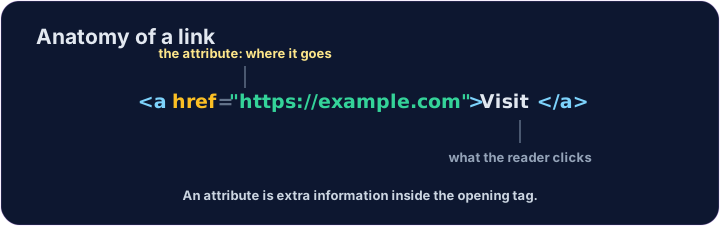
<a href="https://example.com">Visit Example</a>
English
href is an attribute
href="..."is an attribute — extra information inside the opening tag.- The text between
<a>and</a>is what the reader sees and clicks. - Use the full address, starting with
https://.
日本語
href は属性
href="..."は 属性 です — 开きタグ内の追加情報です。<a>と</a>の 間 のテキストが、読者が見てクリックする部分です。https://から始まる完全なアドレスを使用します。
<p>Need facts? <a href="https://wikipedia.org">Look it up</a> now.</p>
English
Common mistakes
- A link needs an
href. - Open a link in a new tab with
target="_blank".
日本語
よくあるミス
- リンクには
hrefが必要です。 target="_blank"を使うと、リンクを新しいタブで開けます。
English
Now you try
- A link can stand alone, or sit inside a sentence.
- Build one of each below.
日本語
あなたも試してみよう
- リンクは単独で存在することも、文の 中 に置くこともできます。
- 下にそれぞれ1つずつ作ってみましょう。
Add a link to https://example.com with the words Visit Example.
Turn the words look it up into a link to https://wikipedia.org, without breaking the sentence.